Posts Tagged ‘Choosing’

Building a 10-Server FreeBSD Jail Cluster Running a LAMP (Linux / Apache / MySQL / Perl / PHP / Python) Stack

Wednesday, March 25th, 2026

building-freebsd-jails-cluster-running-linux-apache-10-cluster-high-availability-with-mariadb-perl-php-howto

Virtualization and workload isolation are foundational to modern infrastructure.
While most teams today default to container platforms like Docker and orchestration systems such as Kubernetes, an older and highly capable alternative exists in the form of jails from FreeBSD.

FreeBSD jails provide lightweight OS-level isolation, allowing multiple independent userland environments to run on a single host. Introduced long before containers became mainstream, jails were designed with a strong focus on security, simplicity, and performance.
Despite their maturity and robustness, they are less commonly used today, largely due to the rapid rise of container ecosystems and cloud-native tooling.

Choosing between jails and containers is not simply a matter of “old vs new,” but rather a trade-off between control and simplicity versus portability and ecosystem support.

Short Comparison of FreeBSD jails and Containers ( Pros and Cons )

Advantages of FreeBSD Jails

a. Strong, simple isolation

Jails provide a clear and tightly integrated security boundary within the FreeBSD kernel. Their design is straightforward, reducing the risk of misconfiguration compared to layered container security models.

freebsd_jails_infographic_diagram

b. High performance

Because jails operate very close to the base system, they deliver near-native performance with minimal overhead—especially beneficial for networking and I/O-heavy workloads.

c. Operational simplicity

There are fewer component moving parts (easier to maintain and debbug):

  • No separate container runtime
  • No image layers
  • No complex orchestration requirements

This makes jails appealing for stable, long-running systems.

d. Predictability and stability

FreeBSD’s conservative, design philosophy results in systems that are highly stable over long periods, that is ideal for infrastructure roles like: storage or networking.

Disadvantages of FreeBSD Jails

a. Limited portability

Not neceserry a huge disadvantage but still,
Jails are tied to FreeBSD. Unlike containers, they cannot be easily moved across different operating systems or cloud platforms.


b. Smaller ecosystem

FBSD Jails is not full equivallent to:

  • Container registries (like Docker Hub)
  • Massive orchestration ecosystems (similar things has to be done with scripts and customizations)
  • Broad third-party integrations

This can slow down a bit development and deployment workflows. Though for a matured Applications that are once well tuned with jails that can be not a real probblem.

Note that though a con, this can also be a pros, as once you tune up an App for it becomes easier to maintain.

c. Less automation tooling

While tools exist, they are not as standardized or widely adopted as container-based CI/CD pipelines.

d. Harder to find people for it
 

Most developers and DevOps engineers are trained in container technologies, making hiring and collaboration easier in container-based environments. However for senior hard core sysadmins and system engineers that could be also advantage as not so many people have an indepth insight with both freebsd and fbsd jails.

This guide walks through a practical, production-style setup: 10 FreeBSD servers, each running isolated jails that host a classic LAMP stack (Linux, here replaced by FreeBSD, Apache, MySQL/MariaDB, PHP).
However still the use of companies or individuals who choose freebsd jails aim to better focus is on repeatability, clean architecture, and operational sanity, not just getting it to run once.

Architecture Overview of sample FBSD Cluster

Our Goal:

  • 10 physical or virtual servers
  • Each server runs multiple jails
  • Each jail runs a LAMP app instance
  • Load balancing across nodes (to have a High Availability Cluster like setup)

Host Setup:

  • 2 × load balancer nodes (nginx or HAProxy)
  • 6 × application nodes (Apache + PHP in jails)
  • 2 × database nodes (MariaDB primary/replica)

All systems run FreeBSD, using native jails for isolation.

1. Base FreeBSD Installation (All 10 Servers)

Install FreeBSD on each machine (minimal install is fine).

Update system:

# freebsd-update fetch install
# pkg update && pkg upgrade -y

Install base tools:

# pkg install -y sudo vim bash git

2. Install Jail Management tool (iocage)

We’ll use iocage, a modern jail manager.

# pkg install -y iocage
# sysrc iocage_enable="YES"
# service iocage start

Activate ZFS (recommended):

# zpool create zroot /dev/da0

Initialize iocage:

# iocage activate zroot
# iocage fetch

3. Create a Reusable Jail Template

Instead of building each jail manually, create a golden template.

# iocage create -n lamp-template -r 13.2-RELEASE ip4_addr="vnet0|10.0.0.10/24" boot=off
# iocage start lamp-template
# iocage console lamp-template

4. Install LAMP Stack Inside the Jail

Inside the jail:

4.1. Install Apache

# pkg install -y apache24
# sysrc apache24_enable="YES"

4.2. Install MariaDB

# pkg install -y mariadb106-server
# sysrc mysql_enable="YES"

Initialize DB:

service mysql-server start
mysql_secure_installation

4.3. Install PHP pre-compiled ports

# pkg install -y php82 php82-mysqli php82-mbstring php82-opcache


Configure Apache to use PHP:

# echo 'LoadModule php_module libexec/apache24/libphp.so' >> /usr/local/etc/apache24/httpd.conf
# echo 'AddType application/x-httpd-php .php' >> /usr/local/etc/apache24/httpd.conf

5. Test LAMP Stack works OK

Create a test file:

# echo "<?php phpinfo(); ?>" > /usr/local/www/apache24/data/index.php

Start services:

service apache24 start

Visit the jail IP and confirm PHP (page output) works in Firefox / Chrome Browser.

6. Convert Template into Clones

Stop Jail and snapshot:

iocage stop lamp-template
iocage snapshot lamp-template@base

Clone for production:

iocage clone lamp-template -n app01 ip4_addr="vnet0|10.0.0.21/24"
iocage clone lamp-template -n app02 ip4_addr="vnet0|10.0.0.22/24"

Repeat across servers and once working create a small shell script to run as a cron job to create backups automated.

Each server might run 5 up to 20 jails depending on resources.

7. Networking Between Jails

Use VNET for proper isolation:

Enable bridge on host:

# ifconfig bridge0 create
# ifconfig bridge0 addm em0 up

Assign jail interfaces automatically via iocage.

8.  Load Balancing Layer

On 2 dedicated nodes, install nginx:

# pkg install -y nginx
# sysrc nginx_enable="YES"

Example config:

http {
    upstream backend {
        server 10.0.0.21;
        server 10.0.0.22;
        server 10.0.1.21;
        server 10.0.1.22;
    }

    server {
        listen 80;

        location / {
            proxy_pass http://backend;
        }
    }
}

9. Database Strategy

You have few options to choose from:

a. Use Centralized DB

  • Dedicated DB jails on 2 nodes
  • Primary + replica

b. Use Per-node DB (simpler)

  • Each jail has its own MariaDB
  • Use app-level replication if needed

10. Automation Across 10 Servers

Use tools like:

  • Ansible
  • SSH scripts
  • ZFS replication

Example (simple parallel execution loop) or use a set of scripts to handle updating with some Ansible Playbooks or Puppet:

# for host in server{1..10}; do
  ssh $host "pkg update"
done

Few more Operational Tips to consider

a. Tune up setup / Do Resource management

  • Limit jail CPU/memory using rctl
  • Avoid overcommitting RAM

b. Use Centralized Logging

c. Do regular jail Backups

  • Use ZFS snapshots to backup each of the Jails:

# zfs snapshot zroot/iocage/jails/app01@backup

d. Tighten Security

  • Disable root SSH
  • Use PF firewall on host
  • Keep jails minimal

e. Do a Further Scaling Strategy

  • Add more servers -> replicate template
  • Add more jails -> clone snapshots
  • Scale horizontally via load balancer

Summary and Last Thoughts

When Choose FBSD Jails and when Containers

  • Use jails when you control the infrastructure, need maximum efficiency, and value simplicity (e.g., appliances, CDNs, storage systems).
  • Use containers when portability, scalability, and integration with modern DevOps workflows are critical.

This setup plays to the strengths of FreeBSD jails:

1. Performance: near-native speed
2.Isolation: strong and predictable
3. Simplicity: fewer layers than container stacks

FreeBSD jails remain a powerful and efficient isolation mechanism, particularly well-suited for controlled, performance-sensitive environments. Containers, however, dominate in modern application deployment due to their flexibility and ecosystem. The choice ultimately depends on whether you prioritize system-level control or platform-level convenience.

You won’t get the ecosystem of tools like Docker or Kubernetes, but you gain control, stability, and efficiency, which is exactly why companies like Netflix still rely on this model in critical infrastructure.


Selecting Best Wireless channel / Choosing Best Wi-FI channel for Wireless Routers or (How to improve Wireless Network performance)

Monday, February 22nd, 2010

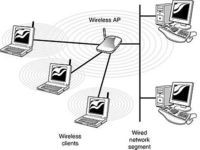
Wireless AP
Below are some valuable advices on Wireless Access Point initial install and configuration to better off your Wireless connection.It’s worthy to note that the 2.4 GHz

Wi-Fi signal range is divided into a number of smaller bands or “channels,” similar to television channels. I decided to run my wireless on channel 12 since this there was no other wireless routers operating on that frequency, though most routers are preconfigured to spread it’s signal on channel 6.

There is a difference in channels available for setup for 802.11b and 802.11g wireless networks in the United States and the European Union. In the USA the wireless channels available are from (1 to 11) whether in the EU it’s in the range of (1-13). Each of the Wireless channels run on a different frequency.

The lower the number of the channel is the lowest the radiating frequence band on which data is transmitted .Subsequently, increasing the channel increases the frequency slightly. Therefore the higher the channel you select on your AP the lesser the overlap with other devices running on the same channel and thus the lesser the possibility to overlap and interference.
It’s quite likely that you experience problems, if you use the default wireless channel which is 6.
If that’s the case it’s recommended to use either channel 1 or channel 11. In case of interference, i.e. overlap with other wireless networks, cellphones etc., there are 2 possible ways to approach the situation. In case of smaller interference, any change in channel on which there is no wireless device running could fix it up. The second way is to choose a wireless channel for your router in between 1,6 or 11 in (The USA) or 1,7,13 in Europe.
Up to 3 networks can run on the same space with minimum interference, therefore it would be a wise idea to check the list of wireless routers in your and check if there are others running on the same frequency.
As I mentioned in the beginning of the post I initially started running my wireless on channel 12, however after I discovered it is recommended to run your wireless router either on channel 1 7 or 13 in Europe I switched my D-Link DI-524 wireless router to transmit it’s signal on Channel 13.

I should testify that after changing the wireless channel, there was quite an improvement in my wireless connection.For instance before I change to Channel 13 (when my wireless internet was still streamed on channel 12) my wireless had constantly issues with disconnects because of low wireless signal.

Back then My wireless located physically in like 35 meters away set in another room, I can see my wireless router hardly connected on like 35%, changing to channel 13 enhanced my connection to the current 60% wireless router availability.

It’s also an interesting fact that Opened Wireless networks had better network thoroughput, so if you’re living in a house with a neighbors a bit distant from your place then you might consider it as a good idea to completely wipe out Wireless Router security encryption and abandon the use of WEP or WPA network encryption.

In case if all of the above is not working for you, you might consider take a close look at your Wireless Wireless LAN pc card and see if there are no any kind of bumps there. Another really interesting fact to know is that many people here in Bulgaria tend to configure there Wireless Access Points on channels either 1,6 or 11 which is quite inadequate considering that we’re in the EU and we should use a wireless channel between 1, 7 or 13 as prescribed for EU citizens.

Another thing not to forget is to place your wireless in a good way and prevent it from interferences with other computer equipment. For example keep the router at least few meters away from PC equipment, printers, scanners, cellphones, microwaves. Also try to put your wireless router on some kind of central place in your home, if you want to have the wireless signal all around your place.

At my place I have a microwave in the Kitchen which is sometimes an obstacle for the Wireless signal to flow properly to my notebook, fortunately this kind of interference happens rare (only when the Microwove is used to warm-up food etc.).Upgrading 802.11b wireless card / router to a better one as 802.11g is a wise idea too. 802.11g are said to be like 5 times faster than 802.11b.

You can expect 802.11b wireless network to transfer maximum between 2-5 Mbp/s whether 802.11g is claimed to transfer at approximately (12 to 23 Mbp/s). If even though the above prescriptions there is no wireless signal at some remote place at your home, you might consider adding a wireless repeater or change the AP router antenna.

By default wireless Routers are designed to be omni-directional (in other terms they broadcast the wireless signal all around the place. Thus is quite unhandy if you intend to use your Wireless net only in certain room or location at your place. If that’s the case for you, you might consider upgrading to a hi-gain antenna that will focus the wireless signal to an exact direction. Let me close this article with a small diagram taken from the net which illustrates a good router placement that will enable you to have a wwireless connection all over your place.
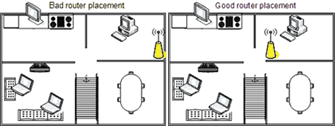

improve wireless router placement diagram




