Some people are still forced to run Windows 10 due to hardware limitations on Legacy desktop PCs and Laptops as Windows 11 does not support all hardware. Hence the Windows Automatic Time Synchronization service might not have been started properly (is failing) and due to that the system clock might be slowing down or up from the actual time. This is a rare issue you might encounter but if you're physically situated on a place with very slow internet connection and / or on an 10 years+ old Gamer PC with Windows 10 you might encounter it under some specific unlucky circumstances combination, like very slow internet or using some kind of damaged windows due to failed Windows updates or due to running some unlicensed copy of Windows (which you should not!) etc. Perhaps Windows time synchronization issues miight be caused due to BIOS / UEFI time setting misconfiguration causing the PC clock to be back in time with minutes / hours or in future mis-synchronized. This perhaps couldcould happen even on more modern 356 Domain connected PCs / notebooks running on modern Windows 11?
In this article I'll give you an easy way how to resolve Windows Clock (Timing) issues by running few standard Windows commands in Windows Administrator Prompt (elevated) cmd.exe line:
Run cmd.exe as Administartor: and try to get information on the configured time server:
sc query w32time
Usually that won't produce a good result if your clock is not properly synching with Windows Time server via the w32time service, to further debug run cmd:
w32tm /query /source
If you run the command:
and receive the error:
The following error occurred: The service has not been started. (0x80070426)
it means the Windows Time (W32Time) service is not running on your system.
This service is responsible for synchronizing your computer’s clock with an internet time server or domain controller. Without it, time sync will not work properly.
Why This Error Happens
The error usually appears when:
The Windows Time service is disabled
The service was stopped manually
System policies disabled time synchronization
The PC was recently restored or cloned
Below is how to fix it quickly.
Solution 1 : Start the Windows Time Service
Open Command Prompt as Administrator and run:
net start w32time
After it starts successfully, verify the time source:
w32tm /query /source
Solution 2: Set the Service to Start Automatically
If the problem keeps happening after reboot, set the service startup type to Automatic:
sc config w32time start= autonet start w32time
Note: There must be a space after
start=
.
Solution 3: Re-register the Windows Time Service
If the service fails to start, try re-registering it:
w32tm /unregisterw32tm /registernet start w32time
Then force time synchronization:
w32tm /resync
Solution 4: Configure an NTP Server Manually
If no time source is configured, set one manually:
The times of the Second Coming of Jesus Christ seem to be really near, this is clear from the facts that the corruption and people's degradation has reached a state, where no truthfulness is existing neither in the worldly organizations Countries, governments, parliaments, courts, institutions, companies and even in the Most Holy Church of Christ which he has consecrated by his Holy Blood, through the Crucifixion and Death on the Cross for our sins.
It seems today, neither the low ordinary people neither the high and eligible and most honored Bishops and even Metropolitans are in a such a bad careless state, that they only care about their own wordly interests and the interests of a few of other servitudes nearby, neglecting the interest of the Holy Church of Christ (which is the Assembly of believers in the Lord Christ Jesus, who breath and live being in the world but , “My kingdom is not of this world. If My kingdom were of this world, My servants would fight, so that I should not be delivered to the Jews; but now My kingdom is not from here.”John 18:36.
What happens now about 2000 years, later in Christ Church is absotely the same. Just like Jesus, his true followers has been rejected to be accepted by his own people. In same way his true people are always, being rejected to take their ruling place, but instead in the world the Lies and manipulations are taking place to crucify the true servents of God.
The Holy Gospel seems to repeat itself again and again all the time through the ages. This time the stage is different this is not ancient Israel with the Assembly of Synodrion and the Old Testament's Church of God and his People the Israelites. But the Holy Synod of the Bulgarian Church and the Bulgarian Orthodox Church with his people the new Israel the Christians.
Get to know the facts on Bulgarian Church Scandal Escalasion for New Metropolitan of Sliven voting – situation as of 24th April 2024
The Holy Synod of the Bulgarian Church has made another and strange untransparent decision once again, right after the Enormous Scandal with the cassation of legal choice of People of Sliven for best candidates Ierotey and Mihail (amongs which Ierotey is preferred), as the Metropolia of Sliven is still mourining on the beloved pontiff his holiness Metropolitan Ioanikij, less than 3 months before his blessed passing to Christ.
Map of Spiritual Eparchies in Bulgaria of Bulgarian Orthodox Church Bulgarian Patriarchy (BPC-BP)
Territorial Map of Sliven Eparchy according to the Local Spiritual districts belonging to Sliven Metropoly
Shortly after, it was decided to stop the legal procedure for choosing between bishop Ierotey and bishop Michail and overwritte the Synod accepted and agreed own legal document to follow on different church casuses, the ' the Church statuses regulations (Устав на БПЦ Българска Патриаршия = Bulgarian Orthodox Church Regulation Rules document decided to be followed by everyone in the Church including the bishops and metropolitans on a National Church Assembly) rightduring a procedure for enthronization of next Metropolitan of Sliven.
The new "regulation" they tried to push "in the shadows (illegally against the Church statues)" was written in a way to make the choice of new Metropolitans to be done only by Metropolitan assembly the Synod, without taking in considerating the christian people preference for such, something scandal as this was not so during the last 150 years since we have restored the Bulgarian Church Excharchy.
Out of this a great number of discussions started by Christian laity in facebook, viber and in the media of multitude of people, priests and cleargy from Sliven Eparchy complaining and protesting first infront of the Metroplitan Palace in Sliven
Sliven Church Priests, Monks and Layman gathered in front of Sliven Eparchy Metropolitan governing building
As this protests were not considered seriously by many of Elders of the Synod, the same protest with much more participant occured in front of Synodal Palace (the ruling ministry of the Bulgarian Church seat place) in Sofia as well as purely physical by presence with Prayer Vigils to the Holy Synod because of their unwillingness to accept the Synod unargumented decision to stop the procedure for choice of new metropolitan.
Peaceful objection Vigil Prayer in front of Holy Synod by Sliven Clergy and Laymen, Poster reads: "Do not exchange our Good shepherd, which gives his soul for the sheep with a mercenary, we do not know !" Second Poster on the background is "Against the New Order", meant the new Order to not venerate People's choice during voting of new Metropolitans
The outcome of the protest in front of the Synodal bulding palace in Sofia, Bulgaria was to cancel the votings for Metropolitan and do the whole voting procedure from the beginning. The people accepted the decision of the Synod even though the synod took this decision to not put in place 'new order' in favour if existing norms of the Churh statuses on the background of multitude of protesting priests, monks and layman from Sliven Eparchy and other eparchies which is well documented well in below video.
Synodal Prayer Vigil against the cassation of choice for future Metropolitan of Sliven
On the protests along with Church people and clergy from Sliven was present people from other Eparchies as well as key well known priests and monks that are from Sofia and the Sofia Metropolitan to tell their unwillingness for overriding the Church established rules "Statuses", as well as to express their support for Sliven Eparchy whose Church people will is to have venerated their up to the rules selection of Bishop Ierotey to become the next Vicar (Metropolitan) of Sliven.
On many TV medias this protest was not shown and the organized fake "contra-protest" of Metropolitan Nikolay and his people who were anti-protesting against people will was shown as it was paid for that (another proof for lack of enough freedom of speech and transparency of Bulgarian mass medias).
The contra-protesters from Plovdvid Eparchy that came with buses from Plovdiv eparchy enforced by Metropolitan Nikolay, very much in the old spirit of manifestations during the totalitarian regime of communism (notice the obviousness of the protest is fake from the exactly same looking slogans held mainly by priests)
As a result people from Sliven Eparchy accepted the fact that the Holy Synod decided to finally cassate (cancel) the procedure for choice of new Sliven Metropolitan and organize a new list of Worthy and dostopochteni (venerable) Bishops among which Sliven's people should make the choice again. The people accepted this as they hoped the Holy Synod elders, might have been misled by the false accusation reports of the two brother priests Silvester and Evgeny Yanakievi (who by the way are very active on facebook) against Ierotey, and thus by organizing the choice once again officially the choice will take case in a transparent way and according to the Church rules statuses and then they can again vote for bishop Ierotey and double verify their initial choice.
However what happened now is far from that. Contrary to any logic (and as provocation), the list of venerable Bishops was made by the Holy Synod, during the Great Lent on 22 of April, a time in which people should concentrate on their repentance and spiritual growing and spiritual preparation to accept the Fest of Feasts, The Resurresction of Christ Easter.
Contrary and again unvenerating the Church clergy and people's will of Sliven the new list of Bishops does not included neither Ierotey nor Mihail and included only 6 Bishops claimed to be venerable !!!
Here is a tiny biographies and only few rumored things about the Bishops, synod have been included and listed them according to seniority on when they become bishops.
1. The first listed Bishop Sionij (Velichki) completed Cherepish Spiritual Seminary (Academy) in 1990. Become monk in 1991. Completed Theology in 1994 in Saint Kliment Ohridski. 1995-1996 specialezed in Erlangen Germany. Become monk from Metropolitan Dometian (Vidinski) in Klisurski Monastery soon after become hieromonk. In 1992 – 1995 has been abbot of Klisura Monastery. In 1996 has become deacon of Sofia's Theological Seminary Saint John of Rila (he was later removed because of scandals, a boy died and accused by pupil parents for pedophilia, a sad fact that was hidden with time, due to many publications you can find online …). In 1998 has been raised to archimandrite by Patriarch Maxim in Dolni Lozen Monastery St. Peter and Paul. In March 2007 has been ordinated as Bishop Velichki in Saint Alexander Nevski Cathedral. In 2009 become vicar of Vidin Metropolitan Dometian In 1 May 2014 become an abbot of Troyan monastery, 3rd April 2019 he has become an abbot also to Bachkovo Monastery. Bishop Sionij is among the most scandalous persons in Bulgarian Orthodox Church, many media scandals assigning his name tо pedophilia and homosexuality through the time. It is claimed by medias he is involved with mafia (and especially with Church mafia). There was even a person who says to have been involved in this affairs with him that publicly has given interview for "Tzanov"'s self financed youtube channel Napred i Nagore" (video titled: "The Church of Sin"). Currently paradoxically he is an abbot of 2 of the biggest and 2 second richest monasteries in Bulgaria Troyanski and Bachkovki.. His family is known in Sofia for years for being one of the most richest people in Sofia. Currently aged 56 yrs.
2. Second one Arsenij gruaded high school 2006 in Stara Zagora in village Osetenovo. Completed Saint John of Rila seminary in 2006, was student in Saint Ohridski Theology and continued his education in Plovdiv University, saint Paisios of Hilendar, said to have graduated 2009. Tonsured monk in 2007, became hierodeacon and consequentially same year 2008 hieromonk. 6th December he was raised by Metr. Nikolay to Bishop. He has been a director of Plovdiv's Orthodox TV since 2009 and Plovdiv Seminary 2010 (seminary initiated again by by Metr. Nikolay). In 2012 he was given to be a head of Metropolitan cathedral in Plovdvid saint Marina. On June 2014 he was raised to bishop after offer was to the Holy Synod, by Metr. Nikolay. Hierotony was made by then very old Metropolitan Ioanikiy of Sliven in collaboration with Metropolitans Dometian of Vidinsky (now deceased), Grigoriy of Velikotarnovsky, Ignatius of Pleven and Nikolay of Plovdiv.
Iinterestingly he is titled as protegee of Metr. Nikolay who orchestrates the decisions in the Holy Synod for the last years (fact known by most people who even had a slight idea of what is going on internally in the Church). The backstage ruling of the Synod and the place is said to be easy for the Metr. Nikolay, since patriarch Neofit was severely sick and in practice inactive as patriarch. According to official information that leaked from Synod, it was exactly Arsenij the choice of Metr. Nikolay and his group of metropolitans (most of whom doesn't have the necessery support from anyone such as DS (Dyrzhavna Sigurnost) to which Metr. Nikolay is said to have the support and in which Metr. Nikolay's father was important ranked person). Thus according to different medias the legative choice of Sliven people was cancelled by the Synod by Metr. Nikolay and his group in attempt to install the already pre-chosen Arsenij in any means.
Bishop Arsenij is known amoung the clergy in Church for becoming a bishop officially against the Church statuses, not having the Statuses set fulfilled years, becoming bishop before his 30s in 28 years, according to Church rules of statuses regulations of BPC-BP he should have had been at least 35 years, 2 more years than Christs age of crucifix. The other break of Church statuses regulations with his hierotony was that he did not have 10 years as a clergy person in Bulgarian Orthodox Church. Currently 37 yrs old (has 10 years served as Bishop)
3. Bishop Gerasim (Melnishki) is famous for having a professional Actors education, before deciding to become monk and start his new career in the Church. He has not have officially any Theological Education diploma till the moment he decided to walk the spiritual path, but received such by specialization in Moscow 2 years in a newly created faculty by Metropolitan Ilarion Alfeev (faculty created 2012) and no longer existing. The Diplomas from Russia are not really considered officially by Bulgarian Government due to legislative reasons. Even though that he managed to be chosen somehow and become the Secretary of Holy Synod, and have signed documents that he has a higher Theological education which he at that time doesn't. He seemed to have served as a head of saint Alexander Nevsky and in this service He is said by some medias to have closed his eyes and signed the documents for requirements of higher education for the job of Synodal Secratary as a preliminary to the function of Secratary. He is known to often serve Liturgy in the Russian Church among which was a lot of scandals last year and which kept closed for quite some time, due to clergy in the Russian Church Clergy in (Sofia) Bulgaria being accused for serving for FSB (Russian Secret Services). He is also accused by medias for organizing an official business dinner for donation to collect money from businessmen for the sake of restoration of Biggest Cathedral in Bulgaria St. Alexander Nevsky. It should be said his service in saint Alexander Nevsky as a head of it for some years was okay, no big scandals like the previous head archim. Dionisij Mishev. Have to say it is strange why such a cathedral as Saint Alexander Nevsky, has to collect donations for its restoration, especially since the Bulgarian church Sofia Metropoly has a lot of land properties and stores on the city center that given for rent and should be bringing money to mitropoly along with the so called "vladichnina" amount of whole profit which every Church on territory of eparchy has to pay to the metropoly, especially as the Church st. Alexander Nevsky is a common tourist destination in Sofia for people all around the world and that should be supposably another way to collect money for its restoration. He is neither famous nor infamous and that is perhaps his main places of service was Saint Alexander Nevsky and as Synodal Secretary. Currently he is aged 44 yrs. Served as Bishop 8 yrs.
4. Bishop Pahomij (Branicki) has been made a monk and hieromonk again by Metr. Nikolay, his elder was proto-abbot Benedict from Holy Mount Athos Zograph in Divotinski Monastery, near Bankya in 2002 in 2004 he become abbot of Divotinsky Monastery. For 2004 till 2010 he had managed to gather brotherhood and helped to recover a Chapel Saint Anna and rerecover the 70 Apostles Church buildings and the Main Church Holy Trinity (which is considered his greatest achievements) his fame amount the Orthodox christian youth has been positive as he managed to have a good charisma and attract young people in his monastery during his abbotship. In 2015 he become hieromonk. bishop (hierotony by current Metropolitan of Vratza and some other bishops who is temporary substitute for patriarch Neofit's passing till the new choice of patriarch completes.). In 12.06.2017 he was made a bishop in Rila Monastery, again – according to some sources he did not have the Higher Theological education at that time for the post of bishopship, requirement according to Statuses of Bulgarian Orthodox Church. Currently he is aged 45 yrs. Served as Bishop 7 yrs
5. bishop Makarij (Glavnicki) has completed Plovdiv's Spiritual Seminary (whose deacan at that time was Bishop Evlogij Adrianopolski), finished Theology school in Bucharest in 2004 and Master degree in Thessaloniki (Solun) completed in 2010. In march 2007 become a novice monk in Rila Monastery Saint John of Rila. In 2008 during Lent become Hierodeacon, by bishop Evlogij. April 2011 become a hieromonk (priest monk). In March 2017 become a bishop. After becoming metropolitan he is now a vicar Bishop of Metropolitan Naum. He is perhaps among the most educated bishops of Bulgarian Church at present. Due to his studies in Greece, some people which play a kind of rloe of 'whisle-blower' but also do distribute some false mirrors, he might be a man of the Ecumenical patriarch. It is interesting fact that his hierotony as bishop did not happen in Saint John of Rila monastery but in Troyan Monastery (The Old Practice of Bulgarian Orthodox Church was to create new bishops in the Capital Sofia in Saint Alexander Nevsky – nowadays changed – some speculate this is done to escape from the anaxios (unworthy) that someone might scream during the services of new hierotony to stop the ceremony). In Troyan monastery as of time of writting this article the abbot is bishop Sionij Velichki. Also it is a bit strange the person who pushed his career forward Bishop Evlogij of Rila Monastery did not take part in the hierotony in Troyan monastery. Current aged 42 yrs. Serves as Bishop 7 yrs
6. Bishop Isaak (Velbyzhdski), started and completed aged 13 in Saint John of Rila seminary in Sofia, which he complated in 2001. In 2001 he started working in Seminary administration. Completed Sofia, Theological School saint Kliment Ohridski in 2008 (Bachelor). In 2009 in Vidin he become monk by Dometian of Vidin under spiritual guidance of Biship Sionij Velichki. In 2010, was raised to hieromonk in Saint Nicolas Church and in parallel works in Sofia Seminary as а tutor (ethnical bulgarians living abroad). In 2011, with blessing of Metr. Dometian he has become episcopal vicar of Lom Spiritual district. In 2012 in Dormition of Theotokos Chapel (which he headed) he was raised to archimandrite. In 2012 he started studying postgraduate studies in Moscow. In June 2023 he was raised to bishop with the title Bishop Velbyzhdski and given the role of second patriarch Neofit's vicar, as first is Bishop Polikarp. According to rumors, he is said according to some media news to have some connections with FSB due to his studies in Russia (and the common Russians practice to try to recruit their students to work for Russian agencies). Also according to some medias he had public appearance speach, staying behind Russia's official position for holy war, held against the evil (Russia as a Third Rome idea which currently Russian Church embraces). Serves as Bishop 1 yr
Bishop Ierotey Agathopolski (Kosakov)
The Seventh Bishop that is excluded from list, Ierotey (Agathopolski) was selected by Sliven Eparchy Priest, Monks and Laity to become the 7th Metropolitan of Sliven is Ierotey (The Voice of the People, The Voice of God) !
Bishop Ierotey (Agathopolski) in 2003 completed, Parallel course of Sofia Theological Seminary. December 22, 2003, Metropolitan Ioannikiy (Nedelchev) of Sliven tonsured him as a monk in brotherhood of the Holy Great Martyr George in the city of Pomorie. Archimandrite Theodosius (abbot of) Pomorie monastery at that time became his spiritual mentor. May 11, 2004, Metropolitan Ioanikiy of Sliven in the Church of Saints Cyril and Methodius in Burgas ordained hierodeacon. On May 16 of the same year, Metropolitan Ioanikiy of Sliven in the Church of the Most Holy Theotokos in Nessebar was ordained to the rank of hieromonk. On January 1, 2005, he was appointed abbot of the Monastery of the Holy Great Martyr George in Pomorie. He made a significant contribution to the development of the Pomorie monastery and its influence on Christian life in the region. Christian children's camps were organized annually at the monastery, a week of Orthodox singing introduced. Many hopeless and lonely and people with problems found a hospitality and spiritual help and resort in the monastery. On May 6, 2008 he was elevated to the rank of archimandrite. In 2010 he graduated Master Degree of Theology of Shumen University, Bishop Konstantin Preslavsky. September 18, 2014, by decision of the Holy Synod of the Bulgarian Orthodox Church, he was elected vicar of the Sliven diocese, bishop with the title of Agathopol (Agathopolski). October 1 was chiratonized to Bishop rank by Metropolitan Ioanikij (Nedelchev) Slivenski, Metropolitan Grogorij (Stefanov) of Tarnovo, Metropolitan Starozagorsky Galaktion (Tabakov), Metropolitan Nikolay Plovdivsky (Sevastyanov), Metropolitan Ambrosij (Ambrosius) Dorostolsky (Parashkevov), Metropolitan of Nevrokop Seraphim (Dinkov), Bishop of Trayanopol Cyprian (Kazandzhiev), Bishop of Znepol Arseniy (Lazarov). Served as Bishop 10 years
I believe there is nearly no person who has even encountered to meet Ierotey (Kosakov) Bishop Ierotey and interacted and doesn't have a good memory of that time, or have some bad impression. Not that I know him presonally but that person has always tried to help everyone in everything, this is really rare in our mostly egoistical world. Perhaps only envious and people obsessed with money or material goods can criticize him for the reason, he lives a true monk, and as every true monk and as Saint John of Rila adviced in His Covenant, "From all the things, most beware of money, for they are the root of all evil.".
It happens Slivens Eparchy is full of material goods due to its strategic location nearby see and due to tourism, and of course this eparchy is interested to be at the hands of businesses who can built freely and sell for cheap to big investors lands for the sake of increasement of tourism in the region, as Bishop Ierotey might be a factor against that (as he has refused to cooparete in building of 200 rooms Hotel accomodation at lands of Pomorie Monastery to Silvester Yanakiev, now there are some people leading fierce company to remove him from the vote and destroy his good name reputation.).
From the Holy Synod, there is no official explanation on why Bishop Ierotey is removed from the vote list during the new choice, but for everyone who has even the slightest idea of what is going on in the Church higher stages of power it is fully clear.
The wing of Metropolitan Nikolay and his protegees Metropolitans has risen their voices against the inclusion of Ierotey in the list. In order to make it not clear that Ierotey is the real target, few others were also removed who were in practice "un-votable" as their personal life has spots.
This just like the first time of decision to halt the process of voting even thugh two candidates for metropolitan were chosen (none of which that seems to fit the desires of the Dark Cardinal of the Bulgarian Church Metr. Nikolay and his synodal group of dependent people who are kept silent and obedient due to compromates against them or with financial donations).
It is not secret and not new the backstage dictation of Metropolitan Nikolay to his band (Synodal wing) of bishops many of whom are known to have a lot of homosexual (homophilia) and even pedophilia and other abnormal sexual activities, as well as activities related to the dark business schemes in bulgarian businesses and money laundary for which people know from mouth to mouth information spreading for years in the Church.
What is now stunning is that these people has become so unscrupulous, that they're ready to get over any person or group of people and even against a whole Eparchy of the Bulgarian Orthodox Church that perhaps nominally might be around 1 million people !!!
These peoples's believe, that us the ordinary believers of the Bulgarian Orthodox Church are stupid and easily managable and they can do with them whatever they want because they're a higher class and very few of people are really regularly going to Church or actively parcipating in the Church Mysteries (Holy Communion and the other 7 sacraments).
What is striking, the Synodal elders are shameless, they think they're the Church, forgetting the word Ecclesia meaning.
"Ecclesia (or Ekklesia) in Christian theology means both: a particular body of faithful people, and the whole body of the faithful."
Seems like now our many of our Synodal Elders understand the Church (Ecclesia) as them and the servitude of faithful to Christ people who should obey them for the only reason, they have taken the seat of the Holy Apostles (that is the metropolitan seat = bishopship seat + administrative obediences).
It is interesting to say the modern understanding of Ecclesia in Western Modern Catholicism does well fit the understanding that the powerful of the day in the Synod that are trying to push out their agendas against the people will and choice, below is a definition.
Christian understanding of Church
If one speaks of the whole body of Christian faithful, then there are included not only the members of the Church who are alive on earth but all who were members of the church before. Some churches therefore describe the Church as being composed of the Church Militant (Christians on Earth) and the Church Triumphant (Christians in Heaven). In Catholic theology, there is also the Church Suffering (Christians still in purgatory).
The Christian family, the most basic unit of Church life, is sometimes called the domestic Church.[2]
Finally, 'The Church' may sometimes be used, especially in Catholic theology, to speak of those who exercise the office of teaching and ruling the faithful, the Ecclesia Docens, or again (more rarely) the governed as distinguished from their pastors, the Ecclesia Discens.
What else is really not Okay with how the selection of Bishops are reduced from 10 to 6 venerable to take the seat of Sliven Metropolitan
All this events happen during the Great Lent and for every True Christian it is well known the old Church practice, that important decisions should not be taken during the great Lent period as usually such decisions are wrong and could create havoc, due to the highest degree of temptations that are let around by the Almighty God for the spiritual grow and healing of his faithful childs the Christians.
It is up to Christian people to now proof them once the Great Lent is over after the Glorious Resurrection Day they're wrong and that people will not let the God given eparchy of Sliven to be ruled by dependent Metropolitan to Metr. Nikolay.
It is up to us to proof we're not sheepsand that people's will on matters of higher hierarchy of Church and their deeds should not be unmonitored and unpunished as it was in a higher degree over the last years !!!
People should rise of their indifference and show they still care about the Pureness of the Church and the legitimity of the Church Law of Selection of new Highest Hierarchical heads of the Church. It is last time and last chances until we still have Church, especially considering the Apocalyptic times in which we seem to be living.
If you dear brothers and sisters in Christ not react and not fight for the truthful selection of a list with really venerable bishops that is transparent and argumented as it should be, another satellite Metropolitan will be installed to fit the plans of the ex-communist DS (Dyrzhavna Sigurnost) and the Ruling elite. If that happens soon we'll not only have a Real Orthodox Church Hierarchy chosen according to canons and due to Church Statues as it should be but an Assembly of Pseudo Hierarchs who acts in secrecy and conspiracy schemes in the same way as any Masonic Lodge.
In other words, we'll have Church but a faked artificial business and party like organization, where decisions are not taken by the Creator of the Church the Lord Jesus Christ and his true followers the Apostles (that are the Bishops and Metropolitans), but we'll have a secular organization with Big beauty Church temple (museums without real cleargy) and a Monasteries full of pedophiles, gays and people who want to live an easy life and enjoy themselves instead of spiritually persevere and lead the hard spiritual fight and pray for the well-being of Bulgarians, Bulgaria and the Rest of the Christians.
Lets pray fervently until the end of the fasting, that the Metropolitans who took that bad decision will change their mind and put back in the list the real venerable people and not have a list of people who are dependent and unworthy due to lack of Higher education, a personal scandals, they were involved like Bishop Sionij or have another kind of spots, that can be easily researched even by a simple few Internet searches in Google.
Nomatter who is worthy or not, the main thing is that Sliven Eparchy should be headed by a person who is wanted in the Eparchy and such person according to the clear votes of Eparchical electors is Ierotey, the problem is that Ierotey is not playing well with the dark businesses and does count the interest of people, and does not randomly do what is being asked for with the only goal to make money and he doesn't follow blindly rules by Metr. Nikolay or whoever else that is not working for the good of True Church of Christ (the assembly of all people believing in Jesus Christ as we theEastern Orthodox believe) and thus he is automatically becoming unworthy. As worthy is considered those who serves the Business and the Internet of the powerful authorities of this day.
If you happen to have issues occasionally with DNS resolvers and you want to keep up an eye on it and alert if DNS is not properly resolving Domains, because sometimes you seem to have issues due to network disconnects, disturbances (modifications), whatever and you want to have another mean to see whether a DNS was reachable or unreachable for a time, here is a little bash shell script that does the "trick".
Script work mechacnism is pretty straight forward as you can see we check what are the configured nameservers if they properly resolve and if they're properly resolving we write to log everything is okay, otherwise we write to the log DNS is not properly resolvable and send an ALERT email to preconfigured Email address.
Below is the check_dns_resolver.sh script:
#!/bin/bash # Simple script to Monitor DNS set resolvers hosts for availability and trigger alarm via preset email if any of the nameservers on the host cannot resolve # Use a configured RESOLVE_HOST to try to resolve it via available configured nameservers in /etc/resolv.conf # if machines are not reachable send notification email to a preconfigured email # script returns OK 1 if working correctly or 0 if there is issue with resolving $RESOLVE_HOST on $SELF_HOSTNAME and mail on $ALERT_EMAIL # output of script is to be kept inside DNS_status.log
for i in ${DNS[@]}; do dns_status=$(timeout $TIMEOUT nslookup $RESOLVE_HOST $i);
if [[ “$?” == ‘0’ ]]; then echo "$(date "+%y.%m.%d %T") $RESOLVE_HOST $i on host $SELF_HOST OK 1" | tee -a $log; else echo "$(date "+%y.%m.%d %T")$RESOLVE_HOST $i on host $SELF_HOST NOT_OK 0" | tee -a $log;
echo "$(date "+%y.%m.%d %T") $RESOLVE_HOST $i DNS on host $SELF_HOST resolve ERROR" | mail -s "$RESOLVE_HOST /etc/resolv.conf $i DNS on host $SELF_HOST resolve ERROR";
fi
done
Download check_dns_resolver.sh here set the script to run via a cron job every lets say 5 minutes, for example you can set a cronjob like this:
Then Voila, check the log /var/log/dns_status.log if you happen to run inside a service downtime and check its output with the rest of infrastructure componets, network switch equipment, other connected services etc, that should keep you in-line to proof during eventual RCA (Root Cause Analysis) if complete high availability system gets down to proof your managed Linux servers was not the reason for the occuring service unavailability.
A simplified variant of the check_dns_resolver.sh can be easily integrated to do Monitoring with Zabbix userparameter script and DNS Check Template containing few Triggers, Items and Action if I have time some time in the future perhaps, I'll blog a short article on how to configure such DNS zabbix monitoring, the script zabbix variant of the DNS monitor script is like this:
[root@linux-server bin]# cat check_dns_resolver.sh #!/bin/bash TIMEOUT=3; DNS=($(grep -R nameserver /etc/resolv.conf | cut -d ' ' -f2)); for i in ${DNS[@]}; do dns_status=$(timeout $TIMEOUT nslookup $(hostname –fqdn) $i); if [[ “$?” == ‘0’ ]]; then echo "$i OK 1"; else echo "$i NOT OK 0"; fi; done [root@linux-server bin]#
Hope this article, will help someone to improve his Unix server Infrastucture monitoring.
I have recently upgraded a number of machines from Debian 10 Buster to Debian 11 Bullseye. The update as always has some issues on some machines, such as problem with package dependencies, changing a number of external package repositories etc. to match che Bullseye deb packages. On some machines the update was less painful on others but the overall line was that most of the machines after the update ended up with one or more failed systemd services. It could be that some of the machines has already had this failed services present and I never checked them from the previous time update from Debian 9 -> Debian 10 or just some mess I've left behind in the hurry when doing software installation in the past. This doesn't matter anyways the fact was that I had to deal to a number of systemctl services which I managed to track by the Failed service mesage on system boot on one of the physical machines and on the OpenXen VTY Console the rest of Virtual Machines after update had some Failed messages. Thus I've spend some good amount of time like an overall of a day or two fixing strange failed services. This is how this small article was born in attempt to help sysadmins or any home Linux desktop users, who has updated his Debian Linux / Ubuntu or any other deb based distribution but due to the chaotic nature of Linux has ended with same strange Failed services and look for a way to find the source of the failures and get rid of the problems. Systemd is a very complicated system and in my many sysadmin opinion it makes more problems than it solves, but okay for today's people's megalomania mindset it matches well.
1. Check the journal for errors, running service irregularities and so on
First thing to do to track for errors, right after the update is to take some minutes and closely check,, the journalctl for any strange errors, even on well maintained Unix machines, this journal log would bring you to a problem that is not fatal but still some process or stuff is malfunctioning in the background that you would like to solve:
root@pcfreak:~# journalctl -x Jan 10 10:10:01 pcfreak CRON[17887]: pam_unix(cron:session): session closed for user root Jan 10 10:10:01 pcfreak audit[17887]: USER_END pid=17887 uid=0 auid=0 ses=340858 subj==unconfined msg='op=PAM:session_close grantors=pam_loginuid,pam_env,pam_env,pam_permit> Jan 10 10:10:01 pcfreak audit[17888]: CRED_DISP pid=17888 uid=0 auid=0 ses=340860 subj==unconfined msg='op=PAM:setcred grantors=pam_permit acct="root" exe="/usr/sbin/cron" > Jan 10 10:10:01 pcfreak CRON[17888]: pam_unix(cron:session): session closed for user root Jan 10 10:10:01 pcfreak audit[17888]: USER_END pid=17888 uid=0 auid=0 ses=340860 subj==unconfined msg='op=PAM:session_close grantors=pam_loginuid,pam_env,pam_env,pam_permit> Jan 10 10:10:01 pcfreak audit[17884]: CRED_DISP pid=17884 uid=0 auid=0 ses=340855 subj==unconfined msg='op=PAM:setcred grantors=pam_permit acct="root" exe="/usr/sbin/cron" > Jan 10 10:10:01 pcfreak CRON[17884]: pam_unix(cron:session): session closed for user root Jan 10 10:10:01 pcfreak audit[17884]: USER_END pid=17884 uid=0 auid=0 ses=340855 subj==unconfined msg='op=PAM:session_close grantors=pam_loginuid,pam_env,pam_env,pam_permit> Jan 10 10:10:01 pcfreak audit[17886]: CRED_DISP pid=17886 uid=0 auid=33 ses=340859 subj==unconfined msg='op=PAM:setcred grantors=pam_permit acct="www-data" exe="/usr/sbin/c> Jan 10 10:10:01 pcfreak CRON[17886]: pam_unix(cron:session): session closed for user www-data Jan 10 10:10:01 pcfreak audit[17886]: USER_END pid=17886 uid=0 auid=33 ses=340859 subj==unconfined msg='op=PAM:session_close grantors=pam_loginuid,pam_env,pam_env,pam_permi> Jan 10 10:10:08 pcfreak NetworkManager[696]: [1641802208.0899] device (eth1): carrier: link connected Jan 10 10:10:08 pcfreak kernel: r8169 0000:03:00.0 eth1: Link is Up – 100Mbps/Full – flow control rx/tx Jan 10 10:10:08 pcfreak kernel: r8169 0000:03:00.0 eth1: Link is Down Jan 10 10:10:19 pcfreak NetworkManager[696]: [1641802219.7920] device (eth1): carrier: link connected Jan 10 10:10:19 pcfreak kernel: r8169 0000:03:00.0 eth1: Link is Up – 100Mbps/Full – flow control rx/tx Jan 10 10:10:20 pcfreak kernel: r8169 0000:03:00.0 eth1: Link is Down Jan 10 10:10:22 pcfreak NetworkManager[696]: [1641802222.2772] device (eth1): carrier: link connected Jan 10 10:10:22 pcfreak kernel: r8169 0000:03:00.0 eth1: Link is Up – 100Mbps/Full – flow control rx/tx Jan 10 10:10:23 pcfreak kernel: r8169 0000:03:00.0 eth1: Link is Down Jan 10 10:10:33 pcfreak sshd[18142]: Unable to negotiate with 66.212.17.162 port 19255: no matching key exchange method found. Their offer: diffie-hellman-group14-sha1,diff> Jan 10 10:10:41 pcfreak NetworkManager[696]: [1641802241.0186] device (eth1): carrier: link connected Jan 10 10:10:41 pcfreak kernel: r8169 0000:03:00.0 eth1: Link is Up – 100Mbps/Full – flow control rx/tx
If you want to only check latest journal log messages use the -x -e (pager catalog) opts
root@pcfreak;~# journalctl -xe … Feb 25 13:08:29 pcfreak audit[2284920]: USER_LOGIN pid=2284920 uid=0 auid=4294967295 ses=4294967295 subj==unconfined msg='op=login acct=28696E76616C> Feb 25 13:08:29 pcfreak sshd[2284920]: Received disconnect from 177.87.57.145 port 40927:11: Bye Bye [preauth] Feb 25 13:08:29 pcfreak sshd[2284920]: Disconnected from invalid user ubuntuuser 177.87.57.145 port 40927 [preauth]
Next thing to after the update was to get a list of failed service only.
2. List all systemd failed check services which was supposed to be running
LOAD = Reflects whether the unit definition was properly loaded. ACTIVE = The high-level unit activation state, i.e. generalization of SUB. SUB = The low-level unit activation state, values depend on unit type. 7 loaded units listed.
3. List all running systemd services for a better overview on what's going on on machine
To get a list of all properly systemd loaded services you can use –state running.
hipo@jeremiah:~$ systemctl list-units –state running|head -n 10 UNIT LOAD ACTIVE SUB DESCRIPTION proc-sys-fs-binfmt_misc.automount loaded active running Arbitrary Executable File Formats File System Automount Point cups.path loaded active running CUPS Scheduler init.scope loaded active running System and Service Manager session-2.scope loaded active running Session 2 of user hipo accounts-daemon.service loaded active running Accounts Service anydesk.service loaded active running AnyDesk apache-htcacheclean.service loaded active running Disk Cache Cleaning Daemon for Apache HTTP Server apache2.service loaded active running The Apache HTTP Server avahi-daemon.service loaded active running Avahi mDNS/DNS-SD Stack
It is useful thing is to list all unit-files configured in systemd and their state, you can do it with:
root@pcfreak:~# systemctl list-units –type service –all UNIT LOAD ACTIVE SUB DESCRIPTION accounts-daemon.service loaded inactive dead Accounts Service acct.service loaded active exited Kernel process accounting ● alsa-restore.service not-found inactive dead alsa-restore.service ● alsa-state.service not-found inactive dead alsa-state.service apache2.service loaded active running The Apache HTTP Server ● apparmor.service not-found inactive dead apparmor.service apt-daily-upgrade.service loaded inactive dead Daily apt upgrade and clean activities apt-daily.service loaded inactive dead Daily apt download activities atd.service loaded active running Deferred execution scheduler auditd.service loaded active running Security Auditing Service auth-rpcgss-module.service loaded inactive dead Kernel Module supporting RPCSEC_GSS avahi-daemon.service loaded active running Avahi mDNS/DNS-SD Stack certbot.service loaded inactive dead Certbot clamav-daemon.service loaded active running Clam AntiVirus userspace daemon clamav-freshclam.service loaded active running ClamAV virus database updater ..
4. Finding out more on why a systemd configured service has failed
Usually getting info about failed systemd service is done with systemctl status servicename.service However, in case of troubles with service unable to start to get more info about why a service has failed with (-l) or (–full) options
Feb 25 00:00:06 pcfreak logrotate[2045577]: 2022/02/25 00:00:06| WARNING: For now we will assume you meant to write /32 Feb 25 00:00:06 pcfreak logrotate[2045577]: 2022/02/25 00:00:06| ERROR: '0.0.0.0/0.0.0.0' needs to be replaced by the term 'all'. Feb 25 00:00:06 pcfreak logrotate[2045577]: 2022/02/25 00:00:06| SECURITY NOTICE: Overriding config setting. Using 'all' instead. Feb 25 00:00:06 pcfreak logrotate[2045577]: 2022/02/25 00:00:06| WARNING: (B) '::/0' is a subnetwork of (A) '::/0' Feb 25 00:00:06 pcfreak logrotate[2045577]: 2022/02/25 00:00:06| WARNING: because of this '::/0' is ignored to keep splay tree searching predictable Feb 25 00:00:06 pcfreak logrotate[2045577]: 2022/02/25 00:00:06| WARNING: You should probably remove '::/0' from the ACL named 'all' Feb 25 00:00:06 pcfreak systemd[1]: logrotate.service: Main process exited, code=exited, status=1/FAILURE Feb 25 00:00:06 pcfreak systemd[1]: logrotate.service: Failed with result 'exit-code'. Feb 25 00:00:06 pcfreak systemd[1]: Failed to start Rotate log files. Feb 25 00:00:06 pcfreak systemd[1]: logrotate.service: Consumed 2.479s CPU time.
systemctl -l however is providing only the last log from message a started / stopped or whatever status service has generated. Sometimes systemctl -l servicename.service is showing incomplete the splitted error message as there is a limitation of line numbers on the console, see below
Feb 25 09:28:33 pcfrxen certbot[290017]: The error was: PluginError('An authentication script must be provided with –manual-auth-hook when using th> Feb 25 09:28:33 pcfrxen certbot[290017]: All renewals failed. The following certificates could not be renewed: Feb 25 09:28:33 pcfrxen certbot[290017]: /etc/letsencrypt/live/mail.pcfreak.org-0003/fullchain.pem (failure) Feb 25 09:28:33 pcfrxen certbot[290017]: /etc/letsencrypt/live/www.eforia.bg-0005/fullchain.pem (failure) Feb 25 09:28:33 pcfrxen certbot[290017]: /etc/letsencrypt/live/zabbix.pc-freak.net/fullchain.pem (failure) Feb 25 09:28:33 pcfrxen certbot[290017]: 3 renew failure(s), 5 parse failure(s) Feb 25 09:28:33 pcfrxen systemd[1]: certbot.service: Main process exited, code=exited, status=1/FAILURE Feb 25 09:28:33 pcfrxen systemd[1]: certbot.service: Failed with result 'exit-code'. Feb 25 09:28:33 pcfrxen systemd[1]: Failed to start Certbot. Feb 25 09:28:33 pcfrxen systemd[1]: certbot.service: Consumed 9.771s CPU time.
5. Get a complete log of journal to make sure everything configured on server host runs as it should
Thus to get more complete list of the message and be able to later google and look if has come with a solution on the internet use:
root@pcfrxen:~# journalctl –catalog –unit=certbot
— Journal begins at Sat 2022-01-22 21:14:05 EET, ends at Fri 2022-02-25 13:32:01 EET. — Jan 23 09:58:18 pcfrxen systemd[1]: Starting Certbot… ░░ Subject: A start job for unit certbot.service has begun execution ░░ Defined-By: systemd ░░ Support: https://www.debian.org/support ░░ ░░ A start job for unit certbot.service has begun execution. ░░ ░░ The job identifier is 5754. Jan 23 09:58:20 pcfrxen certbot[124996]: Traceback (most recent call last): Jan 23 09:58:20 pcfrxen certbot[124996]: File "/usr/lib/python3/dist-packages/certbot/_internal/renewal.py", line 71, in _reconstitute Jan 23 09:58:20 pcfrxen certbot[124996]: renewal_candidate = storage.RenewableCert(full_path, config) Jan 23 09:58:20 pcfrxen certbot[124996]: File "/usr/lib/python3/dist-packages/certbot/_internal/storage.py", line 471, in __init__ Jan 23 09:58:20 pcfrxen certbot[124996]: self._check_symlinks() Jan 23 09:58:20 pcfrxen certbot[124996]: File "/usr/lib/python3/dist-packages/certbot/_internal/storage.py", line 537, in _check_symlinks
root@server:~# journalctl –catalog –unit=certbot|grep -i pluginerror|tail -1 Feb 25 09:28:33 pcfrxen certbot[290017]: The error was: PluginError('An authentication script must be provided with –manual-auth-hook when using the manual plugin non-interactively.')
Or if you want to list and read only the last messages in the journal log regarding a service
And you want to clear up any failed service information that is kept in the systemctl service log you can do it with:
root@rhel:~# systemctl reset-failed
Another useful systemctl option is cat, you can use it to easily list a service it is useful to quickly check what is a service, an actual shortcut to save you from giving a full path to the service e.g. cat /lib/systemd/system/certbot.service
After failed SystemD services are fixed, it is best to reboot the machine and check put some more time to inspect rawly the complete journal log to make sure, no error was left behind.
Closure
As you can see updating a machine from a major to a major version even if you follow the official documentation and you have plenty of experience is always more or a less a pain in the ass, which can eat up much of your time banging your head solving problems with failed daemons issues with /etc/rc.local (which I have faced becase of #/bin/sh -e (which would make /etc/rc.local) to immediately quit if any error from command $? returns different from 0 etc.. The logical questions comes then; 1. Is it really worthy to update at all regularly, especially if you don't know of a famous major Vulnerability 🙂 ? 2. Or is it worthy to update from OS major release to OS major release at all? 3. Or should you only try to patch the service that is exposed to an external reachable computer network or the internet only and still the the same OS release until End of Life (LTS = Long Term Support) as called in Debian or End Of Life (EOL) Cycle as called in RPM based distros the period until the OS major release your software distro has official security patches is reached.
Anyone could take any approach but for my own managed systems small network at home my practice was always to try to keep up2date everything every 3 or 6 months maximum. This has caused me multiple days of irritation and stress and perhaps many white hairs and spend nerves on shit.
4. Based on the company where I'm employed the better strategy is to patch to the EOL is still offered and keep the rule First Things First (FTF), once the EOL is reached, just make a copy of all servers data and configuration to external Data storage, bring up a new Physical or VM and migrate the services. Test after the migration all works as expected if all is as it should be change the DNS records or Leading Infrastructure Proxies whatever to point to the new service and that's it! Yes it is true that migration based on a full OS reinstall is more time consuming and requires much more planning, but usually the result is much more expected, plus it is much less stressful for the guy doing the job.
As Docker containerization is starting to become a standard for installing a brand new servers especially servers who live in Self-Made Clusters based on Orchestration technologites like Kubernetes (k8s) (check out – http://kubernetes.io),
Recently, I've had the task to set-up a Squid Cache (Open Proxy) server on a custom Port number to make it harder for internet open proxy scanners to identify and ship it to a customer.
What is Squid Open Proxy?
An open proxy is a proxy server that is accessible by any Internet user, in other words anyone could access the proxy without any authentication.
Squid is a caching proxy for the Web supporting HTTP, HTTPS, FTP and other protocols. It reduces bandwidth and improves response times by caching and reusing frequently-requested web pages. Squid has extensive access controls and makes a great server accelerator. It runs on most available operating systems, including Windows and is licensed under the GNU GPL.
What is Docker?
For those who hear about Docker for a first time, Docker is an open-source software platform to create, deploy and manage virtualized application containers on a common OS such as GNU / Linux or Windows, it has a surrounding ecosystem of tools. Besides its open source version there is also a commercial version of the product by Docker Inc. the original company that developed docker and is today in active help of the project.
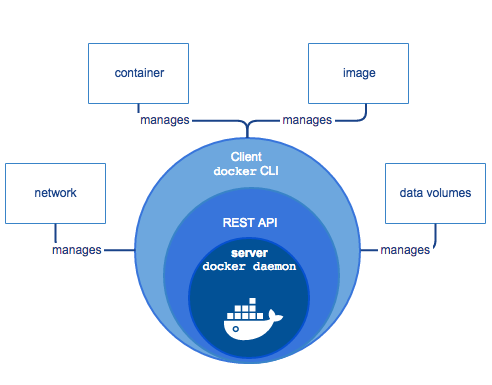
Docker components – picture source docker.com
What is Kubernetes?
Kubernetes, in short, is an open source system for managing clusters of containers. To do this, it provides tools for deploying applications, scaling those application as needed, managing changes to existing containerized applications, and helps you optimize the use of the underlying hardware beneath your containers. Kubernetes is designed to be extensible and fault-tolerant by allowing application components to restart and move across systems as needed.
Kubernetes is itself not a Platform as a Service (PaaS) tool, but it serves as more of a basic framework, allowing users to choose the types of application frameworks, languages, monitoring and logging tools, and other tools of their choice. In this way, Kubernetes can be used as the basis for a complete PaaS to run on top of; this is the architecture chosen by the OpenShift Origin open source project in its latest release.
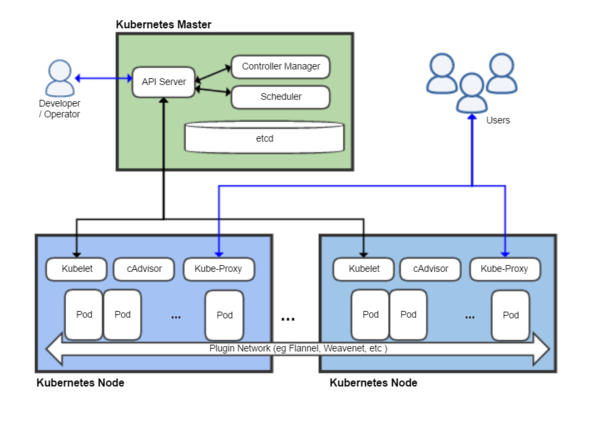
Kubernetes architecture (shortly explained) – picture source Wikipedia
The Kubernetes project is written in the Google developed Go programming language, and you can browse its source code on GitHub.
Hence, In this article I'll give a brief introuduction on what is Docker and show you, how to easily:
a. Build Docker Image with Ubuntu, Update the system and Install Squid inside the container using a sample Dockerfile build file
b. Run Docker Image to test deployed Ubuntu Linux and Squid on top of it works fine
c. Push Docker Image to DockerHub (Docker Images Central Official repository)
d. Deploy (Pull and Run) the new built Docker Ubuntu / Squid Open Proxy Image to the Kubernetes Cluster slave nodes – the K8S Cluster was created using Rancher Enterprise Kubernetes Platform (check out Rancher.net – a bleeding edge tool for k8s quick GUI cluster creation / integration)
1. Install Docker Containerization Software Community Edition
Docker containers are similar to virtual machines, except they run as normal processes (containers), that does not use a Hypervisor of Type 1 or Type 2 and consume less resources than VMs and are easier to manage, nomatter what the OS environment is.
Docker uses cgroups and namespace to allow independent containers to run within a single Linux instance.
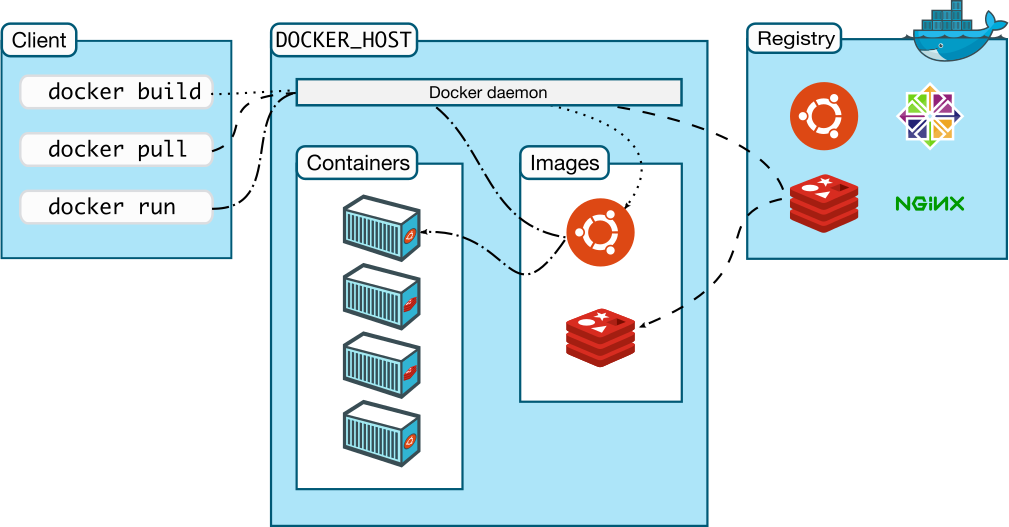
Docker Architecture – Picture source docker.com
Below docker install instructions are for Debian / Ubuntu Linux, the instructions for RPM package distros Fedora / CentOS / RHEL are very similar except yum or dnf tool is to be used.
a) Uninstall older versions of docker , docker-engine if present
apt-get -y remove docker docker-engine docker.io
! Previously running docker stuff such as Volumes, Images and networks will be preserved in /var/lib/docker/
b) install prerequired packages and add apt repositories for doko
Previously running docker stuff such as Volumes, Images and networks will be preserved in /var/lib/docker/
2. Build Docker image with Ubuntu Linux OS and Squid inside
To build a docker image all you need to do is have the Dockerfile (which is docker definitions build file), an Official image of Ubuntu Linux OS (that is provided / downloaded from dockerhub repo) and a bunch of docker commands to use apt / apt-get to install the Squid Proxy inside the Docker Virtual Machine Container
In dockerfile it is common to define for use an entrypoint.sh which is file with shell script commands definitions, that gets executed immediately after Docker fetches the OS from its remote repository on top of the newly run OS. It is pretty much like you have configured your own Linux distribution like using Linux from Scratch! to run on a bare-metal (hardware) server and part of the installation OS process you have made the Linux to run a number of scripts or commands during install not part of its regular installation process.
a) Go to https://hub.docker.com/ and create an account for free
The docker account is necessery in order to push the built docker image later on. Creating the account creates just few minutes time.
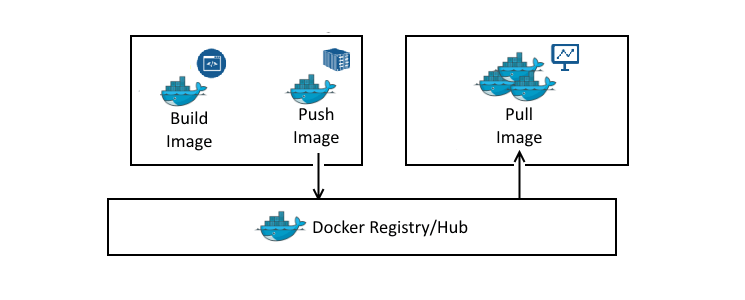
b) Create a Dockerfile with definitions for Squid Open Proxy setup
I'll not get into details on the syntax that Dockerfile accepts, as this is well documented on Docker Enterprise Platform official website but in general gettings the basics and starting it is up to a 30 minutes to maximum 1h time.
After playing a bit to achieve the task to have my Linux distribution OS (Ubuntu Xenial) with Squid on installed on top of it with the right configuration of SQUID Cacher to serve as Open Proxy I've ended up with the following Dockerfile.
FROM ubuntu:xenial LABEL maintainer="hipo@www.pc-freak.net"
Apart from that I've used the following entrypoint.sh (which creates and sets necessery caching and logging directories and launches script on container set-up) permissions for SQUID proxy file that is loaded from the Dockerfile on docker image build time. To have the right SQUID configuration shipped up into the newly built docker container, it is necessery to prepare a template configuration file – which is pretty much a standard squid.conf file with the following SQUID Proxy configuration for Open Proxy
Once, I've created, the proper Dockerfile configuration, I've made a tiny shell script, that can create / re-create my docker image multiple times. Here is the build-docker-image.sh :
The script uses the docker login command to authenticate non-interactively to https://hub.docker.com docker build command with properly set DOCKER_ACC (docker account – which is the username of your hub.docker.com account as I've pointed earlier in article), then DOCKER_REPO (docker repository name) – you can get it either from a browser, after you've logged in to dockerhub or assuming you know your username, it should look like: https://hub.docker.com/u/your-username-name – for example mine is hipod with repository name squid-ubuntu, my squid-ubuntu docker image build is here, you'll also need to provide the password inside the script or if you consider it a security concern, instead type manually from command line docker login and authenticate in advance before running the script, finally the last line docker push pushes to remote docker hub the new build of Ubuntu + SQUID Proxy with a predefined TAG that in my case is latest (as this is my latest build of Squid – if you need a multiple version number of Squid repository just change the tag to the version tag line number.
d) Use the script to build Squid docker image
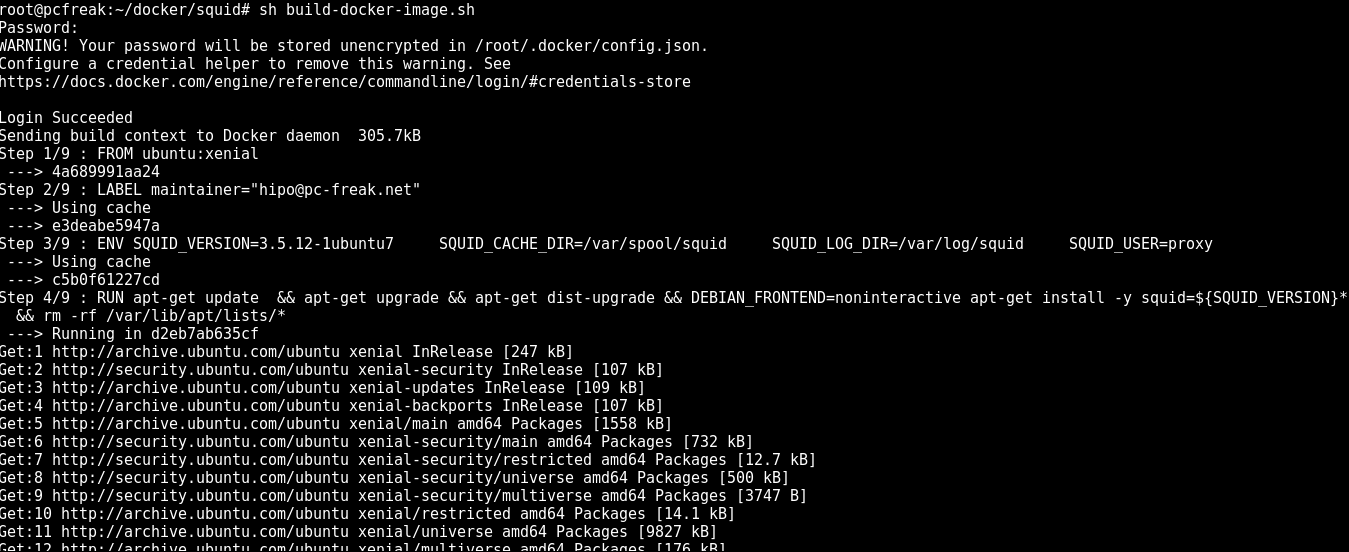
Next run the script to make and push into docker your new image:
sh build-docker-image.sh
Please consider that in order to work with docker hub push / pull, you will need to have a firewall that allows connection to dockerhub site repo, if for some reason the push / pull fails, check closely your firewall as it is the most likely cause for failure.
3. Run the new docker image to test Squid runs as expected
To make sure the docker image runs properly, you can test it on any machine that has docker.io installed, this is done with a simple cmd:
docker run -d –restart=always -p 3128:3128 hipod/squid-ubuntu:latest
The -d option tells docker to background process /run in detached mode -p option tells docker to expose port (e.g. make NAT with iptables from the docker virtual container with Linux OS + SQUID listening inside the container on port 3128 to the TCP / IP 3128 server port). You can use iptables to check the created Network Address Translation rules.
–restart=always option sets the docker restart policy (e.g. when the container is terminating it tells the container to restart the container (OS) after exit), there, you can use as a resetart policy (no, on-failure[:max_retries] , unless-stopped)
CONTAINER ID IMAGE COMMAND CREATED STATUS PORTS NAMES d2eb7ab635cf c5b0f61227cd "/bin/sh -c 'apt-get…" 12 minutes ago Exited (1) 3 minutes ago trusting_elion 18476f546562 c5b0f61227cd "/bin/sh -c 'apt-get…" 37 minutes ago Exited (1) 37 minutes ago admiring_wilson
To connect to the running container later you can use docker attach ID_of_container
docker attach d2eb7ab635cf
command to see the new container runs as well as attach to the newly spawned container
4. Deploying Dockerized SQUID Open Proxy Cache server to Kubernetes cluster
My task was to deploy the newly built squid doko image to remote K8s cluster which was set as a default cluster via a context in .kube/config/ or manually set via:
kubectl config use-context my.k8s-cluster.net
I've used the following YAML file with kubectl to deploy:
The task included to deploy two different Open Proxy squid servers on separate ports in order to add them external cluster Ingress load balancing via Amazon AWS, thus I actually used following 2 yaml files.
The service is externally exposed via later configured LoadBalancer to make the 2 squid servers deployed into k8s cluster accessible from the Internet by anyoneone without authorization (as a normal open proxies) via TCP/IP ports 33128 and 33129.
Conclusion
Below I explained a few easy steps to follow to;
– build docker image Ubuntu + Squid – test the image – deploy the image into a previously prepared k8s cluster
Though it all looks quite simplistic I should say creating the .yaml file took me long. Creating system configuration is not as simple as using the good old .conf files and getting used with the identation takes time.
Now once the LB are configured to play with k8s, you can enjoy the 2 proxy servers. If you need to do some similar task and you don't have to do it for a small fee, contact me.

Since I’ve upgraded to Debian Sid / Squeeze e.g., Debian unstable I’m using compiz and the default patched debian metacity to support it. Thus until today I’ve it setupped to start up with 1. compiz –replace on each and every login session on my account. Today I had my doubts that this is correct since I’ve noticed that compiz terminates after some of the OpenGL games I have started. After some Googling I found a blog post which was discussing the issue. Here is the post how to properly start compiz in gnome . As you could read in the blog post it is wrong to start compiz with compiz –replace cause in that case metacity starts for a couple of seconds during gdm login screen as well as it has to replace metacity afterwards. It is explained that the proper way to start compiz is via the .gnomerc . BTW I was not aware that gnome had that handy .gnomerc file which pretty much like the good old .bashrc. So back to the proper way of running compiz. Edit ~/.gnomerc in and put export WINDOW_MANAGER=/usr/bin/compiz Congrats now you should have compiz to run properly.END—–
I recently installed Windows Vista Enterprise on my cousin’s notebookmodel (Toshiba L300 PLSBGE). I’ve used the 64 bit Vista release and I’ve installed most of the hardware without any setbacks. However Toshiba’s website lacked the 64 bit Vista video drivers. Considering the fact in order to manage the problem I had to use intel’s drivers website and download and install the correct driver for my graphic adapter from there. To adequately catch the correct video card the notebook has I had to use the Windows diagnostics and benchmarking program Everest .END—–
Therefore saith the LORD, the LORD of hosts, the mighty One of Israel, Ah, I will ease me of mine adversaries, and avenge me of mine enemies: -- Isaiah 1:24
Cheap Remote System Administration Very cheap system administration services, Offers administration of Linux, BSD, Windows based servers and services 0
Pc-Freak Homepage Site on Christianity, Orthodox Christianity, The Sign of the Times, Bible, Bible Study, GNU/Linux, Linux, DebianLinux articles, Fedora Linux Articles, hip0’s Blog, Christian Music Review, Christian Artists review and recommendations, Spiritual Movies revi 0
Pc-Freak Security PcFreaK A/H/P/F Organization, Computer Security Research, Project dedicated to Free Software Contribution, Computer Freedom, Penetration Testing, Offering help for people willing to migrate to different operating systems 0
Cheap Remote System Administration Very cheap system administration services, Offers administration of Linux, BSD, Windows based servers and services 0
Pc-Freak Homepage Site on Christianity, Orthodox Christianity, The Sign of the Times, Bible, Bible Study, GNU/Linux, Linux, DebianLinux articles, Fedora Linux Articles, hip0’s Blog, Christian Music Review, Christian Artists review and recommendations, Spiritual Movies revi 0
Pc-Freak Security PcFreaK A/H/P/F Organization, Computer Security Research, Project dedicated to Free Software Contribution, Computer Freedom, Penetration Testing, Offering help for people willing to migrate to different operating systems 0