Posts Tagged ‘Management’

Fix Update KB5060999 Not Installing On Windows 11 Version 23H2/22H2 / Fix windows Update failed

Thursday, July 24th, 2025

fix-Update-KB5060999-Not_Installing_On_Windows_11_Version_23H2_22H2-howto-update-screenshot


Recently I've stumbled across a very annoying issue on my work Laptop. Suddenly windows stopped being upadted it took me really long time of hours of researching to find out how to resolve the error:

Fix Update KB5060999 Not Installing On Windows 11 Version 23H2/22H2 / Fix windows Update failed

After a lot of catch / tries I can manage to Find a fix Thanks God! 

Here are the few steps I took to resolve it, first I've taken all the steps pointed at the Complete Guide Windows Problems it took really long time but even thouigh I did not manage to resolve the issue it give a lot of understanding on different ways of how windows components stick together and how to debug and solve errors if such ones occurs. Thus I warmly recommend it to anyone working as HelpDesk support admin within corporation or if you are a Windows specialist who makes a living from resolving weird unexpected Windows errors for some little money.

Once I went through a lot of underwater stones and nothing word finally  I managed to solve it by following these concrete steps:

1. Check logs and find error message / problems in CBS.log

C:\> notepad c:\windows\Logs\CBS\CBS.log

The root of the issue I found there as a repeating error messages is:

"InternalOpenPackage failed for Package_for_KB3025096~31bf3856ad364e35~amd64~~6.4.1.0 [HRESULT = 0x800f0805 – CBS_E_INVALID_PACKAGE]"


2. Download from Windows catalog the Update


windows11.0-kb5049624-x64-ndp481_6990e824379adc100fd7895adb30e692697381d7.msu to C:\User\myuser\Downloads

3. Use Winrar or 7Zip to extract the msu in local Directory

E.g.open Administrator command line cmd.exe extract  in lets say in \Users\Username\Downloads\
windows11.0-kb5049624-x64-ndp481_6990e824379adc100fd7895adb30e692697381d7

C:\Users/a768839/Downloads/windows11.0-kb5049624-x64-ndp481_6990e824379adc100fd7895adb30e692697381d7 > dir
WSUSSCAN.cab             

4. Remove old package existing on the Windows 11 OS with the same name using DISM tool with /online /remove-package options

C:\Users\myuser\Downloads\windows11.0-kb5049624-x64-ndp481_6990e824379adc100fd7895adb30e692697381d7>DISM /online /remove-package /packagepath:C:\Users\a768839\Downloads\windows11.0-kb5049624-x64-ndp481_6990e824379adc100fd7895adb30e692697381d7\Windows11.0-KB5049624-x64-NDP481.cab                                                                                                                                                                    Deployment Image Servicing and Management tool                                                                                                                                                                                                                                            Version: 10.0.22621.2792                                                                                                                                                                                                                                                                                                                                           Image Version: 10.0.22631.5335                                                                                                                                                                                                                                                                                                                 Processing 1 of 1 – Removing package Package_for_DotNetRollup_481~31bf3856ad364e35~amd64~~10.0.9294.1                                                                                                                                                                                     [==========================100.0%================]                                                                                                                                                                                                                            
 The operation completed successfully.      

                                                                                                                                                                                                                                              5. Use DISM /online /add-package to manually insatall  windows11.0-kb5049624-x64-ndp481_6990e824379adc100fd7895adb30e692697381d7\Windows11.0-KB5049624-x64-NDP481.cab   
                                             

  Assuming you have already downloaded previously and exctracted the .msu file and you have the .cab file at hand run again as cmd.exe Admin                                                                                                                                                                                       

C:\Users\myuser\Downloads\windows11.0-kb5049624-x64-ndp481_6990e824379adc100fd7895adb30e692697381d7>DISM /online /add-package /packagepath:C:\Users\a768839\Downloads\windows11.0-kb5049624-x64-ndp481_6990e824379adc100fd7895adb30e692697381d7\Windows11.0-KB5049624-x64-NDP481.cab                                                                                                                                                                                           Deployment Image Servicing and Management tool                                                                                                                                                                                                                                            Version: 10.0.22621.2792                                                                                                                                                                                                                                                                                                                                                Image Version: 10.0.22631.5335                                                                                                                                                                                                                                                                                                                  Processing 1 of 1 – Adding package Package_for_DotNetRollup_481~31bf3856ad364e35~amd64~~10.0.9294.1                                                                                                                                                                                       [==========================100.0%==========================]                                                                                                                                                                                                                              The operation completed successfully.    


The idea to remove and install the failing package found in the CBS.log was initially found on                                                                   
 http://datadump.ru/windows-update-error-800f0831/
 

6. Force a Windows chkdsk (Check disk on next restart) to make sure no physical hard drive or some other inode Windows Filesystem errors are there

Within same Admin cmd.exe

C:\Users\myuser\> chkdsk /f C:\


Once command executes reboot the PC and wait for the chkdsk scan to complete and PC to Boot as usual

7. Stop / start wuauserv and do sfc /scannow to refresh some Windows update components

Run following set of commands within Admin cmd

C:\> net stop wuauserv
C:\> command prompt in admin mode
C:\>  dism /online /cleanup-image /startcomponentcleanup
C:\>  sfc /scannow
C:\> restart
C:\> sfc /scannow
C:\> net start wuauserv

8. Download Manually failing update from Windows catalog download site:

As of time of writting this article the URL to download is https://catalog.update.microsoft.com/Search.aspx?q=KB5049624%20%20

C:\Users\myuser\Downloads> dir *.msu
windows11.0-kb5060999-x64_99e39c1cf8a8976d9b3313efb38069876c417f70.msu

9. Run Manually again failing Update from command line

Run cmd as Administrator and exec the file:

C:\Users\myuser\Downloads\windows11.0-kb5060999-x64_99e39c1cf8a8976d9b3313efb38069876c417f70.msu

Wait for the install to complete The computer will need to restart

10. Resync the device to the Computer Domain (mandatory step) only if your PC is part of large organizational Domain

Open Microsoft Store / Company Portal and Sync the device (if necessery)

Settings -> Sync

11. Force the PC to sync itself with remote Global Domain policies (mandatory only if PC is part of Domain)

C:\Users\myuser> gpupdate /force
C:\Users\myuser> repadmin /showrepl

Wait for Synchronization and wait for some time for computer compliancy to get back to normal (Computer compliancy might not be an issue if this is a Personal Windows installation) but for computers part of Larger Windows Domains, where a Domain policy requires a compliancy to set of rules)

To come up with this guide and better understand what is going on to resolve it I have to thank my colleague Eduard for assisting me to read the CBS.log and analyze it and also the following forum thread reading explaining what causes the mysterious windows update Update KB5060999 Not Installing On Windows 11 Version 23H2/22H2 to fail.
 

Easy access to all Management Tools on Microsoft Windows 7 and Windows Vista with “GodMode” / A little known hidden Windows feature

Thursday, October 11th, 2012

Windows 7 Vista God Mode little known windows hidden feature, GodMode Microsoft Windows 7 and MS Vista, built in microsoft windows hack shortcut

Are you looking for a quick way to find some kind of security issue with a particular Windows 7 install? You’re an IT geek or your regular daily IT job includes fixing a lot of Windows 7 and Vista broken computers?

I’m sure you will be puzzled to hear about Microsoft embedded default “hack” (feature / shortcut) GodMode. I’m not how exactly “GodMode” should be called is it a security leak? a nice pro admin required feature? or a bad joke with M$ users M$ developers did …

Now you probably still wonder what is GodMode, it is an easy to create Shortcut directory, which when created does an automatic link to all Administrator and Settings services on a Windows OS Desktop PC or Notebook.
GodMode is like all administrator programs link to all management tools accessible via one specific to create (New Directory). It is a sort of Shortcut to everything one accesses from Start Menu, Control Panel and all admin PC interfaces.
GodMode is super handy if you hate to use the messed up and hard to memorize tools in Control Panel ….

Here is a list of all the Utilities you can change via creating the “GodMode” shortcut (New Folder):

Action Center, Administrative Tools, AutoPlay, Backup and Restore, BitLocker Drive Encryption,
Color, Management, Credential Manager, Date and Time, Default Programs, Desktop Gadgets, Device Manager,
Devices and Printer, Display, Easy of Access Center, Folder Options, Fonts, Gettings Started, HomeGroup,
Indexing Options, Internet Options, Keyboard, Mouse, Network and Sharing Center, Notification Area Icons,
Performance Information and Tools, Personalization, Phone and Modem, Power Options, Programs and Features,
Recovery, Region and Language, RemoteApp and Desktop Connections, Sound, Speech Recognition, Sync Center,
System, Taskbar and Start Menu, Troubleshoting, User Accounts, Windows CardSpace, Windows Defender,
Windows Firewall, Windows Update

GodMode is really AWESOME! Its THE DREAM OF THE WINDOWS SYSTEM ADMINISTRATOR COME TRUE 🙂

To get access to all this handy Linked under one Shortcut utilities, all you have to do is create a New Folder (on Windows Desktop plot or anywhere on the Hard Drive) with the following string (name) as New Folder name:


GodMode:{ED7BA470-8E54-465E-825C-99712043E01C}

You will get on your Desktop (or whatever New Directory is created) a Shortcut to all system available management tools.
Below are two screenshots of “GodMode” :):
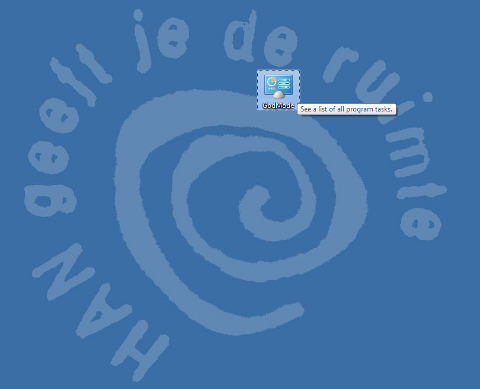
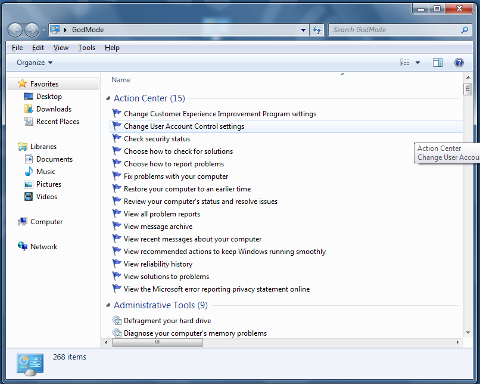
Windows 6 Vista Godmode hack link to all admin tools feature

GodMode is an handy shortcut for tech savvys and for anyone running a PC repair shop it will certainly be previous one to know of.
Using it one can save really a lot of time, screen pondering and obsolete clicks.

GodMode “trick” should work on all M$ Windows 7 / Vista (Pro, Home, Business, Laziness) or whatever. From security standpoint it is a big joke as it can give so easy to way to a possible malicious easier to review system configs and look up for things to break.
I wondery Why Microsoft developers call it GodMode at all? It is just a shortcut and it doesn’t grant you administrator (god like) system access ? Well anyways, Enjoy 😉


Drunk

Monday, February 26th, 2007

I drinked 100 gr. of Rom and a beer after that and I got drunk. I have some problems with one of the servers in DBG. I hope the machine’s hard drive didn’t die. If the hdd is dead it would be very very bad for me. Tomorrow I have test in Management. As usual I haven’t study :]] I’m listening to Pantera and I want to drink more .. which is not good at all. END—–

HRQM Games

Sunday, September 23rd, 2007

The last 3 days in the college we used to have a guest from the Arnhem Business Scholl: Job Thinke.He is a teacher in HRQM (Human Resource and Quality Management). We played a simulator. We choose abusiness to be in. Job, Bozhidar, and two graduating students from Arnhem ( one black girl and one guy from South Africa )were the teachers. We choose an industry (our group was some Open cars producing company). Every peson of the teamhad to participate in taking decisions and writting down the decisions in a decision forms every form was aboutmoney we would invest in things which would lead to accomplish a specific goals we had setted in the beginning of the game,things like hiring more employees promoting some of them etc. etc. were our work. The game was played 3 days and it waslike if we had run a 2 years long business. Our group mistake was that we always thought about things in short terms.In the end of the 2nd year of the game we had a discussion meetings with our higher level employees and it turns outthat we are the poorest team because we always thought about the company in short term instead of long term.During this 3 days there was also some funny games for developing concentration and thinking and improvingcommunication skills. In general I think the whole think was a great loss of time, but I’m a strange person …Most of the ppl liked involved from IBMS and Hotel Management liked the game very much.END—–

Books on Human Resource Management

Friday, September 18th, 2009

Here are two books on Human Resource Management Human Resource Management (MGT – 501)
Strategic Human Resource Management View
Strategic Human Resources Management – Aligning with the Mission END—–