Posts Tagged ‘deb’

How to Split files on Linux FreeBSD, NetBSD and OpenBSD

Sunday, July 31st, 2011

Split large files in pieces Scissors

Did you have the need to sometimes split an SQL extra large files to few pieces in order to be able to later upload it via phpmyadmin?
Did you needed an extra large video or data file to be cut in few pieces in order to transfer it in few pieces over an USB stick?
Or just to give you an another scenario where I sometimes need to have an enormous file let’s say 3G split in few pieces, in order to later read it in vim or mcedit .
I sometimes need to achieve this on FreeBSD and Linux hosts thus I thought it will be helpful to somebody to give a very quick tutorial on the way large files can be cut in pieces on Linux and BSD hosts.

GNU/Linux and FreeBSD are equipped with the split command. The purpose of this command is exactly the cutting of a file to a number of pieces.

On Linux the split command comes by default install to the system with the coreutils package on most Debian (deb) based and Redhat based (rpm) distributions, theerefore Linux’s version of split is GNU/split since it’s part of the GNU Coreutils package. An interesting fact about Linux split is that one of the two programmers who has coded it is Richard Stallman 😉

On BSD Unix split is the AT&T UNIX (BSD) split

In the past splitting files in pieces was much more needed than today, as people used floppy drives to transfer data, though today with the bloom of Internet and the improve of the data carriers transferring even an extra large files from one place to another is a way more trivial task still at many occasions splitting it in pieces is needed.

Even though today splitting file is very rarely required, still there are times when being able to split a file in X number of parts is very much needed.
Maybe the most common use of splitting a file today is necessery when a large SQL file dumps, like let’s say 200 MBytes of info database needs to be moved from ane hosting provider to another one.
Many hosting providers does disallow direct access with standard mySQL client programs to the database directly and only allow a user to connect only via phpMyAdmin or some other web interface like Cpanel to improve data into the SQL or PostgreSQL server.

In such times, having knowledge on the Unix split command is a priceless asset.

Even though on Linux and BSD the code for the split command is not identical and GNU/split and BSD/split has some basic differences, the use of split on both of these Unices is identical.
The way to split a file in few pieces using on both Linux and BSD OSes is being done with one and the same command, here is how:

1. Splitting file in size of 40 mb On Linux

linux:~# split -b 40m SQL-Backup-Data.sql SQL-Backup-Data_split

2. Splitting file in size of 40mb on BSD (FreeBSD, OpenBSD, NetBSD)

freebsd# split -b 40m SQL-Backup-Data.sql SQL-Backup-Data_split

The Second argument the split command takes is actually called a prefix, the prefix is used as a basis name for the creation of the newly generated files cut in pieces file based on SQL-Backup-Data.sql.

As I said identical command will split the SQL-Backup-Data.sql files in a couple of parts which of it will be sized 40 megas.

These command will generate few files output like:

freebsd# ls -1 SQL-Backup-Dat*SQL-Backup-Data.sql
SQL-Backup-Dataa
SQL-Backup-Dataab
SQL-Backup-Dataac
SQL-Backup-Dataad
SQL-Backup-Dataae

As you see the SQL-Backup-Data.sql with size 200MB is being split in four files each of which is sized 40mbytes.

After the files are transfered to another Linux or BSD host, they can easily be again united in the original file with the command:

linux:~# for i in $(ls -1 SQL-Backup-Data_split*); echo $i >> SQL-Backup-Data.sql

Alternatively in most Unices also using cat should be enough to collect back the pieces into the original file, like so:

freebsd# cat SQL-Backup-Data_split* >> SQL-Backup-Data.sql

Enjoy splitting

Send message to GNOME on Linux over plain text ssh terminal session

Wednesday, July 27th, 2011

I just had some fun as, my work day is over. I was curious if I can send message directly to a logged in Gnome user on Ubuntu / Debian environment.

After quick investigation I’ve found gxmessage which is available as deb package for both Debian and Ubuntu.

I installed it and use in the following way:

root@linux:~# apt-get install gxmessage

hipo@linux:~$ ssh root@remotehost.com
hipo@remote-desktop:~$ DISPLAY=:0; XAUTHORITY=~owner_of:0/.Xauthority; export DISPLAY XAUTHORITY
hipo@remote-desktop:~$ gxmessage 'Heya what's up ;) Wanna have a cake?"

Below you see what pops up on the screen on the remote-desktop Gnome Desktop 😉
GxMessage Gnome message Screenshot

How to install Skype on 64 bit Ubuntu (amd64) architecture

Sunday, July 17th, 2011

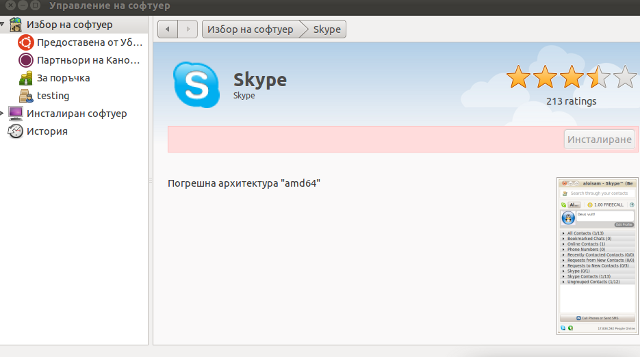
It seems Skype has troubles installing on 64 bit Ubuntu via Ubuntu’s Graphical Package Install manager which in Ubuntu 11.04 is called (Ubuntu Software Center)

During my attempt to take advantage of the nice GUI apt frontend, I encontered the error:
Wrong Architecture amd64

And Skype install failed, as you see in below’s picture (which you might be unable to read since it’s stating the error in Bulgarian 😉

error Ubuntu 11.04 Skype Install error in architecture amd64

The error is quite understandable, since the Skype deb package which tried to install was built for the i386 architecture.
Since the Software Center was not intelligent enough to work around the issue, I finally fixed it myself using the good old apt-get in terminal, like so:

root@ubuntu:~# apt-get install skype
...

apt did not even complain that the package had a different architecture for i386 and installed skype without any errors as well Skype worked immediately even though the arthictural difference.
This is probably because even though it’s a amd64 Ubuntu it has a kernel module loaded to support i386 binaries 😉
Now my sister can enjoy her skype on the shiny Ubuntu 😉

Play Nintendo Super Mario Bros on Linux (Secret Mario Chronicles) and SuperTux

Monday, May 2nd, 2011

Super Mario for Linux, Super Mario Chronicles

Are you looking for free software version of the old-school absolute Nintendo classic Super Mario Bros. ? 🙂

If you’re an old-school geek gamer like me you definitely do 😉
I was lucky to find Secret Mario Chronicles a Linux version of Super Mario while I was browsing through all the available for installation Linux games in aptitude .

The game is really great and worthy to be played. It’s even a better copy of the classical arcade game than SuperTux (another Mario like Linux clone game)

Super Tux A Super Mario Bros. clone for Linux

Both Super Mario Chronicles and Super Mario Bros are available for installation as .deb packages in the repositories of Ubuntu and Debian and most likely the other Debian direvative Linux distrubtion.

To install and play the games out of the box, if you’re a Debian or Ubuntu user, just issue:

linux:~# apt-get install smc supertux

The other good news are that both of the games’s engine, music and graphics are GPLed 🙂

To Launch the games after installation in GNOME I’ve used the menus:

Applications -> Games -> Super Mario Chronicles
andApplications -> Games -> Arcade -> SuperTux

The games can also be launched from terminal with commands:

debian:~$ smc
debian:~$ supertux

The only thing I don’t like about Super Mario Chronicles is that it doesn’t have a good music and only sounds, just to compare SuperTux has an awesome level music.
Along with being an absolute classic I should say that these two games are one of the really good arcade games produced for Linux and if I have to rank them as a gamer among all the other boring arcade games today available for Linux this two ones ranks in the top 10 arcade games prdocuced for Linux

Enjoy and drop me a thanks comment 😉 !