Posts Tagged ‘issue’

Fix Update KB5060999 Not Installing On Windows 11 Version 23H2/22H2 / Fix windows Update failed

Thursday, July 24th, 2025

fix-Update-KB5060999-Not_Installing_On_Windows_11_Version_23H2_22H2-howto-update-screenshot


Recently I've stumbled across a very annoying issue on my work Laptop. Suddenly windows stopped being upadted it took me really long time of hours of researching to find out how to resolve the error:

Fix Update KB5060999 Not Installing On Windows 11 Version 23H2/22H2 / Fix windows Update failed

After a lot of catch / tries I can manage to Find a fix Thanks God! 

Here are the few steps I took to resolve it, first I've taken all the steps pointed at the Complete Guide Windows Problems it took really long time but even thouigh I did not manage to resolve the issue it give a lot of understanding on different ways of how windows components stick together and how to debug and solve errors if such ones occurs. Thus I warmly recommend it to anyone working as HelpDesk support admin within corporation or if you are a Windows specialist who makes a living from resolving weird unexpected Windows errors for some little money.

Once I went through a lot of underwater stones and nothing word finally  I managed to solve it by following these concrete steps:

1. Check logs and find error message / problems in CBS.log

C:\> notepad c:\windows\Logs\CBS\CBS.log

The root of the issue I found there as a repeating error messages is:

"InternalOpenPackage failed for Package_for_KB3025096~31bf3856ad364e35~amd64~~6.4.1.0 [HRESULT = 0x800f0805 – CBS_E_INVALID_PACKAGE]"


2. Download from Windows catalog the Update


windows11.0-kb5049624-x64-ndp481_6990e824379adc100fd7895adb30e692697381d7.msu to C:\User\myuser\Downloads

3. Use Winrar or 7Zip to extract the msu in local Directory

E.g.open Administrator command line cmd.exe extract  in lets say in \Users\Username\Downloads\
windows11.0-kb5049624-x64-ndp481_6990e824379adc100fd7895adb30e692697381d7

C:\Users/a768839/Downloads/windows11.0-kb5049624-x64-ndp481_6990e824379adc100fd7895adb30e692697381d7 > dir
WSUSSCAN.cab             

4. Remove old package existing on the Windows 11 OS with the same name using DISM tool with /online /remove-package options

C:\Users\myuser\Downloads\windows11.0-kb5049624-x64-ndp481_6990e824379adc100fd7895adb30e692697381d7>DISM /online /remove-package /packagepath:C:\Users\a768839\Downloads\windows11.0-kb5049624-x64-ndp481_6990e824379adc100fd7895adb30e692697381d7\Windows11.0-KB5049624-x64-NDP481.cab                                                                                                                                                                    Deployment Image Servicing and Management tool                                                                                                                                                                                                                                            Version: 10.0.22621.2792                                                                                                                                                                                                                                                                                                                                           Image Version: 10.0.22631.5335                                                                                                                                                                                                                                                                                                                 Processing 1 of 1 – Removing package Package_for_DotNetRollup_481~31bf3856ad364e35~amd64~~10.0.9294.1                                                                                                                                                                                     [==========================100.0%================]                                                                                                                                                                                                                            
 The operation completed successfully.      

                                                                                                                                                                                                                                              5. Use DISM /online /add-package to manually insatall  windows11.0-kb5049624-x64-ndp481_6990e824379adc100fd7895adb30e692697381d7\Windows11.0-KB5049624-x64-NDP481.cab   
                                             

  Assuming you have already downloaded previously and exctracted the .msu file and you have the .cab file at hand run again as cmd.exe Admin                                                                                                                                                                                       

C:\Users\myuser\Downloads\windows11.0-kb5049624-x64-ndp481_6990e824379adc100fd7895adb30e692697381d7>DISM /online /add-package /packagepath:C:\Users\a768839\Downloads\windows11.0-kb5049624-x64-ndp481_6990e824379adc100fd7895adb30e692697381d7\Windows11.0-KB5049624-x64-NDP481.cab                                                                                                                                                                                           Deployment Image Servicing and Management tool                                                                                                                                                                                                                                            Version: 10.0.22621.2792                                                                                                                                                                                                                                                                                                                                                Image Version: 10.0.22631.5335                                                                                                                                                                                                                                                                                                                  Processing 1 of 1 – Adding package Package_for_DotNetRollup_481~31bf3856ad364e35~amd64~~10.0.9294.1                                                                                                                                                                                       [==========================100.0%==========================]                                                                                                                                                                                                                              The operation completed successfully.    


The idea to remove and install the failing package found in the CBS.log was initially found on                                                                   
 http://datadump.ru/windows-update-error-800f0831/
 

6. Force a Windows chkdsk (Check disk on next restart) to make sure no physical hard drive or some other inode Windows Filesystem errors are there

Within same Admin cmd.exe

C:\Users\myuser\> chkdsk /f C:\


Once command executes reboot the PC and wait for the chkdsk scan to complete and PC to Boot as usual

7. Stop / start wuauserv and do sfc /scannow to refresh some Windows update components

Run following set of commands within Admin cmd

C:\> net stop wuauserv
C:\> command prompt in admin mode
C:\>  dism /online /cleanup-image /startcomponentcleanup
C:\>  sfc /scannow
C:\> restart
C:\> sfc /scannow
C:\> net start wuauserv

8. Download Manually failing update from Windows catalog download site:

As of time of writting this article the URL to download is https://catalog.update.microsoft.com/Search.aspx?q=KB5049624%20%20

C:\Users\myuser\Downloads> dir *.msu
windows11.0-kb5060999-x64_99e39c1cf8a8976d9b3313efb38069876c417f70.msu

9. Run Manually again failing Update from command line

Run cmd as Administrator and exec the file:

C:\Users\myuser\Downloads\windows11.0-kb5060999-x64_99e39c1cf8a8976d9b3313efb38069876c417f70.msu

Wait for the install to complete The computer will need to restart

10. Resync the device to the Computer Domain (mandatory step) only if your PC is part of large organizational Domain

Open Microsoft Store / Company Portal and Sync the device (if necessery)

Settings -> Sync

11. Force the PC to sync itself with remote Global Domain policies (mandatory only if PC is part of Domain)

C:\Users\myuser> gpupdate /force
C:\Users\myuser> repadmin /showrepl

Wait for Synchronization and wait for some time for computer compliancy to get back to normal (Computer compliancy might not be an issue if this is a Personal Windows installation) but for computers part of Larger Windows Domains, where a Domain policy requires a compliancy to set of rules)

To come up with this guide and better understand what is going on to resolve it I have to thank my colleague Eduard for assisting me to read the CBS.log and analyze it and also the following forum thread reading explaining what causes the mysterious windows update Update KB5060999 Not Installing On Windows 11 Version 23H2/22H2 to fail.
 

Check Windows install date / Howto find install time and date / Check how old is Windows

Sunday, October 22nd, 2017

how-to-find-windows-install-date-change-windows-install-date-change-file-folder-creation-date-howto

Just like us people operating systems have age, they have stages of young, teenage, grow up and old 🙂

Finding out how old is Windows as Operating System is important task for Windows system administrator and Tech support and can help you decide whether the OS requires a fresh reinstall as Windows is known historically to start misbehaving with its aging and especially for Computer Technicians / Support that have Windows Support clients or for Computer Clubs support guys, it is a among the good practices to re-install Windows every few years (every 3 / 4 years for servers to 7 years for Win Servers) and for Desktop or Gamers PCs the lifecycle of OS often much less, a reinstall is required every 2, 2.5 years or so.

Of course Desktop PC Windows users are much more prone to the requirement for frequent reinstalls, because they tend to install a lot of shit cracked, software games and a lot of ugly stuff, that infests the PC and fills up registry with a lot of broken and useless content.

Finding out, the install date of Programs (Applications) in Windows


1. In registry: HKEY_LOCAL_MACHINESoftwareMicrosoftWindowsCurrentVersionUninstall

InstallDate
YYYYMMDD (eg 20090301 for here March 1, 2009)


2. Through Control Panel -> Programs and Features

From Column:

"Installed on"


Determine the install date of Windows
 

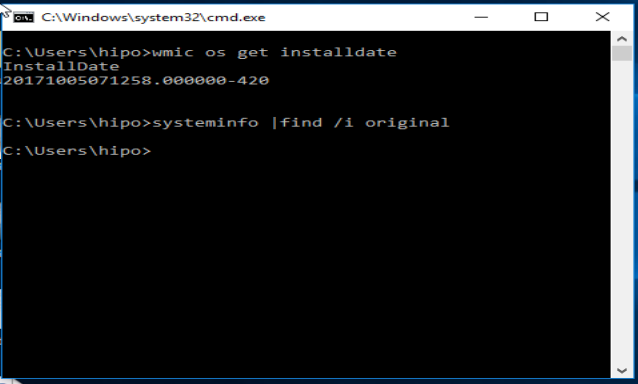
1. In command line you have to issue:
 

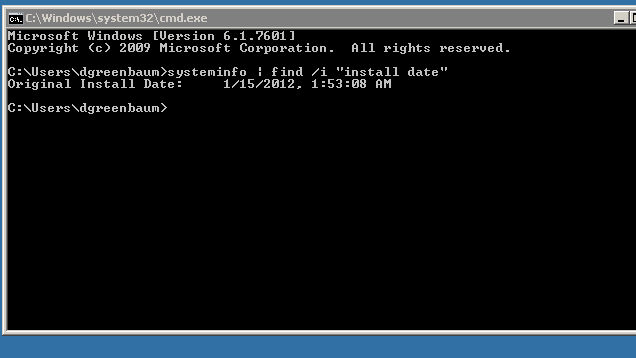
systeminfo|find /i "original"


systeminfo-find-original-windows-server-screenshot-get-windows-install-date-howto

Note that this command will work on Windows Servers 2003, 2007, 2010 and Windows XP, 7, 8 but will show empty result on Windows 10


2. In cmd (command prompt):
 

WMIC OS GET installdate


systeminfo-find-original-windows-server-screenshot-get-windows-install-date-howto1


Reult you will get will be like:
20131019011658

Deciphered this Windows install date is on: 2013(year) 10(month) 19(date) 01(hour) 16(minutes) 58(seconds)
 

3. Another way to get the OS install date via Windows Registers:


HKLMSOFTWAREMicrosoftWindows NTCurrentVersionInstallDate


You will find  therea record number like 1414160971, to get the actual date you have to convert that to decimal
Конвертира се в decimal, и примерно излиза: 1414160971

To convert for those who have GNU / Linux or *BSD at hand the easiest way to convert it is to use below command that converts from unix timestampt to readable date command output:


echo 1414160971 | gawk '{print strftime("%c", $0)}'
24.10.2014 (fr) 17:29:31 EEST


For those that doesn't have GNU / Linux at hand you can use this online tool for conversion unix timestamp to readable output


How to edit creation date, and date of file or folder edit in Windows?

Как да се редактира дата на създаване, дата на редактиране на файл или папка под Windows:

Well why would you want to change the creation date of Windows install or creation date of file or folder edit in Windows?
Well just for the fun or because it can 🙂

Actually a lot of Windows white hats and mostly Script Kiddies (malicious crackers) do use this feature to falsify changed files in Windows lets say system files or any other Windows file, sometimes dumping the install date could be useful in computer data theft investigations or by crackers (please don't mix it with hackers, because term hacker is to be coined for a genius programmers and playful people).

It is possible to do a lot if not everything via Windows registry but perhaps the best way is to use a simple tool Attribute Changer, that is capable to change Windows file, folder and windows install creation date.
 

Ubuntu 9.04 (Jaunty) on Toshiba Satellite L40 14B ACPI problem ACPI loading problem and workaround

Thursday, September 10th, 2009

As you have noticed in my previous posts I'm playing a bit with Toshiba Satellite L40 14B updates this days. I've came across an ugly problem with ACPI on Ubuntu Jaunty. It's really a big issue because acpi stalls and keeps loading the system on 100% leaving it with 0% idle all the time. The solution I’ve found is suggested on the following Ubuntu bug launchpad . As it describes the solution comes to this:

1. rm -f /etc/acpi/events/asus-wireless-on

2. rm -f /etc/acpi/events/asus-wireless-2

the next two steps are added by meto prevent some problems caused by acpidupgrades.

3. touch /etc/acpi/events/asus-wireless-2

4. touch /etc/acpi/events/asus-wireless-on

How Orthodox Easter is calculated or Why Eastern Orthodox Christians celebrate Pascha (later) on a different date from Roman Catholics ?

Tuesday, April 5th, 2016


why-eastern-orthodox-eastern-is-on-different-date-from-roman-catholics-why-we-orthodox-celebrate-easter-later


Why Does Eastern Orthodox Churches celebrate their Eastern often on a later or a different date from (Western Christians) – Roman Catholic Church, Greek Catholic Church, Anglican, Presbyterian or Protestant (Evangelist), Old Catholic Methodist, Calvinist or some other kind of Lutheran or Charismatic Christian sects?

If you happen to be born innd raised in America or Western European contry it is most likely, you're little if at all or not at all aware of the fact that in the Eastern Orthodox Churches the date of Eastern (Passcha) is celebrated often on a different date from the Roman Catholic and the other schismatic churches.

For example, this year 2016 Roman Catholics already celebrated Passcha on March 27th and we Eastern Orthodox Christians are still in the Great Lent (Fasting) period and we'll have the Easter celebrated on 1st of May.
That certainly raises some questions across people who are not Eastern Orthodox, because the Western Roman Catholic Church and the rest of Protestant Christians are the biggest group of Christians out there and even atheists and people belonging to other religions such as Buddhism or Islam might be puzzled why the Eastern Orthodox Christians celebrate easter on a different they if after all they're Christian and what and why is this division among Christians?

With the increased globalization of the World and the fact that currently there are a lot of multi-national international companies and the fact that the companies and businesses today are mostly multi-cultural with people from all the world and all religions across the globe, for some countries situated within countries with predominant Eastern Orthodox population such as Bulgaria, Romania, Serbia, Greece, Ukraine, Belarus, Russia etc. it might be quite a disturbance because there Orthodox Christian country situated branches might be not able to operate on the days of Orthodox Easter. 

Here is a short example on the martch and dismatch by years between Roman Catholic and Eastern Orthodox Church by years from 2010 to 2020


Roman Catholic and Eastern Orthodox Easters from year 2010 to 2020

Year 2010 2011 2012 2013 2014 2015 2016 2017 2018 2019 2020
                       
Catholic 4/4 24/4 8/4 31/3 20/4 5/4 27/3 16/4 1/4 21/4 12/4
Orthodox 4/4 24/4 15/4 5/5 20/4 12/4 1/5 16/4 8/4 28/4 19/4

Easter 2000 to 2009

Year 2000 2001 2002 2003 2004 2005 2006 2007 2008 2009
                     
Catholic 23/4 15/4 31/3 20/4 11/4 27/3 16/4 8/4 23/3 12/4
Orthodox 30/4 15/4 5/5 27/4 11/4 1/5 23/4 8/4 27/4 19/4


A complete list of Eastern Orthodox Pascha feast days is here

Funnly or strangely e ven many people who are situated within an Eastern Orthodox country doesn't have a good understanding why and what is the reason our Eastern Orthodox Easter feast is celebrated on a different date.
There is a lot written on the reasons why Eastern Orthodox Church celebrates on a different date Passcha from Catholics however in this article, I'll try to make it as short and clear as the reasons behind are often presented quiet messy.


In short there are 2 reasons (rules) why Eastern Orthodox Christian Church celebrates Eastern often on a different date:

1) The Julian calendar which is still used by the Eastern Orthodox Church for counting time
2) Adherence of the Orthodox to the early practices of the Original and Ancient Christian Church for Christian Passcha to not coincide with the Jewish Passover

The consequence of these 2 rules is that the Eastern Orthodox Christians on about 50% of the time throughout  years celebrate Christistmas later from Catholics because the Orthodox Church is following the First Church Ecumenical Council of Nicea (325 A.D.) that has set the rule that Passcha must take place always after the Jewish Passover  because in the Church the Biblical described consequence of events of the Passover and the Crucifix are followed, it appears rest of the Christian churches ignore (break) this requirement and this makes them fall under the Anatemas of the Church fathers from the I Ecumenical Council (see the Full decisions of the 7 Ecumenical Canonical Councils of the Original Church here).


Here the difference for Catholics celebrating on a different date Eastern stems from the fact since the XVI century they're using in Catholic Church the Gregorian calendar (adopted by Pope Gregory the XIII-th) because of scientifical superiority claimed by the Gregorian calendar.
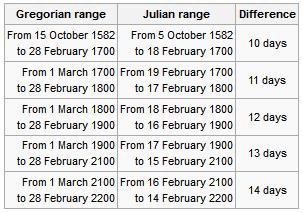
Gregorian Julian calendar-fall-behind-dates by years from 1582 to year 2200

Well as you can see the scientific accuracy of Gregorian calendar is better and with years the Julian calendar is starting to miss astronomical re-calculated dates, causing mathematical incorrectness but the problem with the acceptance of the Gregorian Calendar and the reason why the Eastern Orthodox Church decided not to use the Gregorian calendar for Pascha is the fact that when the Gregorian Calendar was accepted in secular western world and the  Roman Catholic Church in order to matematically align the missing date 13 days were simply dropped off (or from Thursday 4th of October 1582 under Julian Calendar the next day Friday people started being in 15th of October, see the picture below:
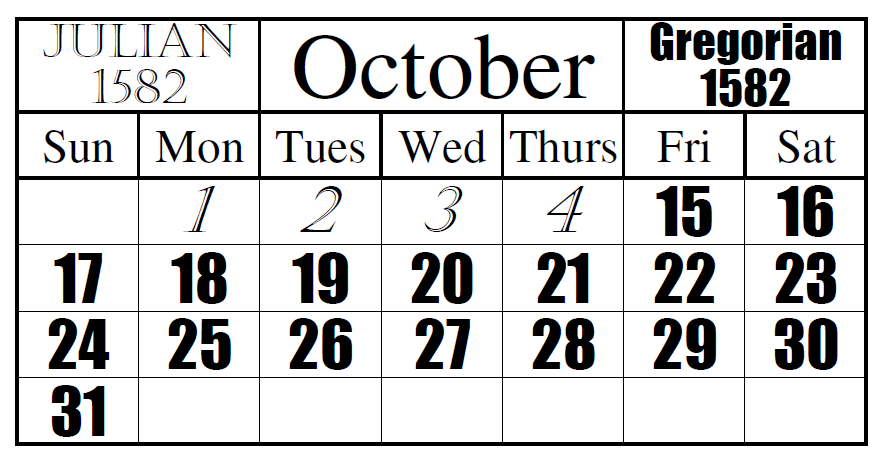
inconsistency_change_from_Julian_to_Gregorian_calendar-Date_Change-and-the-missing-13-days

Well as you can see Friday October the 15,  1582 was quite a crazy year for the people as they lay down as 4th of Thursday and they woke up on 15th the next day 🙂

The Eastern Orthodox still to follow the Julian Calendar for Easter feast and some Churches adopted to using partly the Gregorian (Secular) calendar for some of the feasts under the pressure of the Greek Ecumenical Patriarchate , whether some Churches such as the Russian Orthodox Church (ROC) which as of time of writting is the biggest Orthodox Crhuch as well as the Serbian Church are completely using the Julian calendar for calculating all feast days. Now what should be known is difference between Julian and Gregorian calendar is 13 days falling back (Gregorian Calendar is 13 days in future), while Julian calendar is 13 days in time behind the Gregorian.
However as prior said sometimes throughout years the Easterns of (Western) Roman Catholic Church and Eastern Orthodox Church coincide, such a date on which we celebrated Eastern on one date is on 24 April 2011.
The two dates coincide when the full moon following the equinox comes so late that it counts as the first full moon after 21 March in the Julian calendar as well as the Gregorian.
In recent years the conciding years was frequent in 2010, 2011, 2014 and will be again  2017 but after that there will be no coincidence of Orthodox and  Catholic Easter feasts until 2034.

For those who might be wondering why the Eastern Orthodox Church choose to not celebrate Easter on a different date here is some information on how Pascha (Easter) was determined historically in the One and Holy Apostolic Church
which for historical and dogmatical reasons is today Our Holy Eastern Orthodox Church.

During the first three centuries of Christianity, some Christians celebrates Pascha on the First date after Jewish Passover and others celebrates the feast on the same time as Passover.
This was causing confusions in across Churches and this together with other heretical teachings caused the Holy Church Fathers (successors of Holy Apostols) of the First Ecumenical Council to gather and decide
how to solve the issue.

The Holy Fathers therefore devices a uniform formula for calculating the date of the Pascha that was inline and taking in consideration the most early traditions of the Church as well as the Biblical
sequence of events.

Here is the Easter calculation forumla devices on I Ecumenical Council:

Pascha is to be always celebrated on the first Sunday after the first full moon following the vernal equinox but  always after the Jewish Passover.
 

To even better ensure that there was no confusion as to when the vernal equinox occured the date of the vernal equinox was set to be March 21 (which is April 3rd or 13 days later on the Julain Calendar).
The formula was universally accepted by all of Christianity, ensuring the Pascha was celebrated on the same day throughout the entire Universe (world).
The Eastern Orthodox Church which is keeping to strictly keep the decisions of the fathers 7 Councils and thus strictly keeps the formula in the Church.
The Western Church (Roman Catholic Church) used to be holding also the Eastern calculation formula however in modern times it rejected the Nicene formulate that requires that Pascha to always follow the Jewish  Passover.

Now as the apostacy from True Christian faith is increasing Western theologians and many of the misguided or so called heretical (ecumenism movement oriented) orthodox theologians are starting to claim that the provision about the formula
was not important and thus provision of the formula is rejected and thus ignoring the fact that during years 325 – 1582 as well as the historical date from early Christian historians and Early Canons such as Canon VII of the Apostolic Canons clearly reads:

“If any Bishop, or Presbyter, or Deacon celebrate the holy day of Pascha before the vernal equinox with the Jews, let him be deposed.”
 

 The Calendar Issue came to be in 1582  by Pope Gregory XIII with  instituted reform of the traditional Julian calendar. Actually the Protestant Reformation in its beginning harshly defended the Julian Calendar and kept the new Julian Calendar as an unnecessery information at times
when large chunks of the protestantized countries such as Germany and Netherlands were thinking actively of joining the Orthodox Church, however for some historical reason and by the settle backs of the Roman Catholic Church the rejoining of large sea of protestants with Orthodox sadly never happened.

Until 1923 all Eastern Orthodox Chuches was following the Julian calendar for all yearly feasts however as in 1923 an inter-Orthodox congress was helpd in Constantinople attended by some but not all of the Orthodox Churches, the Church fathers gathering took the very
controversial decision to follow a revised Julian calendar (the so called new Orthodox Church Calendar / New Style) which is essentially the same as Gregorian calendar for all things except the celebration of Pascha and few other feasts which continued to be celebrated across all Orthodox Churches on the same dates across all  Eastern Orthodox Churches who are in full eucharistic communion.

The official claimed reason for accepting the Gregorian calendar and moving most of the feasts +13 days in future  was that within some eastern countries many of the orthodox christian workers couldn't attend many of the 12 important feasts because of work duties (for example 7th of January is a working day in most of the world except Russia and thus it is a problem for many to attend the Church service and prepare and much more confortable if the feast is celebrated on 24th of December like it is in Roman Catholic and Protestant christians) – i.e. the change was initiated most for economical reasons right after the end of the 1st world war.

The result is now many of the great 12 Church Feasts in Orthodox Church like Christmas (Nativity of Christ), Epiphany, the Nativity of the Holy Theotokos, Entrance Presentation of the Theotokos in many of the Orthodox Churches together with Catholics but not with Russian Church and the other Orthodox Churches who still stick to the Julian Calendar.
The only other feasts which are being celebrated together with Russian Orthodox Church is Pentecost and Ascension as they're movable feasts depending on Pascha according to Julian calendar.

For us Orthodox tradition and Church teachings are of paramount importance and thus sadly the change to re-visited Julian calendar just created further confusion internally in the Eastern Orthodox Church, today many people who completely stick to the Julian calendar and refuse the re-visited Julian calendar has joined Schismatic Self-Proclaimed Orthodox Old Calendar Churches or for those who prefered to stay in full communion with the rest of the Eastern Orthodox Churches and stick to old calendar joined the Russian Orthodox Church and Serbian Church as they're considered to better keep the true faith tradition and spiritual descendance from the holy apostles. The question of the calendar difference has been largely discussed within the Orthodox Church and hopefully on the upcoming Holy All Orthodox Council upcoming this year in June 16 – 27 2016 the question of returning back the Old Julian calendar for all Church feasts might be also raised and resolved, once and for all.

As a closure I'll say that the most important thing why Pascha tends to falls different from Catholics is to show that actually the Eastern Orthodox Church is the original Church and different from Roman Catholic and the true Church of Christ falling the prescription of the Church fathers.

P.S. As the so called "Holy Orthodox Council", often called by many 8th ecumenical counil already has taken place in Crete and there was no real signs for it to be neither ecuminical nor holy as the Bulgarian, The Russian, Antiochian and Georgian Orthodox Churches refused to take participation and the overall observation online from their website holycouncil.org  evidently shows that this council is not needed neither solved any of the real important non-doctrinal problems of the Orthodox Church it also prooved to be a PR kind of council trying to make in the eyes of the world the ecumenical patriarch Bartholomeo to look like an Orthodox Church (head) pope and perhaps the ones who organized this council had this intention together with the intention to put even more confusion concerning the unity of the Orthodox Church and separate the chirch into two parties (a conservatives) and (liberals) sides.
Also after the council finalized it prooved not to be really what it meant to be Thanks be to our Lord and Saviour Jesus Christ. The refusal of the Bulgarian Orthodox Church to take participation in the council from my point of view as a member of the Orthodox Church was a right one and has delayed the plans of global enemies of the church to destroy it.
An interesting rumor is the holy council in Crete was sponsored with 70 000 000 from anonymous donators within United States some priests claim the money come from secret societies such as free masonry also it is mostly ridiculous the costs that this ecumenical council impeded.

 

Apache Webserver: No space left on device: Couldn’t create accept lock /var/lock/apache2/accept.lock – Fix

Wednesday, April 8th, 2015

Apache-http-server-no-space-left-on-device-semaphores-quotes-hard-disk-space-resolve-fix-howto
If out of a sudden your Apache webserver crashes and is refusing to start up by manually trying to restart it through its init script on Debian Linux servers – /etc/init.d/apache2 and RPM based ones: /etc/init.d/httpd

Checking in php_error.log there was no shown errors related to loading PHP modules, however apache's error.log show following errors:

[Wed Apr 08 14:20:14 2015] [error] [client 180.76.5.149] client denied by server configuration: /var/www/sploits/info/trojans_info/tr_data/y3190.html
[Wed Apr 08 14:20:39 2015] [warn] pid file /var/run/apache2.pid overwritten — Unclean shutdown of previous Apache run?
[Wed Apr 08 14:20:39 2015] [emerg] (28)No space left on device: Couldn't create accept lock (/var/lock/apache2/accept.lock.15974) (5)
[Wed Apr 08 14:25:39 2015] [warn] pid file /var/run/apache2.pid overwritten — Unclean shutdown of previous Apache run?
[Wed Apr 08 14:25:39 2015] [emerg] (28)No space left on device: Couldn't create accept lock (/var/lock/apache2/accept.lock.16790) (5)
[Wed Apr 08 14:27:03 2015] [warn] pid file /var/run/apache2.pid overwritten — Unclean shutdown of previous Apache run?
[Wed Apr 08 14:27:03 2015] [emerg] (28)No space left on device: Couldn't create accept lock (/var/lock/apache2/accept.lock.16826) (5)
[Wed Apr 08 14:27:53 2015] [warn] pid file /var/run/apache2.pid overwritten — Unclean shutdown of previous Apache run?
[Wed Apr 08 14:27:53 2015] [emerg] (28)No space left on device: Couldn't create accept lock (/var/lock/apache2/accept.lock.16852) (5)
[Wed Apr 08 14:30:48 2015] [warn] pid file /var/run/apache2.pid overwritten — Unclean shutdown of previous Apache run?
[Wed Apr 08 14:30:48 2015] [emerg] (28)No space left on device: Couldn't create accept lock (/var/lock/apache2/accept.lock.17710) (5)
[Wed Apr 08 14:31:21 2015] [warn] pid file /var/run/apache2.pid overwritten — Unclean shutdown of previous Apache run?
[Wed Apr 08 14:31:21 2015] [emerg] (28)No space left on device: Couldn't create accept lock (/var/lock/apache2/accept.lock.17727) (5)
[Wed Apr 08 14:32:40 2015] [warn] pid file /var/run/apache2.pid overwritten — Unclean shutdown of previous Apache run?
[Wed Apr 08 14:32:40 2015] [emerg] (28)No space left on device: Couldn't create accept lock (/var/lock/apache2/accept.lock.17780) (5)
[Wed Apr 08 14:38:32 2015] [warn] pid file /var/run/apache2.pid overwritten — Unclean shutdown of previous Apache run?

As you can read the most likely reason behind above errors preventing for apache to start is /var/run/apache2.pid  unable to be properly written due to lack of disk space or due to disk quota set for users including for userID with which Apache is running.

First thing I did is of course to see how much free space is on the server:

df -h
Filesystem                     Size  Used Avail Use% Mounted on
/dev/mapper/vg00-rootvol       4.0G  1.7G  2.2G  44% /
udev                           7.8G  204K  7.8G   1% /dev
tmpfs                           24G     0   24G   0% /dev/shm
/dev/sda1                      486M   40M  422M   9% /boot
/dev/mapper/vg00-lv_crashdump 1008M   34M  924M   4% /crashdump
/dev/mapper/vg00-homevol       496M   26M  445M   6% /home
/dev/mapper/vg00-lv_opt         12G  1.4G  9.9G  13% /opt
/dev/mapper/vg00-tmpvol        2.0G   68M  1.9G   4% /tmp
/dev/mapper/vg00-varvol        7.9G  609M  6.9G   8% /var
/dev/mapper/vg00-crashvol      1.9G   35M  1.8G   2% /var/crash
/dev/mapper/vg00-auditvol      124M  5.6M  113M   5% /var/log/audit
/dev/mapper/vg00-webdienste     60G   12G   48G  19% /webservice


As visible from above df command output , there is enough disk on HDD, so this is definitely not the issue:

Then I Checked whether there is Quota enabled on the Linux server with repquota command shows there are no quotas enabled:

# repquota / var/
repquota: Mountpoint (or device) / not found or has no quota enabled.
repquota: Mountpoint (or device) /var not found or has no quota enabled.
repquota: Not all specified mountpoints are using quota.


So obviously the only few left possible reason for Apache failing to start after invoked via init script is  either due to left tainted semaphores or due to some server hardware  RAM problem / or a dying  hard disk with bad blocks.

So what are Semaphores? Generally speaking Semaphores are apparatus for conveying information by means of visual signals between applications (something like sockets).They're used for communicating between the active processes of a certain application. In the case of Apache, they’re used to communicate between the parent and child processes, hence if Apache can’t properly write and coordinate these things down, then it can’t communicate properly with all of the processes it starts and hence the Main HTTPD process can't spawn probably its childs preventing Webserver to enter "started mode" and write its PID file.

To check general information about system semaphore arrays there is the ipcs -s command, however my experience is that ipcs -a is more useful (because it lists generally all kind of semaphores) including Semaphore Shared Memory Signals which are the most likely to cause you the problem.

ipcs -a

—— Shared Memory Segments ——–
key        shmid      owner      perms      bytes      nattch     status

—— Semaphore Arrays ——–
key        semid      owner      perms      nsems
0x00000000 22970368   www-data   600        1

—— Message Queues ——–
key        msqid      owner      perms      used-bytes   messages

As you see in my case there is a Semaphore Arrays which had to be cleaned to make Apache2 be able to start again.
 

To clean all left semaphores (arrays) preventing Apache from start properly, use below for one liner bash loop:
 

for i in `ipcs -s | awk '/www-data/ {print $2}'`; do (ipcrm -s $i); done
ipcrm -m 0x63637069


Note that above for loop is specific to Debian on CentOS / Fedora / RHEL and other Linuxes the username with which stucked semaphores might stay will be apache or httpd

Depending on the user with which the Apache Webserver is running, run above loop like so:

For RPM based distros (CentOS / RHEL):


for i in `ipcs -s | awk '/apache/ {print $2}'`; do (ipcrm -s $i); done
ipcrm -m 0x63637069


For other distros such as Slackware or FreeBSD or any custom compiled Apache webserver:

for i in `ipcs -s | awk '/httpd/ {print $2}'`; do (ipcrm -s $i); done
ipcrm -m 0x63637069


If there is also Shared Memory Segments you can remove them with ipcrm i.e.:

ipcrm -m 0x63637069


An alternative way to get rid of left uncleaned semaphores is with xargs:
 

ipcs -s | grep nobody | awk ‘ { print $2 } ‘ | xargs ipcrm


Even though this fixes the issue I understood my problems were due to exceeding semaphores, to check default number of set semaphores on Linux Kernel level as well as few Semaphore related values run below sysctl:

sysctl -a | egrep kernel.sem\|kernel.msgmni
kernel.msgmni = 15904

kernel.sem = 250        32000   32      128


As you can see the number of maximum semaphores is quite large so in my case the failure because of left semaphores was most likely due to some kind of Cracker / Automated bot scanner attack or someone trying malicious against the webserver or simply because of some kind of Apache bug or enormous high load the server faced.

Don’t revoke GoDaddy SSL certificate. (Expired) Revoked SSL is impossible to revert

Thursday, April 12th, 2012

godaddy_logo
One of our company SSL (https) Certificates recently expired so I needed to renew the SSL certificate.

I was in a hurry doing plenty of other stuffs so it seemed logical for me to Revoke the Certificate. I thought revoking the certificate will simply cancel it and afterwards, in Godaddy's SSL (Manager Certificates) interface the Revoked – Cancelled certificate will re-appear in the menu, ready to be generated in the same way as earlier I initially generated the Godaddy's bought SSL certificate

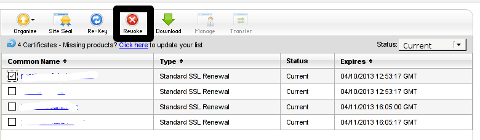
Hence I proceeded and used Revoke button:

Godaddy SSL certificate manager browser certificate Screenshot

Well guess what my calculations, were wrong.
 Revoking, just cancel it. The  revoked domain SSL certificate did not show up again in Godaddy's Cert Manager and I have no way from their interface to revert the changes.

To deal with the situation, I contacted Godaddy Support immediately with the following inquiry:
 

Other : Revoked SSL Certificate
Issue :
Hello we have revoked the SSL certificate for our domain our.domain-name.com.
 Can we revert back the certificate as it was.
If not how to generate a new key for our domain https://our.domain-name.com
Thanks in Advance.
Kindest Regards

"My-Company-name" Tech Support

In 5 hours time I received the following tech support answer:
 

Dear Tech Support,

Thank you for contacting Online Support. It is not possible to reinstate a canceled certificate. You will need to purchase a new certificate. I have requested that a refund be applied to your account. Once the credit appears in your account, please allow 5-7 business days to see the funds applied to the associated payment method. Thank you for your patience and understanding in this matter.

Please let us know if we can help you in any other way.

Sincerely,

Christian P.
Online Support Team
Customer Inquiry
Name : Cadia Tech Support
Domain Name : our.domain-name.com
ShopperID : xxxxxxxxx
Phone : xxxxxxxx
Shopper Validated : Yes
Browser : Mozilla/5.0 (Windows; U; Windows NT 6.1; en-US; rv:1.9.2.3) Gecko/20100401 Firefox/3.6.3

Apparently Godaddy, can work out a bit on their tech support answering time 5 hours for a simple reply is quite long.

Now taking in consideration, above reply from Godady, my only options are to either wait for 5 to 7 (business days) or buy a new credit for SSL certificate.

Buying a new credit will probably not happen as our company is experiencing some financial troubles because of the crisis. So I guess we will have to wait for this 7 days at worst. So again if you wonder to REVOKE or not an SSL certificate. Think again …

Just a small note to make here, that Godaddy has a very straight forward way to just renew an expered certificate, which I succesfully later have done for 4 domains. Well, if only I knew earlier what REVOKE SSL cert really does I wouldn't have ended in this mess …

How to enable VirtualBox Windows XP FullScreen with VboxGuestAdditions.iso on Ubuntu 11.10 Linux

Tuesday, January 17th, 2012

Enable_VirtualBox_Windows_XP-fullscreen-with-vboxguest-additions-iso
Right after installing Windows XP inside VirtualBox, I've found out everything works fine except the screen. Even though pressing (Right CTRL + F) was changing the Windows XP running window to FullScreen the XP screen was taking only a part of the whole screen area, where almost half of the screen was visible as simply staying blank.

A bit of research and I found the issue is caused by missing VirtualBoxGuestAdditions .

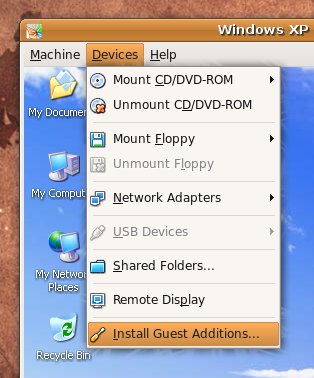
VBoxAdditions is a package which should be installed inside the VirtualBox by navigating to Devices -> Install Guest Additions

Virtualbox offers a download of a VboxGuestAdditions_4.1.2_Ubuntu.iso from url;
http://dlc.sun.edgesuite.net/virtualbox/4.1.2_Ubuntu/VBoxGuestAdditions_4.1.2_Ubuntu.iso, anyways this download fails since the URL is currently unavailable.

To fix this two ways are possible:

1. Download VBoxGuestAdditions.iso from here and put it in directory /usr/share/virtualbox , e.g.:

root@ubuntu:~# cd /usr/share/virtualbox
root@ubuntu:/usr/share/virtualbox# wget https://www.pc-freak.net/files/VBoxGuestAdditions.iso
...

2. Download and install virtualbox-guest-additions-iso_4.1.2-1_all.deb

root@ubuntu:~# wget https://www.pc-freak.net/files/virtualbox-guest-additions-iso_4.1.2-1_all.deb
...
root@ubuntu:~# dpkg -i virtualbox-guest-additions-iso_4.1.2-1_all.deb
...

Next to enable and install guest additions once again use menus:

Devices -> Install Guest Additions

VirtualBox Install Guest Additions Ubuntu Screenshot

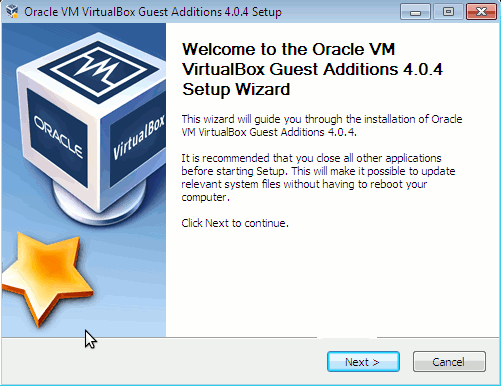
The screen to appear next will be similar to:

VBox guest Additions windows Ubuntu

Further on follow the few dialogs to complete the installations and integration of Guest Additions and restart the Virtual machine and hooray the Windows will appear in Full screen in VirtualBox ! 😉