Posts Tagged ‘deb’

AEWAN – a nice advanced GNU / Linux console ASCII art text editor

Saturday, May 19th, 2012

I'm a guy fascinated by ASCII art, since the very early days I saw a piece of this awesome digital art.

As time passed and computers went to be used mostly  graphics resolution, ASCII art loose its huge popularity from the early DOS and BBS (internet primordial days).

However, this kind  of art is still higly valued by true computer geeks.
In that manner of thoughts, lately I'm researching widely on ASCII art tools and ASCII art open source tools available for Linux.
Last time I check what is available for 'ASCII job' was before 5 years time. Recently I decided to review once again and see if there are new software for doing ascii manipulations on Linux and this is how this article got born.

My attention was caught by aewan (ASCII-art Editor Without A Name), while searching for ASCII keyword description packages with:

apt-cache search ascii

Aewan project official website is on sourceforge check it out here

Here is the complete description of the Debian package:

hipo@noah:~$ apt-cache show aewan|grep -i description -A 5
Description: ASCII-art Editor Without A Name
aewan is an ASCII art editor with support for multiple layers that can be
edited individually, colors, rectangular copy and paste, and intelligent
horizontal and vertical flipping (converts '\' to '/', etc). It produces
both stand-alone art files and an easy-to-parse format for integration
into your terminal applications.

I installed it to give it a try:

noah:~# apt-get --yes install aewan
Selecting previously deselected package aewan.
(Reading database ... 388522 files and directories currently installed.)
Unpacking aewan (from .../aewan_1.0.01-3_amd64.deb) ...
Processing triggers for man-db ...
Setting up aewan (1.0.01-3) ...

aewan package provides three executable binaries:

noah:~# dpkg -L aewan|grep -i /bin/ /usr/bin/aecat
/usr/bin/aewan
/usr/bin/aemakeflic

1. aewan binary is the ascii-art editor itself

2. aecat is utility to display an aewan documents (aewan format saved files)3. aemakeflictool to produce an animation from an aewan document

Next I ran it in plain console tty  to check how it is like:

hipo@noah:~$ aewan

Below are screenshots to give you an idea how powerful aewan ASCII art editor is:

AEWAN ASCII art editor entry information screen Debian GNU / Linux shot

Aewan immediate entry screen after start up

Aewan ASCII art editor Linux showing the major functionality of aewan on Debian GNU / Linux Squeeze

Aewan ASCII art editor – all of the supported tool functions

As you can see from the shot the editor is very feature rich. I was stunned to find out it even supports layers (in ASCII!!) (w0w!). 
It even has a Layers Manager (like GIMP) 🙂

To create my first ASCII art I used the:

New

menu.

This however didn't immediately show the prompt, where I can type  the ascii characters to draw my picture. In order to be able to draw inside the editor, its necessary to open at least one layer, through using the menu:

Add Layer (defaults)

then the interactive ASCII art editor appeared.

While an ASCII art is created with the editor you can select the color of the input characters by using Drawing Color menu seen in the above screenshot.

aewan drawing color choose color Linux shot

I've played few minutes and created a sample ascii art, just to test the color and editor "look & feel", my conclusions are the editor chars drawing is awesome.

Aewan ascii art produced on my Debian GNU / Linux host

All the commands available via menus are also accessible via a shortcut key combinations:

Aewan Linux Ascii art editor quick key shortcut commands

aewan controls are just great and definitely over-shadows every other text editor I used to draw an ASCII art so far.
Once saved the ASCII art, are by default saved in a plain gzipped ascii text. You can therefore simply zcat the the saves;
Don't expect zcat to show you the ascii as they're displayed in aewan, zcat-ing it will instead  display just the stored meta data; the meta data is interpreted and displayed properly only with aecat command.

aewan aecat displaying properly previously saved ascii art picture

I've checked online for rpm builds too and such are available, so installing on Fedora, CentOS, SuSE etc. is up to downloading the right distro / hardware architecture rpm package and running:

# rpm -ivh aewan*.rpm

On the official website, there are also instructions to compile from source, Slackware users and users of other distros which doesn't have a package build should compile manually with the usual:

$ tar -zxf aewan-1.0.01.tar.gz
$ cd aewan-1.0.01
$ ./configure
$ make
$ su -c "make install"

For those inrested to make animations with aemakeflic you need to first save a multiple layers of pictures. The idea of creating ASCII art video is pretty much like the old school way to make animation "draw every scene" and movie it. Once all different scene layers of the ASCII art animation are prepared one could use  aemakeflic to export all the ASCII layers as common video.

aemakeflic has the ability to export the ASCII animation in a runnable shell script to display the animation. The other way aemakeflic can be used is to produce a picture in kind of text format showing the video whether seen with  less cmd.
Making ASCII animation takes a lot of time and effort. Since i'm too lazy and I lack the time I haven't tested this functionality. Anyways I've seen some ascii videos on telnet  to remote hosts (some past time); therefore I guess they were made using aewan and later animated with aemakeflic.

I will close this post with a nice colorful ASCII art, made with aewan (picture is taken from the project page):

Aewan Flipping Selection Screenshot
 

How to reduce spam in PHPBB based internet forum on Debian GNU / Linux

Monday, March 26th, 2012

phpbb reduce spam bot registrations on Debian Linux tiny script

I had to install two PHPBB based internet forums, some long time ago. Since long time passed and I haven't checked what's happening with them I just noticed. They start filling up spam threads. The phpbb installations are done using the standard shipped deb packages in Debian Linux Lenny.

After checking online, I found one smart solution to . The idea is very simple most spam bots are written in a way that they don't have a properly set timezone. Therefore the quickest way to get rid of spam bots which try to auto register and put spam content inside the a forum category or post is to add a simple if condition in php to check the browser set timezone:

The file to add the php if condition is ucp_register.phpThe phpbb package install places default phpbb path on Debian is /usr/share/phpbb3/ and hence the file I had to modify is located in:

/usr/share/phpbb3/www/includes/ucp/ucp_register.php

To make the TZ check one needs to modify ../www/includes/ucp/ucp_register.php and look for php array definition:

$data = array(
'username' => utf8_normalize_nfc(request_var('username', '', true)),
'new_password' => request_var('new_password', '', true),
'password_confirm' => request_var('password_confirm', '', true),
'email' => strtolower(request_var('email', '')),
'email_confirm' => strtolower(request_var('email_confirm', '')),
'confirm_code' => request_var('confirm_code', ''),
'lang' => basename(request_var('lang', $user->lang_name)),
'tz' => request_var('tz', (float) $timezone),
);

Right after this chunk of code add the if condition code which is like so:

if ($data['tz'] == '-12.00')
{
die('Die, bot! Die.');
}

From now onwards, any attempt for new user registration with an incorrect timezone of -12.00 will be immediately stopped while the forum spammer bot will be offered an empty page 🙂

Another good practice is to disable Birthday Listing from phpbb Admin Control panel (ACP). Go to menus:

ACP -> General -> Board Settings -> Enable Birthday listing: (No)

Enable birthday listing phpbb forum screenshot

I like disabling birthday listing, as when it is enabled and you have some spammer registrations, which even though didn't succeeded to contaminate your forum content has specified a birthday and therefore there profiles gets popping up each different day on the main page of the forum.
This will not eradicate all spammer bots, but at least will significantly decrease spammer bot registrations.

How to upgrade single package with their dependencies on Debian and Ubuntu Linux

Friday, March 16th, 2012

Debian GNU / Linux apt-get upgrade a package selection of a whole bunch of packages ready to upgrade apt artistic logo

Are you a Debian System Administrator and you recently run apt-get upgrade && apt-get upgrade finding out there are plenty of new packagesfor upgrade? Do you need only a pre-selected number of packages to upgrade with apt?
I run apt-get update && apt-get upgrade on one of our company Debian servers, just to see there are a number of packages to be upgraded among which there was some I didn't wanted to upgrade. Here is a little paste output from apt-get upgrade:

debian:~# apt-get update && apt-get upgrade
Hit http://security.debian.org squeeze/updates Release.gpg
...
Hit http://security.debian.org squeeze/updates/main amd64 Packages
Fetched 128 kB in 0s (441 kB/s)
Reading package lists... Done
Building dependency tree
Reading state information... Done
The following packages will be upgraded:
at imagemagick libdbd-pg-perl libfreetype6 libmagickcore3 libmagickcore3-extra libmagickwand3 libmysqlclient16 mysql-client
mysql-client-5.1 mysql-common mysql-server mysql-server-5.1 mysql-server-core-5.1
Do you want to continue [Y/n]
14 upgraded, 0 newly installed, 0 to remove and 0 not upgraded.

From first sight it seems logical to issue apt-get upgrade packagename to upgrade only single package with its package dependencies, instead of the whole group the above packs. However doing:
apt-get upgrade imagemagick will still try to upgrade all the packages instead of just imagemagick and its dependency package deb libmagickcore3

debian:~# apt-get upgrade imagemagick
Reading package lists... Done
Building dependency tree
Reading state information... Done
The following packages will be upgraded:
at imagemagick libdbd-pg-perl libfreetype6 libmagickcore3 libmagickcore3-extra libmagickwand3 libmysqlclient16 mysql-client
mysql-client-5.1 mysql-common mysql-server mysql-server-5.1 mysql-server-core-5.1
14 upgraded, 0 newly installed, 0 to remove and 0 not upgraded.
Do you want to continue [Y/n]

Doing all package,upgrade is not a good idea in my case, since upgrading mysql-server will require a MySQL server restart (something which we cannot afford to do right now) on this production server.
MySQL server restart during upgrade is never a good idea especially on productive busy (heavy loaded) SQL servers.
A restart of the MySQL server serving thousands of requests per second could lead often to crashed tables and hence temporary server downtime etc.

Still it is a good idea to upgrade the rest of packages with their newer versions. For exmpl. to upgrade; imagemagick, at , libfreetype6 and so on.

In order to upgrade only this 3 ones and their respective package dependencies, issue:

debian:~# apt-get --yes install imagemagick at libfreetype6

Repeat the apt-get install command with passing all the single package name you want to be upgraded and voila you're done :).
Be sure the apt-get install packagename upgrade doesn't require also upgrade of myssql-server, mysql-client, mysql-common or mysql-server-core-5.1 or any of the package name you want to preserve from upgrading.
Convert single PDF pages to multiple SVG files on Debian Linux with pdf2svg

Sunday, February 26th, 2012

In my last article, I've explained How to create PNG, JPG, GIF pictures from one single PDF document
Convertion of PDF to images is useful, however as PNG and JPEG graphic formats are raster graphics the image quality gets crappy if the picture is zoomed to lets say 300%.
This means convertion to PNG / GIF etc. is not a good practice especially if image quality is targetted.

I myself am not a quality freak but it was interesting to find out if it is possible to convert the PDF pages to SVG (Scalable Vector Graphics) graphics format.

Converting PDF to SVG is very easy as for GNU / Linux there is a command line tool called pdf2svg
pdf2svg's official page is here

The traditional source way compile and install is described on the homepage. For Debian users pdf2svg has already existing a deb package.

To install pdf2svg on Debian use:

debian:~# apt-get install --yes pdf2svg
...

Once installed usage of pdf2svg to convert PDF to multiple SVG files is analogous to imagemagick's convert .
To convert the 44 pages Projects.pdf to multiple SVG pages – (each PDF page to a separate SVG file) issue:

debian:~/project-pdf-to-images$ for i in $(seq 1 44); do \
pdf2svg Projects.pdf Projects-$i.SVG $i; \
done

This little loop tells each page number from the 44 PDF document to be stored in separate SVG vector graphics file:

debian:~/project-pdf-to-images$ ls -1 *.svg|wc -l
44

For BSD users and in particular FreeBSD ones png2svg has a bsd port in:

/usr/ports/graphics/pdf2svg

Installing on BSD is possible directly via the port and convertion of PDF to SVG on FreeBSD, should be working in the same manner. The only requirement is that bash shell is used for the above little bash loop, as by default FreeBSD runs the csh. 
On FreeBSD launch /usr/local/bin/bash, before following the Linux instructions if you're not already in bash.

Now the output SVG files are perfect for editting with Inkscape or Scribus and the picture quality is way superior to old rasterized (JPEG, PNG) images

Debian (Unstable) Squeeze / Sid /usr/lib32/alsa-lib/libasound_module_pcm_pulse.so linked to missing libraries

Thursday, September 10th, 2009

While playing with my installed programs on my recently updated Debian I stepped into a problem with /usr/lib32/alsa-lib/libasound_module_pcm_pulse.so. It seems the library was linked to two non-existing libraries: /emul/ia32-linux/lib/libwrap.so.0 as well as /emul/ia32-linux/usr/lib/libgdbm.so.3. A temporary solution to the issue is pointed out in Debian of the Debian Bug reports . As the report reads to solve that it’s required to:

1. Download libwrap0_7.6.q-18_i386.deb and libgdbm3_1.8.3-6+b1_i386.deb.

2. Extract the packages:dpkg -X libwrap0_7.6.q-18_i386.deb /emul/ia32-linux/dpkg -X libgdbm3_1.8.3-6+b1_i386.deb /emul/ia32-linux/

3. echo /emul/ia32-linux/lib >> /etc/ld.so.conf.d/ia32.conf

4. Execute /sbin/ldconfig

5. Check if all is properly linkedExecute ldd /usr/lib32/alsa-lib/libasound_module_pcm_pulse.so|grep -i “not found”Hopefully all should be fixed now.

Kill everything that Moves (KETM) an arcade spaceship Tyrian GNU / Linux game

Saturday, January 7th, 2012

I always love so much to go back to the times, when games were games and people had still valued words like moral and respect.
In that great days of old school computing, we used to play the awesome old schools Tyrian and the Nintendo 1941 game (hopefully some still remember).

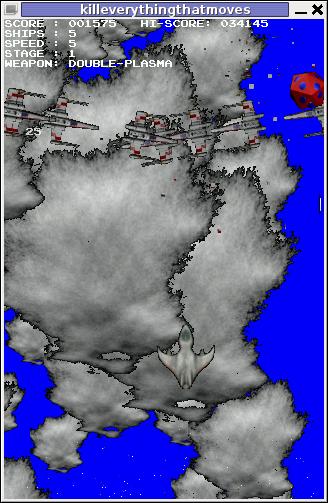
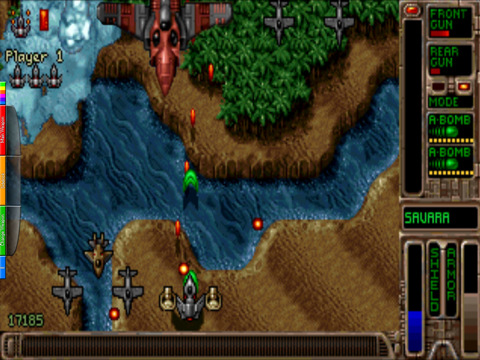
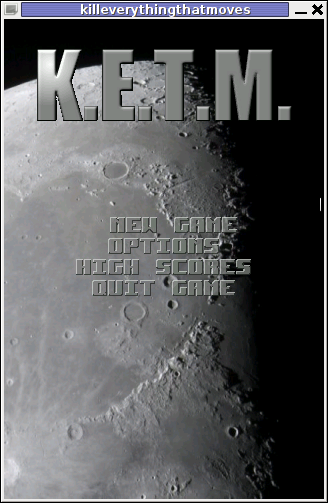
KETM Tyrian like Old School 2d Spaceship shooter awesome

For all who don't Tyrian is one of the best Spaceship Arcades of all times!, and especially for DOS operating system the best I've personally seen.

Recently I was checking the arcade games available for install on my Debian GNU / Linux and happily come across a game called KETM.

KETM acronym stands for the memorizable KILL EVERYTHING THAT MOVES and is free software distributed game under GPL.
The original creation idea was probably to resemble the so famous in the '90s spaceshooter games.

KETM is pretty addictive just like tyrian and has santimental meaning for me since it brings me memories for my arcade gaming years 😉

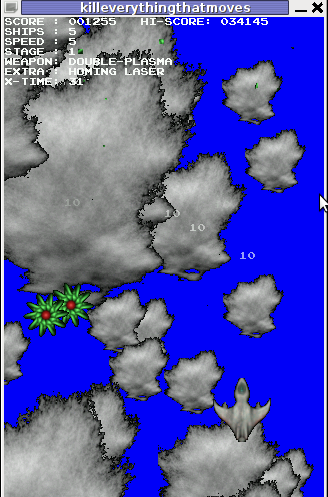
The game is easy to play and has a feeling of "diversity" especially in type of weapons your ship can obtain and use against enemies.

The powerups you get is quite plenty compared to the enemy ship types you should destroy 😉 In overall the game is quite easy to play, this however is also a good thing, as you can play more smoothly without dying every few secs like it is in so many arcade games…

The game has only 4 game levels and on each level end there is a big spaceship "the boss" which is the last in line to destroy in the tradition of the 2d arcade games.

KETM Tyrian like Linux Debian arcade game

Kill Everything That Moves is available for Debian and Ubuntu as a deb installable with apt. To install the game on Debian and Ubuntu

debian:~# apt-get install ketm
...

ketm's official latest available source and binary of time of writting this article is at version 0.6 and as far as I checked it unfortunately seems like the game development is stucked and the code seems a unmaintained.
I'm sure ketm has a lot of potential en hope somebody will adopt the code and will push further its development.
The game runs by default in the annoying windowed mode, I don't like this so I always run it fullscreen:

Kill Everything that Moves Tyrian like arcade game for Debian Ubuntu Linux

debian:~# ketm -f

KETM also reminds a bit on GEKI 2 / 3, which I have previously blogged about but I found KETM to be more enjoyable than gekis.
I've seen KETM has RPM ports as well so installing the game on fedora will be probably as easy as downloading the respective RPMs fulfilling the RPM package requirements and installing with rpm -i. I would be glad to hear from people who had succesfully run the game on Fedora and other RPM based Linux distributions?

The only thing that prevents the game to feel a bit more awesome (in my view) is the missing sound & music … Even though in the game settings inside the main menu there is an option for Sound On / Off the game runs by default without any sound or music (at least on my Debian).
I hope you will have some fun with KETM just I like I did! 😉
Also if you haven't played Tyrian yet, then I strongly advice you download Tyrian from here and try it out with dosbox (a dos gnu linux / bsd game emulator)

Absolute Game Classics Tyrian native game play with dosbox Linux screenshot

Interesting fact to mention here,  while looking for the native tyrian game info , I found tyrian has an open source version under development called OpenTyrian . I'll check the game and write on it when I have time.

Install jwchat web chat jabber interface to work with Debian ejabberd jabber server

Wednesday, January 4th, 2012

JWChat ejabber jabber Ajax / HTML based client logo
 

I have recently blogged how I've installed & configured ejabberd (jabber server) on Debian .
Today I decided to further extend, my previous jabberd installation by installing JWChat a web chat interface frontend to ejabberd (a good substitute for a desktop app like pidgin which allows you to access a jabber server from anywhere)

Anyways for a base of installing JWChat , I used the previously installed debian deb version of ejabberd from the repositories.

I had a lot of troubles until I actually make it work because of some very minor mistakes in following the official described tutorial ejabberd website jwchat install tutorual

The only way I can make jwchat work was by using the install jwchat with ejabberd's HTTP-Bind and file server method

Actually for quite a long time I was not realizing that, there are two ways to install JWChat , so by mistake I was trying to mix up some install instructions from both jwchat HTTP-Bind file server method and JWchat Apache install method

I've seen many people complaining on the page of Install JWChat using Apache method which seemed to be experiencing a lot of strangle troubles just like the mines when I mixed up the jwchat php scripts install using instructions from both install methods. Therefore my guess is people who had troubles in installing using the Apache method and got the blank page issues while accessing http://jabber.servername.com:5280/http-poll/ as well as various XML Parsing Error: no element found errors on – http://ejabberd.oac.com:5280/http-poll/ is most probably caused by the same install instructions trap I was diluted in.

The steps to make JWChat install using the HTTP-Bind and file server method, if followed should be followed absolutely precisely or otherwise THEY WILL NOT WORK!!!

This are the exact steps I followed to make ejabberd work using the HTTP-Bind file server method :

1. Create directory to store the jwchat Ajax / htmls

debian:~# mkdir /var/lib/ejabberd/www
debian:~# chmod +x /var/lib/ejabberd
debian:~# chmod +x /var/lib/ejabberd/www

2. Modify /etc/ejabberd/ejabberd.cfg and include the following configs

While editting the conf find the section:

{listen,
[


Scrolling down you will fine some commented code marked with %% that will read:

{5269, ejabberd_s2s_in, [
{shaper, s2s_shaper},
{max_stanza_size, 131072}
]},

Right after it leave one new line and place the code:

{5280, ejabberd_http, [
{request_handlers, [
{["web"], mod_http_fileserver}
]},

http_bind,
http_poll,
web_admin
]}
]}.

Scrolling a bit down the file, there is a section which says:

%%% =======
%%% MODULES

%%
%% Modules enabled in all ejabberd virtual hosts.
%%

The section below the comments will look like so:

{modules, [ {mod_adhoc, []},
{mod_announce, [{access, announce}]}, % requires mod_adhoc
{mod_caps, []},
{mod_configure,[]}, % requires mod_adhoc
{mod_ctlextra, []},
{mod_disco, []},
%%{mod_echo, [{host, "echo.localhost"}]},
{mod_irc, []},
{mod_last, []},

After the {mod_last, … the following lines should be added:

{mod_http_bind, []},
{mod_http_fileserver, [
{docroot, "/var/lib/ejabberd/www"},
{accesslog, "/var/log/ejabberd/webaccess.log"}
]},

3. Download and extract latest version of jwchat

Of the time of writting the latest version of jwchat is jwchat-1.0 I have mirrored it on pc-freak for convenience:

debian:~# wget https://www.pc-freak.net/files/jwchat-1.0.tar.gz
….

debian:~# cd /var/lib/ejabberd/www
debian:/var/lib/ejabberd/www# tar -xzvf jwchat-1.0.tar.gz
...
debian:/var/lib/ejabberd/www# mv jwchat-1.0 jwchat
debian:/var/lib/ejabberd/www# cd jwchat

4. Choose the language in which you will prefer jwchat web interface to appear

I prefer english as most people would I suppose:

debian:/var/lib/ejabberd/www/jwchat# for a in $(ls *.en); do b=${a%.en}; cp $a $b; done

For other languages change in the small one liner shell script b=${a%.en} (en) to whatever language you will prefer to make primary.After selecting the correct langauge a rm cmd should be issued to get rid of the .js.* and .html.* in other language files which are no longer needed:

debian:/var/lib/ejabberd/www/jwchat# rm *.html.* *.js.*

5. Configure JWChat config.js

Edit /var/lib/ejabberd/www/jwchat/config.js , its necessery to have inside code definitions like:

/* If your Jabber server is jabber.example.org, set this: */
var SITENAME = "jabber.example.org";

/* If HTTP-Bind works correctly, you may want do remove HTTP-Poll here */
var BACKENDS =
[
{
name:"Native Binding",
description:"Ejabberd's native HTTP Binding backend",
httpbase:"/http-bind/",
type:"binding",
servers_allowed:[SITENAME]
}
];

6. Restart EJabberd server to load the new config settings

debian:~# /etc/init.d/ejabberd restart
Restarting jabber server: ejabberd..

7. Test JWChat HTTP-Bind and file server backend

I used elinksand my beloved Epiphany (default gnome browser) which by the way is the browser I use daily to test that the JWChat works fine with the ejabberd.
To test the newly installed HTTP-Bind ejabberd server backend on port 5280 I used URL:

http://jabber.mydomain.com:5280/web/jwchat/I had quite a struggles with 404 not found errors, which I couldn't explain for half an hour. After a thorough examination, I've figured out the reasons for the 404 errors was my stupidity …
The URL http://jabber.mydomain.com:5280/web/jwchat/ was incorrect because I fogrot to move jwchat-1.0 to jwchat e.g. (mv jwchat-1.0 jwchat) earlier explained in that article was a step I missed. Hence to access the web interface of the ejabberd without the 404 error I had to access it via:

http://jabber.mydomain.com:5280/web/jwchat-1.0

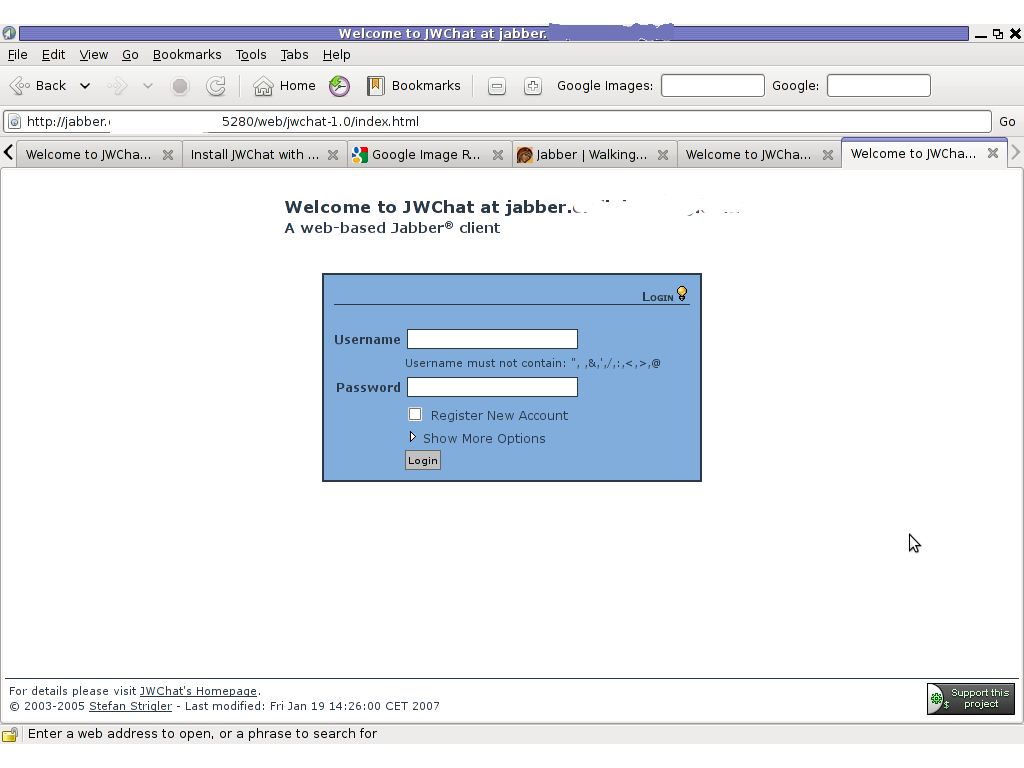
JWChat Ejabber webchat Epiphany Linux screenshot

Finally it is handy to add a small index.php redirect to redirect to http://jabber.mydomain.com:5280/web/jwchat-1.0/

The php should like so:


<?
php
header( 'Location: http://jabber.mydomain.com:5280/web/jwchat-1.0' ) ;
?>

How to check /dev/ partition disk labeling in Debian GNU / Linux

Thursday, December 8th, 2011

The usual way that one is supposed to check a certain partition let’s say /dev/sda1 disk UUID (Universal Unique Identifier) label is through a command:
vol_id /dev/sda1

For reason however Debian does not include vol_id command. To check the UUID assigned disk labels on Debian one should use another command called blkid (part of util-linux deb package).

blkid will list all block device attributes so it doesn’t specifically, passing any partition as argument.
Here is an example output of blkid :

server:/root# blkid
/dev/sda1: UUID="cdb1836e-b7a2-4cc7-b666-8d2aa31b2da4" SEC_TYPE="ext2" TYPE="ext3"
/dev/sda5: UUID="c67d6d43-a48f-43ff-9d65-7c707a57dfe6" TYPE="swap"
/dev/sdb1: UUID="e324ec28-cf04-4e2e-8953-b6a8e6482425" TYPE="ext2"
/dev/sdb5: UUID="1DWe0F-Of9d-Sl1J-8pXW-PLpy-Wf9s-SsyZfQ" TYPE="LVM2_member"
/dev/mapper/computer-root: UUID="fbdfc19e-6ec8-4000-af8a-cde62926e395" TYPE="ext3"
/dev/mapper/computer-swap_1: UUID="e69100ab-9ef4-45df-a6aa-886a981e5f26" TYPE="swap"
/dev/mapper/computer-home: UUID="2fe446da-242d-4cca-8b2c-d23c76fa27ec" TYPE="ext3"


Easy way to look for irregularities and problems in log files / Facilitate reading log files on GNU / Linux and FreeBSD

Thursday, November 24th, 2011

LogWatch logo picture check Logcheck Linux BSD look for irregularities in log files

As a System Administrator I need to check daily the log files produced on various GNU / Linux distributions or FreeBSD. This can sometimes take too much time if the old fashioned way using the normal system tools cat, less and tail etc. is used.

Reading logs one by one eats too much of my time and often as logs are reviewed in a hurry some crucial system irregularities, failed ssh or POP3 / Imap logins, filling disk spaces etc. are missed.

Therefore I decided to implement automated log parsing programs which will summary and give me an overview (helicopter view) on what were the system activities from the previous day (24h) until the moment I logged the system and issued the log analyzer program.
There are plenty of programs available out there that does “wide scale” log analysis, however there are two applications which on most GNU / Linux and BSD systems had become a de-facto standard programs to scan system log files for interesting lines.

These are:
 

  • 1. logwatchsystem log analyzer and reporter
  • 2. logcheckprogram to scan system log files for interesting lines

1. logwatch is by default installed on most of the Redhat based Linux systems (Fedora, RHEL, CentOS etc.). On Debian distributions and as far as I know (Ubuntu) and the other deb based distros logwatch is not installed by default. Most of the servers I manage these days are running Debian GNU / Linux so, to use logwatch I needed to install it from the available repository package, e.g.:

debian:~# apt-get install logwatch
...

logwatch is written in perl and with some big files to analyze, parsing them might take hell a lot of time. It does use a bunch of configuration scripts which defines how logwatch should read and parse the various services logwatch support by default. These conf scripts are also easily extensible, so if one has to analyze some undefined service in the conf files he can easily come up with a new conf script that will support the service/daemon of choice.Using logwatch is very easy, to get an overview about server system activity invoke the logwatch command:

debian:~# logwatch
################### Logwatch 7.3.6+cvs20080702-debian (07/02/08) ####################
Processing Initiated: Thu Nov 24 05:22:07 2011
Date Range Processed: yesterday
( 2011-Nov-23 )
Period is day.
Detail Level of Output: 0
Type of Output/Format: stdout / text
Logfiles for Host: debian
 ################################################# 

——————— dpkg status changes Begin ————- 

Upgraded:
libfreetype6 2.3.7-2+lenny7 => 2.3.7-2+lenny8
libfreetype6-dev 2.3.7-2+lenny7 => 2.3.7-2+lenny8

———————- dpkg status changes End ————————-

——————— httpd Begin ————————

Requests with error response codes
400 Bad Request
HTTP/1.1: 2 Time(s)
admin/scripts/setup.php: 2 Time(s)
401 Unauthorized


———————- vpopmail End ————————-

——————— Disk Space Begin ————————

Filesystem Size Used Avail Use% Mounted on
/dev/md0 222G 58G 154G 28% /

———————- Disk Space End ————————-

###################### Logwatch End #########################

The execution might take up from 10 to 20 seconds up to 10 or 20 minutes depending on the log files size and the CPU / RAM hardware on the machine where /var/log/… logs will be analyzed.

logwatch output can be easily mailed to a custom mail address using a crontab if the server runs a properly configured SMTP server. Using a cron like:

00 5 * * * /usr/sbin/logwatch | mail -s "$(hostname) log files for $(date)"

Here is time to make a note that logwatch is ported also to FreeBSD and is available from BSD’s port tree, from a port with path:

/usr/ports/security/logcheck

2. logcheck is another handy program, which does very similar job to logwatch . The “interesting” information it returns is a bit less than compared to logwatch

The good thing about logcheck is that by default it is made to mail every 1 hour a brief data summary which might be of an interest to the sys admin.
Logcheck is available for install on RedHat distros via yum and has existing package for Debian as well as a port for FreeBSD under the port location /usr/ports/security/logcheck

To install on logcheck on Debian:

debian:~# apt-get install logcheck
...

After installation I found it wise to change the default mailing time from each and every hour to just once per day to prevent my email from overfilling with “useless” mails.

This is done by editting the default cron tab installed by the package located in /etc/cron.d/logcheck

The default file looks like so:

# /etc/cron.d/logcheck: crontab entries for the logcheck package
PATH=/usr/local/sbin:/usr/local/bin:/sbin:/bin:/usr/sbin:/usr/bin
MAILTO=root
@reboot logcheck if [ -x /usr/sbin/logcheck ]; then nice -n10 /usr/sbin/logcheck -R; fi
2 * * * * logcheck if [ -x /usr/sbin/logcheck ]; then nice -n10 /usr/sbin/logcheck; fi
# EOF

To change it run only once per day its content should looks something like:

# /etc/cron.d/logcheck: crontab entries for the logcheck package
PATH=/usr/local/sbin:/usr/local/bin:/sbin:/bin:/usr/sbin:/usr/bin
MAILTO=root
@reboot logcheck if [ -x /usr/sbin/logcheck ]; then nice -n10 /usr/sbin/logcheck -R; fi
2 5 * * * logcheck if [ -x /usr/sbin/logcheck ]; then nice -n10 /usr/sbin/logcheck; fi
# EOF

Altering it that way the log summary interesting info analysis will be sent on mail every day in 05:02 a.m.
Changing the default email logcheck will ship its log analyzer report emails on deb based distros is done via editting the file:

/etc/logcheck/logcheck.conf

And changing the SENDMAILTO=”” variable to point to the appropriate admin email email addr.
 

Fix to Nagios is currently not checking for external commands

Wednesday, August 24th, 2011

While I was deploying a new Nagios install to Monitor some Windows hosts I’ve came across the following error in Nagios’s web interface:

Sorry, but Nagios is currently not checking for external commands, so your command will not be committed!
Read the documentation for information on how to enable external commands...

This error is caused by an option configuration for /etc/nagios/nrpe.cfg (part of the nrpe-nagios-server Debian package.

The config variable in nrpe.cfg causing the error is check_external_command=0 , the fix comes to changing the variable to:

check_external_command=1

As well as restart the /etc/init.d/nagios-nrpe-server and /etc/init.d/nagios3 services:

debian:~# /etc/init.d/nagios3 restart
...
debian:~# /etc/init.d/nagios-nrpe-server
...

This changes has work out the error Sorry, but Nagios is currently not checking for external commands, so your command will not be committed! , however immediately after another kind of error appared in Nagios web interface when I tried to use the send Nagios commands button. The error was:

Error: Could not stat() command file '/var/lib/nagios3/rw/nagios.cmd'!

This error is due to a deb package, which seems to be affecting the current deb versions of Nagios shipped with Debian 6 Squeeze stable, as well as the Latest Ubuntu release 11.04.

Thanksfully there is a work around to the problem I found online, to fix it up I had to execute the commands:

debian:~# /etc/init.d/nagios3 stop debian:~# dpkg-statoverride --update --add nagios www-data 2710 /var/lib/nagios3/rw
debian:~# dpkg-statoverride --update --add nagios nagios 751 /var/lib/nagios3
debian:~# /etc/init.d/nagios3 start

And hooray Thanks God the error is gone 😉