We (Me and My Family) had to stand up early in the morning around 4:30 in Saturday and we traveled to Burgas. First we had to go to a herbman to prescribe me some Herbs. The herbamn is called “bai Dimitar” where bai is a bulgarian specific title for a man on age after the middle age he is located in Kamenartzi village (a small village near Bourgas). He is a sort of strange guy and is speaking very strange things. I hope this herbs will help me. I have to boil them and drink them five times a day. After that we went to Bourgas in my aunt Galia and uncle Galen’s apartment. Everything was a sort was going smooth, Gergana my cousin which was going to merry dressed with a bride dress and waited for his future man (son-in-law). The guy appeared with a limosine and an orchestra. Some ordinary Bulgarian rituals were followed after that the ceremony continued in the council house. Where they became man and wife officially (in front of Bulgaria). After that it followed a celebration in a Bourgas Hotel called “Bulgaria”. The celebration of the marriage included again different traditional Bulgarian dances, guest also danced and ofcourse the Bulgarian familiar horos. I did eat a lot of food and drinked a lot of the meaningless of marriage and all this vanity into celebrity and a lot of empty words spokened there I also convinced myself that I would NEVER EVER allow to have a marriage celebration like this. Some 20 or 30% of the music was Chalga which ofcourse drived me mad. In somewhere 05:00 in the morning we traveled back by car with my father driving. My father is driver from some few months and I definetely can’t say he is an experiencable type of driver which may allow himself to drive with speed higher than the maximum allowed, anywayz he did and I just tried to make him aware that he is braking the driver codex rules. He instead of taking my notes which I made with the idea that I would like to be home back ALIVE, nagged him and he started yelling at me and telling me to stop to complain. That ended in again making me hate him and regret I have parents like this which was a expected to happen since I was angry at all the stupidity and the low intelectual level of most of the ppl who were invited into the Marriage ceremony (although most of them were businessman and a ppl with a high degrees, education). The thing that irritated me the most that the had a marriage ceremony in a orthodox Church and they probably did this just because this is the ordinary way most ppl in Bulgaria does. PFF.. I have slept just for a hour or two today so I probably will go to sleep soon. But first I intend to go for a Liturgy in St. George’s orthodox church. This is after 20 minutes from now. Well thats most of how I spend my saturday on “nothing”. The good thing from all that was that Niki, a.k.a. Nomen’s brother has given me his PSP for the weekend. So I had the time to examine it and generally play with it. I even used a free wifi access in the restaurant where we were and did a bit of browsing :)END—–
Posts Tagged ‘thing’
My cousin’s Marriage – Impressian from Burgas (Bulgaria) marriage and Kamenartzi herbal healer
Sunday, March 9th, 2008Evening service and Holy Liturgy in Russian Church st. Nicolas and marriage preparations
Wednesday, February 5th, 2014
Last Saturday evening I and my future wife Svetlana went to get train tickets (Sofia Dobrich), cause next week me and Svetlana will be travelling to Dobrich. Afterwards we went to Russian Church in center of Sofia – St. Nicolas for the evening service and confessed. The evening service was led by Archimandrite Philip who is currently Russian Church's prior.

At the end of Church service there was an oilment, as always being on a Russian Holy Liturgy is astonishing experience. On Sunday morning 2nd February we were in Russian Church again for the Russian Liturgy and we took the holy sacraments as it is proper (according to Orthodox Church tradition the marrying couple should confess and receive the sacraments before marrying in Church). After Church service we went to Church crypt to venerate holy relics of Archimandrate Seraphim Sobolev. A big thing is happening in my life nowdays as I will have marriage this week on Friday 7-th of February:)
We prepared so far almost everything for marriage. My parents helped with finding a marriage resturant and finding musicians for post marriage restaurant celebration. We also travelled to Asenovgrad to look for Svetlana's wedding dress and we got one I bough a marriage suit 2 weeks back and we ordered a marriage rings. There is already agreement with a priest father Vasilij – who will merry us in Church St. Trinity this Friday. Father Vasilij serves in Church "Dormition of Virgin Mary" in Kavarna . We choose father Vasilij to make the Marriage vows for the reason he is nativily Russian speaking (like Svetlana) plus the father is a good example of a true Christian priest. Today the parents of Svetlana (mama Vera and papa Alexander) arrived in the airport in Varna for the marriage (thanks God they had safe flight). Sunday night I send Svetlana to Train Station here in Sofia to make latest preparations for marriage. I will be travelling to Dobrich on Wednesday night 1 day before marriage. The rest of things happening around are not so interesting. In y job in HP work is complicated as usual. On my job I'm learning HPSM (HP Service Manager) and how to open new Changes in system and that's mostly my life these days. When I have time I'm playing OpenTyrian and a couple of nice arcade games on my ZTE Android mobile phone and reading some saint livings on mobile.
How to make SSH tunnel with PuTTY terminal client
Monday, November 18th, 2013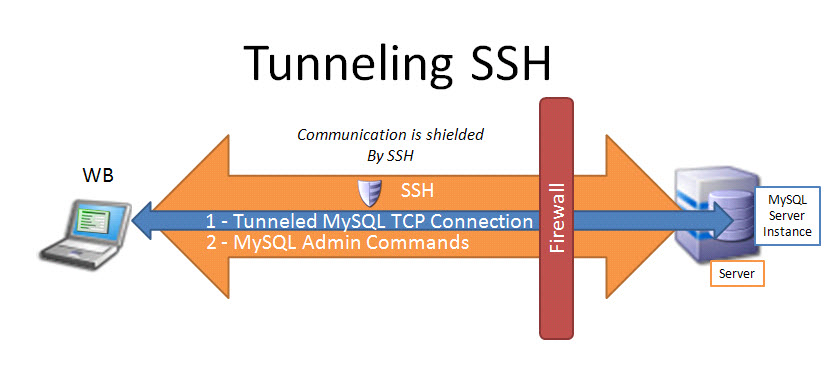
Earlier I blogged how to create SSH tunnels on Linux. Another interesting thing is how to make SSH tunnels on Windows. This can be done with multiple SSH clients but probably quickest and most standard way is to do create SSH tunnel with Putty. So why would one want to make SSH tunnel to a Windows host? Lets say your remote server has a port filtered to the Internet but available to a local network to which you don't have direct access, the only way to access the port in question then is to create SSH tunnel between your computer and remote machine on some locally binded port (lets say you need to access port 80 on remote host and you will access it through localhost tunneled through 8080). Very common scenario where tunneling comes handy if you have a Tomcat server behind firewalled DMZ| / load balancer or Reverse Proxy. Usually on well secured networks direct access to Tomcat application server will be disabled to its listen port (lets say 11444). Another important great think of SSH tunnels is all information between Remote server and local PC are transferred in strong SSH crypted form so this adds extra security level to your communication.
Once "real life" case of SSH tunnel is whether you have to deploy an application which fails after deployment with no meaningful message but error is returned by Apache Reverse Proxy. To test directly tomcat best thing is to create SSH tunnel between remote host 11444 and local host through 11444 (or any other port of choice). Other useful case would be if you have to access directly via CLI interface an SQL server lets say MySQL (remote port 3306 filtered) and inaccessible with mysql cli or Oracle DB with Db listener on port 1521 (needed to accessed via sqlplus).
In that case Putty's Tunneling capabilities comes handy especially if you don't have a Linux box at hand.
To create new SSH tunnel in putty to MySQL port 3306 on localhost (3306) – be sure MySQL is not running on localhost 😉
Open Putty Navigate in left pane config bar to:
SSH -> Tunnels
Type in
Source Port
– port on which SSH tunnel will be binded on your Windows (localhost / 127.0.0.1) in this example case 3306.
Then for
Destination
– IP address or host of remote host with number of port to which SSH tunnel will be opened.
N.B. ! in order to make tunneling possible you will need to have opened access to SSH port of remote (Destination) host
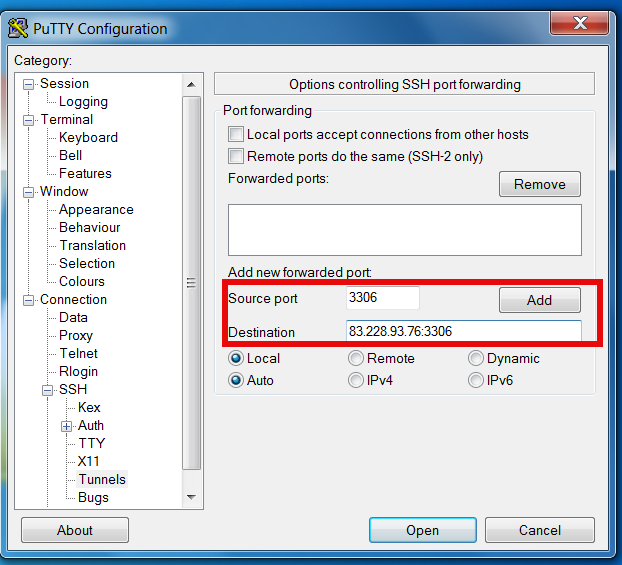
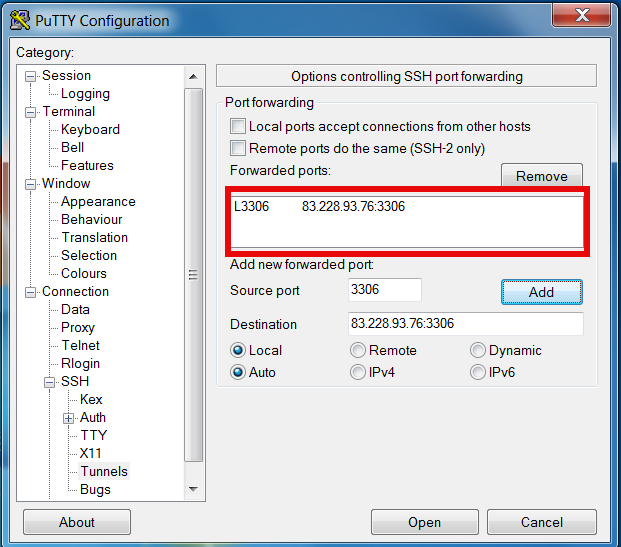
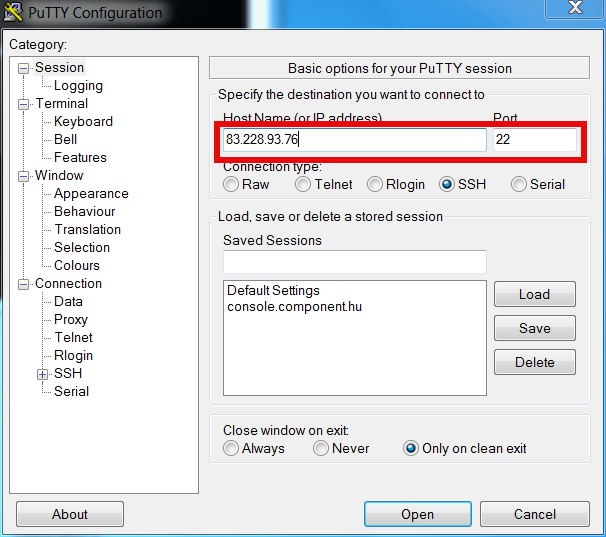
Once click Open you will be prompted for username on remote host in my case to my local router 83.228.93.76. Once you login to remote host open command prompt and try to connect Windows Command prompt Start -> Run (cmd.exe) ;
C:\Users\\hipo> telnet localhost 3306
Connection should be succesful and you from there on assuming you have the MySQL cli version for windows installed you can use to login to remote SQL via SSH tunnel with;
C:\Users\\hipo> mysql -u root -h localhost -p
To later remove existing SSH Tunnel go again to SSH -> Tunnels press on SSH tunnel and choose Remove
Further you can craete multiple SSH tunnels for all services to remote host where access is needed. Important think to remember when creating multiple SSH connections is source port on localhost to remote machine should be unique
Raspberry Pi – Cheap portable credit-card sized single board Linux computer box
Thursday, November 7th, 2013
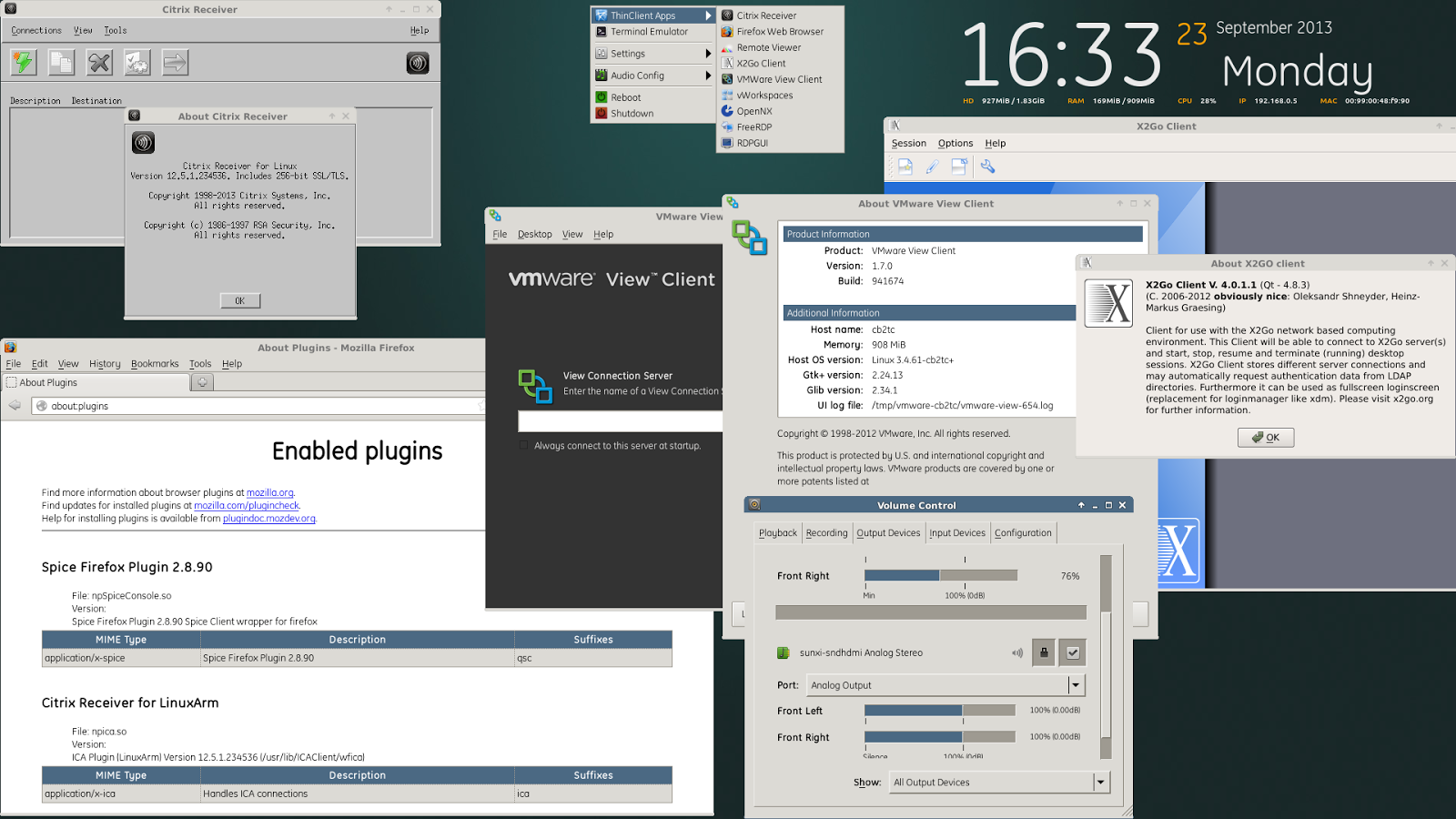
Not of a the latest thing out there but I believe a must know for every geek is existence of Raspberry Pi mini computer Linux board. It is a geek credit-card sized mini PC on extremely cheap price between 25$ and 35$ bucks (e.g. Raspberry Pi model A and Raspberry Pi Model B).
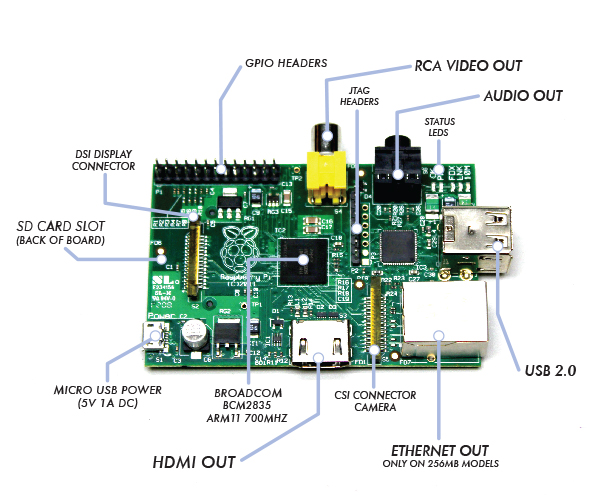
Raspberry Pi hardware you get for this ultra low price is as follows:
- Broadcom BCM2835 system on chip
- ARM Mobile processor model ARM1176JZF running at 700 Mhz (overlocking up to 1Ghz is possible – overclocked RP is called Turbo 🙂 )!
- VideoCore IV GPU with 512 MBytes of ram
- No Build hard disk or solid-state drive but instead designed to use SD-Card as a Storage
- two video outputs
- composite RCA and an HDMI port
- 3.5mm audio output
- 2 or 1SD/MMC/SDIO card slot (depending on device model A or model B)
- Micro USB adapter power charger 500mA (2.5 watts) – Model and 700mA (3.5 watts)
The idea of whole device is to make cheap affordable device for pupils and people from third countries who can't afford to pay big money for a full-featured computer. Achievement is unique all you need to Raspberry Pi credit card sized device is external keyboard a mouse, SD-card and a monitor, this makes a 700Mhz featured almost fully functional computer for less than lets say 80$ whether used with a second hand monitor / mouse and kbd :). A fully functional computer or full functional thin client for as less as 80$ yes that's what RaspberryPi is!
It is recommendable that SD-Card storage on which it is installed is at least 4GB as this is part of its minimum requirement, however it is best if you can get an SD-Card of 32GBytes whether you plan to use its whole graphic functionalities.
Raspberry Pi Hardware is not too powerful to run a version of Windows as well as there is no free version of MS-Windows for ARM Processor, so basicly device is planned to run free software OSes GNU / Linux. 5 operating systems are working fine with the mini-board device as time of writting;
- Raspbian – Debian "Wheezy" Linux port
- Pidora – Fedora mixed version ported to run on Raspberry Pi
- Risk OS port
- Arch Linux port for ARM devices
- Slackware Arm
FreeBSD / NetBSD
- QtonPi
Recommended and probably best distro port is for Debian Squeeze
To boot an OS into raspberry PI dowbnload respective image from raspberrypi.org
– Use application for copying and extracting image to SD-Card like Win32 Disk Imager – whether on Windows platform
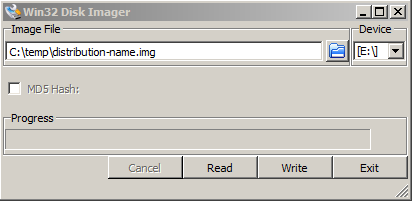
– Or from Linux format SD-Card with gparted (N!B! format disk to be in FAT32 filesystem), extrat files and copy them to SD-CARD.
Once Raspberry Pi loads up it will drop you into Linux console, so further configuration will have to be done manually with invoking plenty of apt-get commands (which I will not talk about here as there are plenty of manuals already) – you will have to manually install your Desktop … Default shipped Web browser in Debian is Midori and due to lack of ported version of flash player for ARM streaming video websites like youtube.com / vimeo.com does not work in browser. There is a Google Chrome for Raspberry Pi port but just like with Midori heavy object loaded websites works very slow and thus not very suitable for multimedia.
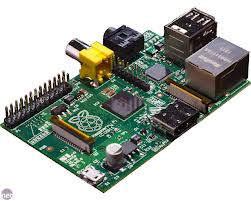
Raspberry Pi device is very suitable for ThinClient use there is a special separate project – Raspberry ThinClient Project – using which a hobbyist can save 400$ for buying proprietary ThinClient.