Posts Tagged ‘after’

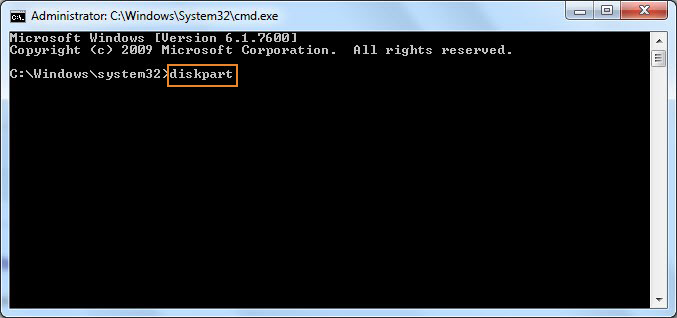
How to Install and Use auditd for System Security Auditing on Linux

Thursday, September 25th, 2025

System auditing is essential for monitoring user activity, detecting unauthorized access, and ensuring compliance with security standards. On Linux, the Audit Daemon (auditd) provides powerful auditing capabilities for logging system events and actions.

This short article will walk you through installing, configuring, and using auditd to monitor your Linux system.

What is auditd?

auditd is the user-space component of the Linux Auditing System. It logs system calls, file access, user activity, and more — offering administrators a clear trail of what’s happening on the system.


1. Installing auditd

The auditd package is available by default in most major Linux distributions.

 On Debian/Ubuntu

# apt update
# apt install auditd audispd-plugins

 On CentOS/RHEL/Fedora

# yum install audit

After installation, start and enable the audit daemon

# systemctl start auditd

# systemctl enable auditd

Check its status

# systemctl status auditd

2. Setting Audit Rules

Once auditd is running, you need to define rules that tell it what to monitor.

Example: Monitor changes to /etc/passwd

# auditctl -w /etc/passwd -p rwxa -k passwd_monitor

Explanation:

  • -w /etc/passwd: Watch this file. When the file is accessed, the watcher will generate events.
  • -p rwxa: Monitor read, write, execute, and attribute changes
  • -k passwd_monitor: Assign a custom key name to identify logs. Later on, we could search for this (arbitrary) passwd string to identify events tagged with this key.

List active rules:

# auditctl -l

3. Common auditd Rules for Security Monitoring

Here are some common and useful auditd rules you can use to monitor system activity and enhance Linux system security. These rules are typically added to the /etc/audit/rules.d/audit.rules or /etc/audit/audit.rules file, depending on your system.

a. Monitor Access to /etc/passwd and /etc/shadow
 

-w /etc/passwd -p wa -k passwd_changes
-w /etc/shadow -p wa -k shadow_changes

  • Monitors read/write/attribute changes to password files.

b. Monitor sudoers file and directory
 

-w /etc/sudoers -p wa -k sudoers
-w /etc/sudoers.d/ -p wa -k sudoers

  • Tracks any change to sudo configuration files.

c. Monitor Use of chmod, chown, and passwd
 

-a always,exit -F arch=b64 -S chmod -S fchmod -S fchmodat -k perm_mod
-a always,exit -F arch=b64 -S chown -S fchown -S fchownat -k perm_mod
-a always,exit -F arch=b64 -S passwd -k passwd_changes

  • Watches permission and ownership changes.

d. Monitor User and Group Modifications

-w /etc/group -p wa -k group_mod
-w /etc/gshadow -p wa -k gshadow_mod
-w /etc/security/opasswd -p wa -k opasswd_mod

  • Catches user/group-related config changes.

e. Track Logins, Logouts, and Session Initiation

-w /var/log/lastlog -p wa -k logins
-w /var/run/faillock/ -p wa -k failed_login
-w /var/log/faillog -p wa -k faillog

  • Tracks login attempts and failures.

f. Monitor auditd Configuration Changes

-w /etc/audit/ -p wa -k auditconfig
-w /etc/audit/audit.rules -p wa -k auditrules

  • Watches changes to auditd configuration and rules.

g. Detect Changes to System Binaries

-w /bin/ -p wa -k bin_changes
-w /sbin/ -p wa -k sbin_changes
-w /usr/bin/ -p wa -k usr_bin_changes
-w /usr/sbin/ -p wa -k usr_sbin_changes

  • Ensures core binaries aren't tampered with.

h. Track Kernel Module Loading and Unloading

-a always,exit -F arch=b64 -S init_module -S delete_module -k kernel_mod

  • Detects dynamic kernel-level changes.

l. Monitor File Deletions

-a always,exit -F arch=b64 -S unlink -S unlinkat -S rename -S renameat -k delete

  • Tracks when files are removed or renamed.

m. Track Privilege Escalation via setuid/setgid

-a always,exit -F arch=b64 -S setuid -S setgid -k priv_esc

  • Helps detect changes in user or group privileges.

n. Track Usage of Dangerous Binaries (e.g., su, sudo, netcat)

-w /usr/bin/su -p x -k su_usage
-w /usr/bin/sudo -p x -k sudo_usage
-w /bin/nc -p x -k netcat_usage

  • Useful for catching potentially malicious command usage.

o. Monitor Cron Jobs

-w /etc/cron.allow -p wa -k cron_allow
-w /etc/cron.deny -p wa -k cron_deny
-w /etc/cron.d/ -p wa -k cron_d
-w /etc/crontab -p wa -k crontab
-w /var/spool/cron/ -p wa -k user_crontabs

  • Alerts on cron job creation/modification.

p. Track Changes to /etc/hosts and DNS Settings

-w /etc/hosts -p wa -k etc_hosts
-w /etc/resolv.conf -p wa -k resolv_conf

  • Monitors potential redirection or DNS manipulation.

q. Monitor Mounting and Unmounting of Filesystems

-a always,exit -F arch=b64 -S mount -S umount2 -k mounts

  • Useful for detecting USB or external drive activity.

r. Track Execution of New Programs

-a always,exit -F arch=b64 -S execve -k exec

  • Captures command execution (can generate a lot of logs).
     

A complete list of rules you can get from the hardening.rules auditd file place it under /etc/audit/rules.d/hardening.rules
and reload auditd to load the configurations.

Tips

  • Use ausearch -k <key> to search audit logs for matching rule.
  • Use auditctl -l to list active rules.
  • Use augenrules –load after editing rules in /etc/audit/rules.d/.


4. Reading Audit Logs

Audit logs events are stored in:

/var/log/audit/audit.log

By default, the location, this can be changed through /etc/auditd/auditd.conf

View recent entries:
 

# tail -f /var/log/audit/audit.log

Search by key:
 

# ausearch -k passwd_monitor

Generate a summary report:

# aureport -f

# aureport


Example: Show all user logins / IPs :

# aureport -au


5. Making Audit Rules Persistent

Rules added with auditctl are not persistent and will be lost on reboot. To make them permanent:

Edit the audit rules configuration:

# vim /etc/audit/rules.d/audit.rules

Add your rules, for example:

-w /etc/passwd -p rwxa -k passwd_monitor

Apply the rules:

# augenrules –load

7. Some use case examples of auditd in auditing Linux servers by sysadmins / security experts
 

Below are real-world, practical examples where auditd is actively used by sysadmins, security teams, or compliance officers to detect suspicious activity, meet compliance requirements, or conduct forensic investigations.

a. Detect Unauthorized Access to /etc/shadow

Use Case: Someone tries to read or modify password hashes.

Audit Rule:

-w /etc/shadow -p wa -k shadow_watch

Real-World Trigger:

sudo cat /etc/shadow

Check Logs:
 

# ausearch -k shadow_watch -i

Real Output:
 

type=SYSCALL msg=audit(09/18/2025 14:02:45.123:1078):

  syscall=openat

  exe="/usr/bin/cat"

  success=yes

  path="/etc/shadow"

  key="shadow_watch"

b. Detect Use of chmod to Make Files Executable

Use Case: Attacker tries to make a script executable (e.g., malware).

Audit Rule:

-a always,exit -F arch=b64 -S chmod -k chmod_detect

Real-World Trigger:
 

 # chmod +x /tmp/evil_script.sh

Check Logs:

# ausearch -k chmod_detect -i

c. Monitor Execution of nc (Netcat)

Use Case: Netcat is often used for reverse shells or unauthorized network comms.

Audit Rule:
 

-w /bin/nc -p x -k netcat_usage
 

Real-World Trigger:

nc -lvp 4444

Log Entry:

type=EXECVE msg=audit(09/18/2025 14:35:45.456:1123):

  argc=3 a0="nc" a1="-lvp" a2="4444"

  key="netcat_usage"


d. Alert on Kernel Module Insertion
 

Use Case: Attacker loads rootkit or malicious kernel module.

Audit Rule:

-a always,exit -F arch=b64 -S init_module -S delete_module -k kernel_mod

Real-World Trigger:

# insmod myrootkit.ko

Audit Log:
 

type=SYSCALL msg=audit(09/18/2025 15:00:13.100:1155):

  syscall=init_module

  exe="/sbin/insmod"

  key="kernel_mod"

e. Watch for Unexpected sudo Usage

Use Case: Unusual use of sudo might indicate privilege escalation.

Audit Rule:

-w /usr/bin/sudo -p x -k sudo_watch

Real-World Trigger:

sudo whoami

View Log:
 

# ausearch -k sudo_watch -i


f. Monitor Cron Job Modification

Use Case: Attacker schedules persistence via cron.

Audit Rule:

-w /etc/crontab -p wa -k cron_mod

Real-World Trigger:
 

echo "@reboot /tmp/backdoor" >> /etc/crontab

Logs:
 

type=SYSCALL msg=audit(09/18/2025 15:05:45.789:1188):

  syscall=open

  path="/etc/crontab"

  key="cron_mod"

g. Detect File Deletion or Renaming
 

Use Case: Attacker removes logs or evidence.

Audit Rule:

-a always,exit -F arch=b64 -S unlink -S unlinkat -S rename -S renameat -k file_delete

Real-World Trigger:

# rm -f /var/log/syslog

Logs:
 

type=SYSCALL msg=audit(09/18/2025 15:10:33.987:1210):

  syscall=unlink

  path="/var/log/syslog"

  key="file_delete"


h. Detect Script or Malware Execution
 

Use Case: Capture any executed command.

Audit Rule:
 

-a always,exit -F arch=b64 -S execve -k exec

Real-World Trigger:

/tmp/myscript.sh

Log View:

# ausearch -k exec -i | grep /tmp/myscript.sh

l. Detect Manual Changes to /etc/hosts

Use Case: DNS hijacking or phishing setup.

Audit Rule:

-w /etc/hosts -p wa -k etc_hosts

Real-World Trigger:
 

# echo "1.2.3.4 google.com" >> /etc/hosts

Logs:

type=SYSCALL msg=audit(09/18/2025 15:20:11.444:1234):

  path="/etc/hosts"

  syscall=open

  key="etc_hosts"


8. Enable Immutable Mode (if necessery)

For enhanced security, you can make audit rules immutable, preventing any changes until reboot:

# auditctl -e 2


To make this setting persistent, add the following to the end of /etc/audit/rules.d/audit.rules:

-e 2


Common Use Cases

Here are a few more examples of what you can monitor:

Monitor all sudo usage:

# auditctl -w /var/log/auth.log -p wa -k sudo_monitor


Monitor a directory for file access:

# auditctl -w /home/username/important_dir -p rwxa -k dir_watch

Audit execution of a specific command (e.g., rm):

# auditctl -a always,exit -F arch=b64 -S unlink,unlinkat -k delete_cmd

(Adjust arch=b64 to arch=b32 if on 32-bit system.)

9. Managing the Audit Log Size

Audit logs can grow large over time. To manage log rotation and size, edit:
 

# vim /etc/audit/auditd.conf

Set log rotation options like:

max_log_file = 8

num_logs = 5

Then restart auditd:
 

# systemctl restart auditd

Conclusion

The Linux Audit Daemon (auditd) is a powerful tool to track system activity, enhance security, and meet compliance requirements. With just a few configuration steps, you can monitor critical files, user actions, and system behavior in real time.


References

  • man auditd
  • man auditctl
  • Linux Audit Wiki


Father Archimandrite Ivan of Novi Han, Protector of Poor and Homeless passed away to Christ

Tuesday, September 16th, 2025

Father Ivan with his shepherd stick

On September 14, the 80-year-old Archimandrite Joan (John) , known simply as Father Ivan from Novi Khan.
Father Ivan
was well known in Bulgarian society as the only Monk father of the Fatherless. and a great benefactor who dedicated his life to the sick, poor, needy and, the homeless people in Bulgaria.

The Requiem service  will be consecrated on September 16 from 12:00 pm in the church "The Holy Trinity" in Novi Khan (a Church situated in the improvised homeless shelter organized in an old Monastery (Saint Nicholas) by Father Ivan himself. by Bishop John of Branitsky, former Vicar Bishop of Patriarch Daniel.

Father Ivan Dimitrov Ivanov was born on March 31, 1945. in the Bulgarian village of Blagovo, Montana region. He received his basic and secondary education in the High Professional School "Peter Beron" in city of Sofia. Next He attended a university degree from the Theological Academy "St. Clement of Ohrid" (which was re-established in the distant year 1981)  already in grown age after working different other jobs. He merried and with his wife Todorka Grigorova Ivanova had two sons – Ivaylo and Grigor. On October 19, 1981 he was ordained a deacon, and on 26 October same year – ordained for a  priest by Metropolitan Filaret of Vidin. Since 1987 he was appointed as a priest at the Church "Holy Trinity" in the town of Novi Han, region of Elin Pelin. In year 2011 he has been consecrated as monk the name Ioan by the Bishop of Devol Theodosij (Theodosius). In 2015 in Montana he was promoted to archimandrite dignity by Vidin Metropolitan Dometian.

Along with his pastoral work, he devotes all his strength to caring for the poor. His selfless service remains misunderstood by many, and for a long time he does not receive support from the leadership of the Bulgarian Orthodox Church. In 2014, His Holiness Patriarch Neophyte of Bulgaria came to visit the “Holy Trinity” shelter in Novi Han. In addition to food and gifts, he also gave a sign of empathy with the great priest’s work.

Otec_Ivan_Novi-Han-s-patriarh-Neofit

Father Ivan began his work in  the distanct 1993, short after the fall of Communism regime in Bulgaria when he restored the abandoned building of the monastery "Holy Trinity" in Novi Han. He revived the liturgical life in the monastery church (that was abondoned for many years due to the dictatorship regime in Bulgaria) and created the shelter "Saint Nicholas", in which he sheltered a dozen homeless people. Gradually, the orphanage expanded and it housed mainly women and children deprived of home and protection, but also found shelter for the elderly and homeless. The priest gave pregnant girls left without any financial support and shelter, the opportunity to give birth to their children and take care of them in the shelter for free. Several generations of children were born and raised under the care of Father Ivan. Today, some of them were the first to express their grief over the death of the father on social networks.

otec_Ivan-with-his-children

Even though his genuine kindness and great good deeds Father Ivan has suffered a lot from people who hate the light of Christ, being a victim of various life hardships, road incidents, and a lot of health issues, which he endevoured with stoicism. He has multiple times has shared when we met that many people being pushed by the devil has done him a lot of badness. 
As a mean to finance the homeless people Father Ivan with the help of his orpans, take care about animals such as chickens, cows, sheeps.
Not on a signle occasion animals belonging to him and his shelter has been stolen.
He fought many battles in his life time but never lost hope neither he fall in spirit always counting on the help of the Almighty, like the ancient saints.
Father Ivans deed for that hard times can be compared to the great deeds of the ancients and for the Bulgarian society his meaning and inspiration was similar
to the old testamental important of Moses who led the people.
His servence of a priest was always given for the good example and people respected him and loved him for his deeds in Bulgaria over the last 40 years.

Otec_Ivan-stuck-with-a-knife

In 2013, the father bought several houses in the Montana village of Yakimovo, where he housed also homeless families and their children (the houses hosting homless families reached about 80+ houses ! which accomodated about 180 people, together with the people in the orphanage in Novi Han they were more than 250+ people).

The last years of his life he spend living in his small living Room (monastic Cell) in the Saint Nicolas Monastery in prayer and last spiritual cares for his many children.

Father Ivan of Novi Han and his son Grigorij

The priest's work is continued by his son (who also took the path of his father) Fr. Grigoriy, who now takes care of the orphanages. Fr. Ivan remains in our recent church history as an example of complete dedication to the service of his neighbors, without seeking reward or gratitude. Something unique and unrepeatable fhat inspired many to be more merciful and benevolent for the poor and needy and by this he incarnated the example of Christ who teached us to always have the poor and needy with us and in our hearts. Generous to the life's misfortunes of his "children", Fr. Ivan set an example of a servant of Christ, whose love "does not seek its own… bears all things, believes all things, hopes all things, endures all things" (1 Cor. 13:5-7).

I had the blessing to meet father Ivan of Novi Han a couple of times together with Bishop Ierotey Agathopolski (who used to be in the past under the spiritual guidance of Father Ivan). And my personal impressions are that father Ivan was a highly spiritual person and true monk. I had the chance one time in the distant 2011 to meet him in Novi Khan afer a pilgrimage to Holy Mount Athos we have been guests to Father Ivan in the monastery for a night and even had the chance to be and serve as a ipodeacon on a Holy Liturgy led by Father Ivan. I still remember how much he worried about the children God has sent him for care and how much he worried if financially he can make it to give a good life to all the new inhabitants who recently come to his shelter. 

The Children and old homeless people for whom Father Ivan of Novi Han took care

I remember he had to buy some food for the shelter and I wanted to help him to carry the stuff and we were to the SuperMarket together to buy food and goods for the children.
Father Ivan had a great temper and a great sense of humor even though he has been already aging and his spirit was lifted even though the hardships both with suffering heavy form of diabetes and other multitude of physical infirmity.

 
Film Sparks (Movie about the Shleter of Saint Nicolas created by Father Ivan of Novi Han)


Father Ivan and his Children an Interview Movie by Fr Ivan


Movie about The Life Story hardships of Father Ivan of Novi Khan and what made him decide to serve the sick, the poor and the lonely

Father Archimandrite Ivan one worthy Bulgarian

In above interview, father Ivan talks about how he decided to become a priest and how he promised God that he will make an orphanage home. He was accused during the communistic times in Bulgaria for being a priest only to serve as a spy for the West. He was kept in Montana Police station interrogated for 7 months in a small dark police carcer (small police room for prisoners), trying and the police tried to brain wash him that he is guilty for things he is not for all the time being asked the same questions again and again with a light lamp infront of his eye sight. He tells in short in the interview, how he managed to restore the Holy Trinity monastery, after a lot of hardships and miracles of God who helped me to do so. On multiple times his orphanage house has been tried to be (closed) and even destroyed by the local people of Novi Han unsuccesful. He has a lot of abusers who tried to run the deeds of his life the oprphanage but God by his great grace and his powers did not allow this to happen! But right on the contrary helped him and the children and provided him everything he needs to fulfill the dead of his life to help the salvation of tens of thousands to find his path to God and multitudes of people to physically survive a life of horror for years. He put a multitude of lost souls for whom noone cared back on the track of life and by his mercifulness he preached the Gospel not only words but in deeds.

Let God forgive him, Have mercy on his Soul and Forgive him if he sinned as a man and Receive him in his heavenly kingdom ! And Let us have his prayers to Christ ! Amen

Christ is Risen Eastern Orthodox Resurrection Paschal Greeting in Different Languages

Friday, April 24th, 2020

Resurrection-of-Christ-holy-orthodox-icon-Voskresenie-Hristovo

Happy Easter to All Orthodox Christians worldwide ! 
We are the the bright week –  this is the week after The Feast of Feasts Resurrection of Christ. This year in 2020, we Orthodox Christians celebrated this feast on 19th, 20th and 21st of April. The celebrations of the Feast of Christians and the Paschal joy continues for the whole week, so I found some time to quickly blog to share the Joy of the Resurrection of the Savior Jesus Christ who has freed all People from the Fear of the Death by Manifestating Death has been overtaken by Life Eternally.
Earlier years, I've blogged shortly on the Christ is risen in many languages. But this time I decided to extend my previous blog by adding some more details on which are the Member Churches consisting the Christ body of Holy Orthodoxy, What is the Creed of Faith (Symbol of Faith) difference Between Orthodox Christians and Roman Catholics and why we're not catholics and do celebrate Easter on a different date from Roman Catholics. Finally I will post the Paschal Greeting translated to as many languages I could find.

In the Eastern Orthodox Christian world which is the True Church of Christ consists of 15 National Churches each traced back to the Holy Apostles of Christ, each of Churches is in eucharistic Communion with the other. 

Canonical Orthodox Christ Churches as of year 2020 are the following:

1. Orthodox Church of Constantinople
2. Orthodox Church of Alexandria
3. Orthodox Church of Antiochia
4. Jerusalem Patriarchal Orthodox Church
5. Bulgarian Orthodox Church
6. Georgian Orthodox Church
7. Serbian Orthodox Church
8. Russian Orthodox Church
9. Romanian Orthodox Church
10. Orthodox Church of Cyprus (archibishopship)
11. Greek Orthodox Church
12. Albanian Orthodox Church
13. Polish Orthodox Church
14. Orthodox Church of Chech Lands and Slovakia
15. American Orthodox Church


Historically Christ Church was one before the Great Schism that was perhaps the greatest tragedy of mankind after Christ's Crucifix it occured in 1054 A.D. About this saddening events, the manuscripts and contemporary saints says with this terrible event, the whole world shaked its basis. The result of the Bulla brought by Pope's messangers in Hagia Sophia Cathedral in Constantinople in the Holy Alter of the Church putting in document of official schism and the Church of the east condeming the Western Church Cuhrch action headed by the pope due to the false Creed of faith inclusion legallized by the pope with the so called 'Filioque' word formula that changed the original agreement of Church fathers decisions on the First Ecumenical Council of Constantinople in 381 A.D. (which by the way puts Anathemas on anyone who dares to change the Creed of Faith as well change by the Popes in the well known ancient Baptism Formulas like oilment (receving the sign of the holy spirit during baptism).

The historical number of Orthodox Churche dioceses were much more numerous but with the time and the hardships this are the only ones that left as official Churches, many dioceses were destroyed by the Muslims Conquests and Roman Catholics orders like the Jesuits whose fight against orthodoxy has been severe in their attempt to make the whole world to turn to the pope, this is very well known by the many remains of Uniates around Europe, especially in nowadays Ukraine. There is a lot of nations like Chechz and Hungarians whose for many centuries confessed orthodoxy but due to the economic relations with the West and the converion of their rulers (princes / Kings) etc. to Roman Catholicism has gradually converted their Eastern Churches to Roman Catholics.

The origional Nicean Creed (Nicea-Constantinople) creed of faith reads as this:

Nicean Creed of Faith ( Agreed on 381 Anno Dommini in Emperor Constantine City of Byzantine Empire Constantinople)

We believe in one God, the Father Almighty, Maker of heaven and earth, and of all things visible and invisible.

And in one Lord Jesus Christ, the only-begotten Son of God, begotten of the Father before all worlds (æons), Light of Light, very God of very God, begotten, not made, consubstantial with the Father;

by whom all things were made;

who for us men, and for our salvation, came down from heaven, and was incarnate by the Holy Ghost and of the Virgin Mary, and was made man;

he was crucified for us under Pontius Pilate, and suffered, and was buried, and the third day he rose again, according to the Scriptures, and ascended into heaven, and sitteth on the right hand of the Father;

from thence he shall come again, with glory, to judge the quick and the dead. ;

whose kingdom shall have no end.

* And in the Holy Ghost, the Lord and Giver of life, who proceedeth from the Father, who with the Father and the Son together is worshiped and glorified, who spake by the prophets.

In one Holy Catholic and apostolic Church; we acknowledge one baptism for the remission of sins; we look for the resurrection of the dead, and the life of the world to come. Amen.

The Western Church head Bishop the Pope and local priests due to some historical regions of Spain and other parts of Western Europe's aim to fight heresies included the word Latin word Filioque in above translated text (Word which is translated as "And from the Son") in above starred line 'And in te Holy Ghost, The Lord Giver of Life who proceedeth from the Father' become 'And in the Holy Ghost, The Lord Giver of Life who proceedeth from the Father (Filioque) = and from the Son.' this was acceptable for the Eastern Churches until the moment when this Confession of Faith has been legalized for the Whole Western Church with a decree so called pope 'Bulla' with which it become the official confession of faith for the whole Catholic Church. The Eastern Church of course was following the accepted Canon rules from the first Ecumenical Council in 381 A.D. and rejected to accept the definition of the Pope at first in the Face of Saint Patriarch Photios I of Constantinople (year 810 –  893) and become official in 1054 by the rule of Pope Leo whose legates tried to claim Headship of the Pope over the whole Church and questioned the title of the Constantinople Ecumenical Patriarch Michael I Cerularius.
Along with the chages of the Creed of Faith the West, the years during centuries VII and IX centuries has already put a lot of differences in the East and West Church along doctrinal, theological, linguistic, political, and geographical lines so the split was a reflection of all this. The Latin Church was much more power hungry and more progressive for its time and authoritarian, trying to combine the Worldly power with the Spiritual one given by the line of Apostoles from Christ Ceasaris-Papism, where the Eastern Church was governed in the ancient model of the Worldly power in face of Eastern Roman empire Emperor and the Patriarch who was a governor of the Spiritual power. The schism was worsened also by the many Latins raids in the Eastern Empire Christian brothers and the sacking of Constantinople in 8-13 April year 1204. Of course both Wester and Eastern Roman Empire had an appetite for a conquest over the other and often this has lead the secular rulers on both sides to try to manipulate activities of the spiritual leaders of both to work for their interests, but the schism would never occur if the spiritual establishment of the Church which are the Holy Canons (decision of the Ecumenical Councils) were not breached by the Western Church.
One of this breaches of the Ancient canons is the Celebration of Eastern Pascha which says the Christian Pascha should never coincide with Jewish Pascha. However in the Western Church this rule was breached and nowadays The Eastern (The Day of the Resurrection of Christ) in the Roman Catholic Church (Western Church) coincides most of the years with Jewish Pascha (both Roman Catholics and the executors of Christ who never accepted him the Jews celebrate together … a sad fact).

Nowadays most of the Ancient Churches of the East together with the Eastern Orthodox Churches, who are confessing the Faith of Christ such as it was handed by the Saint Fathers has a very specific ancient way of confession of faith similar to the Creed of Faith which was a very common short ancient way to confess the faith when two Christians met it is perhaps originating from the times of the Heresies in the 1st century right after the Christ Crucifix, when the pupil of Christ used it to confirm the Glorious and unexplainable Miracle of the Resurrection of the Lord Jesus Christ from the Death in Real Body in the 3rd day from the Grave in the Cave where his body was buried.

Resurrection-of-Christ-Anastasis-Greek-orthodox-icon

The Greeting Formula is the well known in the Eastern Orthodox Churches such as in Bulgaria / Greece / Russia / Serbia etc. Christ is Risen.
On every easter Almost everyone in the Orthodox Christian Countires greats everyone else both in homes on the street at work or anywhere relatives friends and even unfamiliar people who has to do business deeds with the immersely joyful greeting.

ХРИСТОС ВОСКРЕСЕ / CHRIST IS RISEN !!!!! !!!

Then the greeted Person answers back

ВОЙСТИНУ ВОСКРЕСЕ / TRULY HE IS RISEN (INDEED HE IS RISEN) !!!!!!!!

In the Orthodox Churches, believers do greet themselves with this heartful joyful greeting for the whole 40 days after the Feast of Resurrection of Christ.

In Russia, Ukrain, Belarus and the surrounding Slavonic lands there is this tradition that the greeting is repeated 3 times as an interaction between person A and person B, for example.

Person A (3 times) greets:
ХРИСТОС ВОСКРЕСЕ = CHRIST IS RISEN !!!
Person B (3 times) answers:
ВОЙСТИНУ ВОСКРЕСЕ = TRULY HE IS RISEN !!!

Resurrection-of-Christ-Velikden-orthodox-holy-icon

Below is a good list with Paschal Resurrection Greeting in multiple languages, for those who has curious polyglot minds who want to learn few words in different languages.

Indo-European languages

Greek: Χριστὸς ἀνέστη! Ἀληθῶς ἀνέστη! (Khristós anésti! Alithós anésti!)

Voskresenie-Gospoda-Nashego-Iisusa-Hrista-Mosaic

Slavic languages

Church Slavonic: Хрїсто́съ воскре́се! Вои́стинꙋ воскре́се! (Xristósŭ voskrése! Voístinu voskrése!

Bulgarian: Христос воскресе! Воистину воскресе! (Khristos voskrese! Voistinu voskrese!), as if in Church Slavonic; Христос възкресе!

Belarusian: Хрыстос уваскрос! Сапраўды ўваскрос! (Chrystos uvaskros! Sapraŭdy ŭvaskros!)

Наистина възкресе! (Khristos vâzkrese! Naistina vâzkrese!) in Modern Bulgarian

In Georgia Christ is risen! Truly is risen would be: " ქრისტე აღსდგა![Qriste Agsdga],—– ჭეშმარიტად! [Cheshmaritad].

Croatian: Krist uskrsnu! Uistinu uskrsnu!

: Kristus vstal z mrtvých! Vpravdě vstal z mrtvých!

Macedonian: Христос воскресе! Навистина воскресе! (Hristos voskrese! Navistina voskrese!), traditional; or Христос воскресна! Навистина воскресна! (Hristos voskresna! Navistina voskresna!)

Polish: Chrystus zmartwychwstał! Prawdziwie zmartwychwstał!

Russian: Христос воскрес(-е)! Воистину воскрес(-е)! (Khristos voskres(-е)! Voistinu voskres(-е)!) (the version with -e is in Church Slavonic, one without it is in modern Russian; both are widely used)

Rusyn: Хрістос воскрес! Воістину воскрес! (Hristos voskres! Voistynu voskres!)

Serbian: Христос васкрсе! Ваистину васкрсе! (Hristos vaskrse! Vaistinu vaskrse!) or Христос воскресе! Ваистину воскресе! (Hristos voskrese! Vaistinu voskrese!)

Slovak: Kristus vstal z mŕtvych! Skutočne vstal (z mŕtvych)! (though the Church Slavonic version is more often used)

Slovene: Kristus je vstal! Zares je vstal!

Ukrainian: Христос воскрес! Воістину воскрес! (Khrystos voskres! Voistynu voskres!)

Tosk Albanian: Krishti u ngjall! Vërtet u ngjall!

Armenian

Western Armenian: Քրիստոս յարեա՜ւ ի մեռելոց: Օրհնեա՜լ է Յարութիւնն Քրիստոսի: (Krisdos haryav i merelotz! Orhnyal e Haroutyunen Krisdosi!)

eastern dialect, Քրիստոս հարյա՜վ ի մեռելոց: Օրհնյա՜լ է Հարությունը Քրիստոսի: (Khristos haryav i merelotz! Orhnyal e Harouthyoune Khristosi!); literally "Christ is risen! Blessed is the resurrection of Christ!")
 

Christus-Resurrexit-Latin-icon-Christ_Resurrection


Germanic languages


Anglic languages

Scots: Christ has ryssyn! Hech aye, he his ain sel!

English: Christ is risen! He is risen indeed! Or Christ is risen! Truly, he is risen!

Old English: Crist is ārisen! Hē is sōþlīċe ārisen!

Middle English: Crist is arisen! Arisen he sothe!

Danish: Kristus er opstanden! Sandelig Han er Opstanden!

West Frisian: Kristus is opstien! Wis is er opstien!

German: Christus ist auferstanden! Er ist wahrhaft auferstanden! or Der Herr ist auferstanden! Er ist wahrhaftig auferstanden!

Icelandic: Kristur er upprisinn! Hann er sannarlega upprisinn!

Faroese: Kristus er upprisin! Hann er sanniliga upprisin!

Low Franconian languages

Dutch: Christus is opgestaan! Hij is waarlijk opgestaan! (Netherlands) or Christus is verrezen! Hij is waarlijk verrezen! (Belgium)

Afrikaans: Christus het opgestaan! Hy het waarlik opgestaan!

Norwegian

Bokmål: Kristus er oppstanden! Han er sannelig oppstanden!

Nynorsk: Kristus er oppstaden! Han er sanneleg oppstaden!

Swedish: Kristus är uppstånden! Han är sannerligen uppstånden!

Italic languages

Latin: Christus resurrexit! Resurrexit vere!

Romance languages

Aromanian: Hristolu anyie! Di alihea anyie!

Resurrection-of-Christ-Coptic-christian-icon

Catalan: Crist ha ressuscitat! Veritablement ha ressuscitat!

French: Le Christ est ressuscité ! En vérité il est ressuscité! Or Le Christ est ressuscité ! Vraiment il est ressuscité !

Galician: Cristo resucitou! De verdade resucitou!

Italian: Cristo è risorto! È veramente risorto!

Portuguese: Cristo ressuscitou! Em verdade ressuscitou! or Cristo ressuscitou! Ressuscitou verdadeiramente!

Arpitan: Lo Crist es ressuscitat! En veritat es ressuscitat!

Romanian: Hristos a înviat! Adevărat a înviat!

Romansh: Cristo es rinaschieu! In varded, el es rinaschieu!

Sardinian: Cristu est resuscitadu! Aberu est resuscitadu!

Sicilian: Cristu arrivisciutu esti! Pibbiru arrivisciutu esti!

Spanish: ¡Cristo resucitó! ¡En verdad resucitó!

Walloon: Li Crist a raviké! Il a raviké podbon!

Baltic languages

Latvian: Kristus (ir) augšāmcēlies! Patiesi (viņš ir) augšāmcēlies!

Lithuanian: Kristus prisikėlė! Tikrai prisikėlė!
 

Celtic languages

Goidelic languages

Old Irish: Asréracht Críst! Asréracht Hé-som co dearb!

Irish: Tá Críost éirithe! Go deimhin, tá sé éirithe!

Manx: Taw Creest Ereen! Taw Shay Ereen Guhdyne!

Scottish Gaelic: Tha Crìosd air èiridh! Gu dearbh, tha e air èiridh!


Brythonic languages


Breton:Dassoret eo Krist! E wirionez dassoret eo!

Cornish: Thew Creest dassorez! En weer thewa dassorez!

Welsh: Atgyfododd Crist! Yn wir atgyfododd!

Indo-Iranian languages

Ossetian:Чырысти райгас! Æцæгæй райгас! Or бæлвырд райгас! (Ḱyrysti rajgas! Æcægæj rajgas or bælvyrd rajgas!)

Persian: مسیح برخاسته است! به راستی برخاسته است!‎ (Masih barkhaste ast! Be rasti barkhaste ast!)

Hindi: येसु मसीह ज़िन्दा हो गया है! हाँ यक़ीनन, वोह ज़िन्दा हो गय یسوع مسیح زندہ ہو گیا ہے! ہاں یقیناً، وہ زندہ ہو گیا ہے!‎ (Yesu Masīh zindā ho gayā hai! Hā̃ yaqīnan, voh zindā ho gayā hai!)

Marathi: Yeshu Khrist uthla ahe! Kharokhar uthla ahe!

Abkhazian: Kyrsa Dybzaheit! Itzzabyrgny Dybzaheit!
 

Jesus-Christ-Resurrected-arabic-coptic-icon

Afro-Asiatic languages


Semitic languages


Standard Arabic: المسيح قام! حقا قام!‎ (al-Masīḥ qām! Ḥaqqan qām!) or المسيح قام! بالحقيقة قام! (al-Masīḥ qām! Bi-l-ḥaqīqati qām!)

Aramaic languages


Classical Syriac: ܡܫܝܚܐ ܩܡ! ܫܪܝܪܐܝܬ ܩܡ!‎ (Mshiḥa qām! sharīrāīth qām! or Mshiḥo Qom! Shariroith Qom!)

Assyrian Neo-Aramaic: ܡܫܝܚܐ ܩܡܠܗ! ܒܗܩܘܬܐ ܩܡܠܗ!‎ (Mshikha qimlih! bhāqota qimlih!)

Turoyo: ܡܫܝܚܐ ܩܝܡ! ܫܪܥܪܐܝܬ ܩܝܡ!‎ (Mshiḥo qāyem! Shariroith qāyem!)


East African languages


Tigrinya: Christos tensiou! Bahake tensiou!

Amharic: Kristos Tenestwal! Bergit Tenestwal!

Hebrew: המשיח קם! באמת קם!‎ (Hameshiach qam! Be'emet qam!)

Maltese: Kristu qam! Huwa qam tassew! or Kristu qam mill-mewt! Huwa qam tassew!

Egyptian

Coptic: (Pi'Christos aftonf! Khen oumetmi aftonf!)

Judeo-Berber: Lmasih yahye-d ger lmeytin! Stidet yahye-d ger lmeytin!


Dravidian languages

Tamil: கிறிஸ்து உயிர்த்தெழுந்தார், மெய்யாகவே அவர் உயிர்த்தெழுந்தார்.

Malayalam: ക്രിസ്തു ഉയിര്ത്തെഴുന്നേറ്റു! തീര്ച്ചയായും ഉയിര്ത്തെഴുന്നേറ്റു! (Christu uyirthezhunnettu! Theerchayayum uyirthezhunnettu!)
 

Eskimo–Aleut languages

Aleut: Kristusaaq Aglagikuk! Angangulakan Aglagikuk!

Pacific Gulf Yupik: Kristusaq ungwektaq! Pichinuq ungwektaq!

Central Yupik: Kristuussaaq unguirtuq! Ilumun unguirtuq!

Mayan languages

Tzotzil: Icha'kuxi Kajvaltik Kristo! Ta melel icha'kuxi!

Tzeltal: Cha'kuxaj Kajwaltik Kristo! Ta melel cha'kuxaj!

Christ-resurrection-Anastasis


Austronesian languages

Malayo-Polynesian

Batak: Tuhan nunga hehe! Tutu do ibana hehe!

Carolinian: Lios a melau sefal! Meipung, a mahan sefal!

Cebuano: Nabanhaw Si Kristo! Nabanhaw gayud!

Waray: Hi Kristo nabanwaw! Matuod nga Hiya nabanhaw!

Chamorro: La'la'i i Kristo! Magahet na luma'la' i Kristo!

Fijian: Na Karisito tucake tale! Io sa tucake tale!

Filipino: Nabuhay muli Si Kristo! Nabuhay talaga!

Hawaiian: Ua ala hou ʻo Kristo! Ua ala ʻiʻo nō ʻo Ia!

Indonesian: Kristus telah bangkit! Dia benar-benar telah bangkit!

Kapampangan: Y Kristû sinûbli yáng mèbié! Sinûbli ya pin mèbié!

Malagasy: Nitsangana tamin'ny maty i Kristy! Nitsangana marina tokoa izy!

Cook Islands Māori: Kuo toetu’u ‘ae Eiki! ‘Io kuo toetu’u mo’oni!

 Austroasiatic languages: Mon-Khmer

: Preah Christ mean preah choan rous leong vinh! trung mean preah choan rous leong vinh men!

 Vietnamese

: Chúa Ki-tô đã sống lại! Ngài đã sống lại thật!

 Thai

Thai: พระคริสต์เป็นขึ้นจากความตาย! or พระคริสต์ทรงกลับคืนพระชนม์ชีพ!

Basque

Basque: Cristo Berbiztua! Benetan Berbiztua!

Japanese

Japanese: ハリストス復活!実に復活! (Harisutosu fukkatsu! Jitsu ni fukkatsu!)

 Korean

Korean 그리스도 부활하셨네! 참으로 부활하셨네! (Geuriseudo buhwalhasyeonne! Chameuro buhwalhasyeonne!)

 Na-Dené languages

Athabaskan languages

Navajo: Christ daaztsą́ą́dę́ę́ʼ náádiidzáá! Tʼáá aaníí daaztsą́ą́dę́ę́ʼ náádiidzáá!

Tlingit: Xristos Kuxwoo-digoot! Xegaa-kux Kuxwoo-digoot!

Niger–Congo languages

: Kristo Ajukkide! Kweli Ajukkide!

Swahili: Kristo Amefufuka! Amefufuka kweli kweli!

Gikuyu: Kristo ni muriuku! Ni muriuku nema!

Quechuan languages

Quechua: Cristo causarimpunña! Ciertopuni causarimpunña!

Mongolic languages

Classical Mongolian: Есүс дахин амилсан, Тэр үнэхээр амилсан! (Yesus dahin amilsan, ter uneheer amilsan)

Turkic languages

Turkish: Mesih dirildi! Hakikaten dirildi!

Uyghur: ‫ئەيسا تىرىلدى! ھەقىقەتىنلا تىرىلدى!‬‎ (Əysa tirildi! Ⱨəⱪiⱪətinla tirildi!)

Azerbaijani: Məsih dirildi! Həqiqətən dirildi!

Chuvash: Христос чĕрĕлнĕ! Чăн чĕрĕлнĕ! (Hristos čĕrĕlnĕ! Čyn čĕrĕlnĕ!)

Khakas: Христос тірілді! Сыннаң тірілді! (Hristos tíríldí! Sınnañ tíríldí!)

Uzbek: Масих тирилди! Хақиқатдан тирилди! (Masih tirildi! Haqiqatdan tirildi!)

Sino-Tibetan languages

Chinese: 基督復活了!他確實復活了! (Jīdū fùhuó-le! Tā quèshí fùhuó-le!) or 耶穌復活了,真的他復活了! (Yēsū fùhuó-le, Zhēnde tā fùhuó-le!)

Uralic languages

Estonian: Kristus on üles tõusnud! Tõesti on üles tõusnud!

Finnish: Kristus nousi kuolleista! Totisesti nousi!

Hungarian: Krisztus feltámadt! Valóban feltámadt!

Karelian: Hristos nouzi kuollielois! Tovessah nouzi!

Glorious-Resurrection-of-Jesus-Christ-icon

Constructed languages

International auxiliary languages

Esperanto: Kristo leviĝis! Vere Li leviĝis!

Ido: Kristo riviveskabas! Ya Il rivivesakabas!

Interlingua: Christo ha resurgite! Vermente ille ha resurgite! or Christo ha resurrecte! Vermente ille ha resurrecte!

Quenya: (Hristo Ortane! Anwave Ortanes!)

Klingon: Hu'ta' QISt! Hu'bejta'!


How to Copy / Backup Windows USB drive from one USB to a second

Friday, October 18th, 2024

Did you know that when you copy all the files from a USB Drive you don’t copy all the data?

Did you know that there may be files that are not even visible?

In this tutorial you will discover how to copy all of your USB Drive sector by sector, that is to say, that you will see how to create a copy identical to your USB drive without missing anything!

This can be useful if you have formatted your USB stick in error and want to use it, you can create an image for the USB Drive on your computer and then you can recover the formatted data in the image afterward!

The software used in this tutorial is called ImageUSB, it is free, portable, and easy to use.

Don’t use this method if you want only to copy some files, use this to clone/backup your USB Drive with all its master boot record, partition tables, and data.

Let’s go!

Clone Your USB Drive with ImageUSB on Windows 10

Start by downloading and extracting ImageUSB from this official URL: https://www.osforensics.com/tools/write-usb-images.html

Double-click on imageUSB.exe.

Select your USB Drive from the list, select “Create image from USB drive“. Choose the location for the binary image file (.bin) that will be created from the USB drive.

Click on “Create“.Click “Yes” to confirm your choices.

imageusb clone usb flash drive backup restore 3 create image

Click “Yes” to overwrite the bin file in case it’s already there.

Wait for a couple of minutes…

After the image is created you should see this message. Click “OK“.

Now if you want to restore an image to your USB Drive, just select your USB Drive and choose “Write image to USB drive“. Choose your bin image and click on “Write“.

imageusb clone usb flash drive backup restore 7 write

This program is not recommended on different sizes USB Drives…
Use it mostly for backup/restore on the same USB Drive for your bootable software.

There you have it, the copy of USB to second USB completed !

Enjoy ! 


Recover lost / forgotten root password for CentOS 7 Linux / Boot CentOS 6 into Single User mode to reset admin pass

Friday, September 27th, 2024

centos-community-enterprise-operating-system-logo.

If you have some old CentOS 7 Virtual machine hanging for a long time and you don't remember the root password or you don't remember where you have stored it, but you have something important as data left over, you might need to recover root password for your CentOS 7 Virtual Machine.

I recently had to resolve that issue and here is the few easy steps to take to recover the lost root password.

Assuming you have tried to boot the VM and the VM boots fine and your few attempts to input manually some default passwords of yours failed, next 

1. Reboot the Virtual Machine to the GRUB boot menu


grub.png

The GRUB boot screen should appear and be there for few secs

2. Edit the boot loader kernel options ( add add rd.break enforcing=0 )


How to reset root password on CentOS Linux - Clouvider

Press 'e' to Edit the boot loader and modify the boot commands options passed to the linux kernel.

In GRUB edit mode:

add rd.break enforcing=0


to the end of the line starting with linux at the end of passed parameters list as shown in the picture.

When done editing, press Ctrl-x (Control button x key simultaneously) to boot with changed parameters.

ALTERNATIVE WAY TO BOOT THE SYSTEM INTO ROOT WITHOUT PASSWORD PROMPT:

Alternative options to use instead of add rd.break.enforcing=0 are to substitute the rhgb quiet kernel option with init=/bin/bash

Edit CentOS Grub Boot Menu Entries rhgb quiet options shot

Modify kernel parameters pass init=/bin/bash to kernel to boot emergency mode centos linux


As you might wonder for the meaning of the passed 2 parameters:

rd.break breaks the boot process at initramfs while
enforcing=0 disables the SELinux (which often enabled by default on CentOS).

Another way is to 

3. Boot in CentOS emergency mode and Reset the root password
 

When done editing, press Ctrl-x to boot with changed parameters.

As you might wonder for the meaning of the passed parameters:

rd.break breaks the boot process at initramfs while
enforcing=0 disables the SELinux (which often enabled by default on CentOS).

Whence system boots up with the modified kernel options cmd, the switch_root prompt will appear.
As the emerency mode boots the filesystem into read-only mode under /sysroot default directory, in order to be able to
modify the MD5 root password stored hash inside RO mounted /sysroot/etc/shadow you need to remount the Filesystme
in read-write mode.

To Remount the read-only file system /sysroot in write mode:

# mount -o remount,rw /sysroot

As the /sysroot is not the root directory to be able to use a standard passwd command you need to make /sysroot
as the default root folder for the booted linux by chrooting into it.
 

  • Generate MD5 password manually (for Hardcore masochistic admins 🙂 )

If you're a hard core linux sysadmin of course, generate your own new md5 password and directly modify /etc/shadow copy pasting the md5 string.

If you want to manually generate the md5 string, you can do it depending on the required encryption algorithm with:

For (md5, sha256, sha512) encrypted pass

# openssl passwd -6 -salt xyz  yourpass

For   (md5, sha256, sha512) encrypted pwd

# mkpasswd –method=SHA-512 –stdin

For (des, md5, sha256, sha512) encrypted pw

# perl -e 'print crypt("YourPasswd", "salt", "sha512"),"\n"'


Once the string is generated;

# vim  /etc/shadow


and exchange the old with new string for MD5

  • Change password with chroot (the easy common way)

remount read write the filesystem in emergency single user mode CentOS LINUX

# chroot /sysroot

That should drop you into another shell bash-4.x


Reset root user password in CentOS 7

# passwd
Changing password for user root.
New password:
Retype new password:

We need have to sync the entire filesystem we have to use the sync command, for novice sys admins who never heard about this command, below
short description:

The Linux sync command synchronizes cached data to permanent storage.
This data includes modified superblocks, modified inodes, delayed reads and writes, and others. sync uses several system calls:

sync()
syncfs()
fsync()
fdatasync()


For example, the sync command utilizes the sync() system call to write all buffered modifications to file data and metadata to an underlying storage device.

As a Linux systems administrator or developer, understanding the sync command can be crucial for efficient file synchronization. Additionally, sync can be helpful after crashes or when the file system becomes corrupted.

In this tutorial, we’ll explore the various aspects of the sync command. Also, we’ll see how we can use sync in different scenarios.

# sync

# exec /sbin/init

Try out the root password after booting normally into CentOS and the new set administrator pass should work.


Resetting forgotten (lost) root password on CentOS 6

The process is absolutely the same except on the Step 1 (in the modification of GRUB boot menu by pressing e key), add to

rhgb quiet

at the end one 'S'

This S character means 'boot CentOS into Single user mode'

rhgb quiet S


Go to single user mode on CentOS 6 Linux in boot loader S kernel setting

Then, press ENTER key and press b key to boot CentOS 6 into to single user mode.
 

A Biography of one big Heart + His Holiness Patriarch Neophyte (Neofit) head of Bulgarian Orthodox Church

Friday, March 22nd, 2024


His-Holiness-Patriarch-Neofitos-with-Dikiri-and-Thrikiri-blessing-the-people

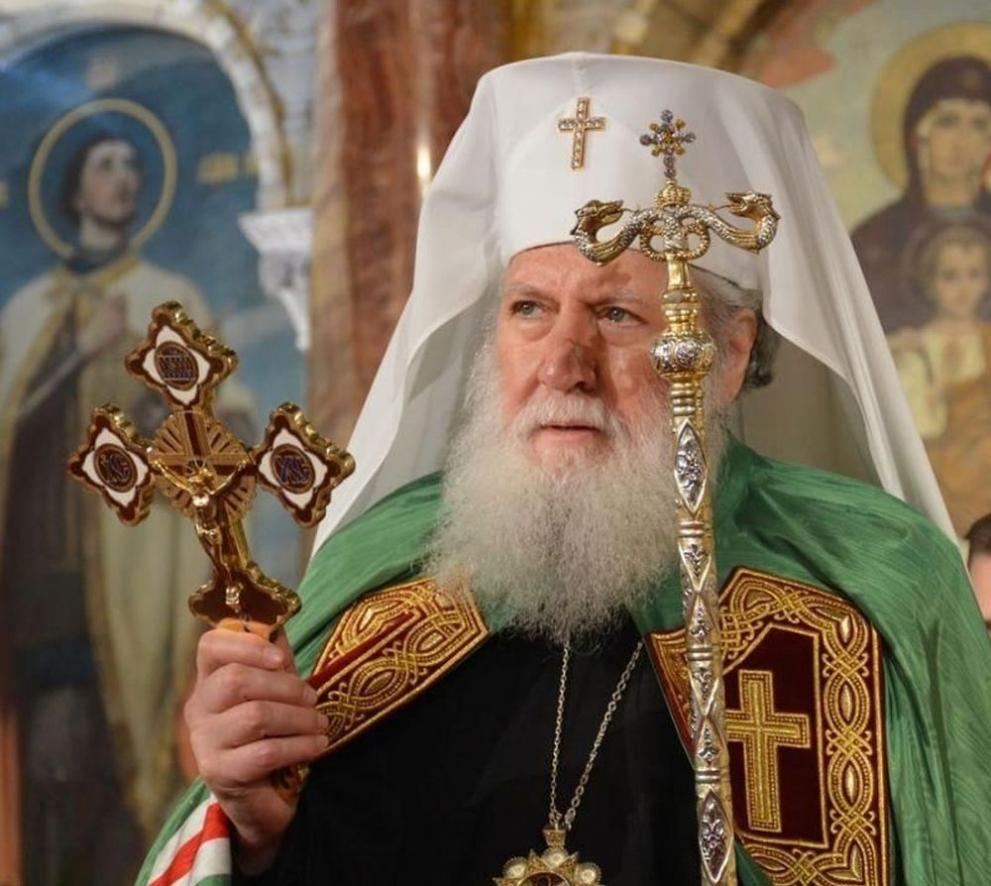
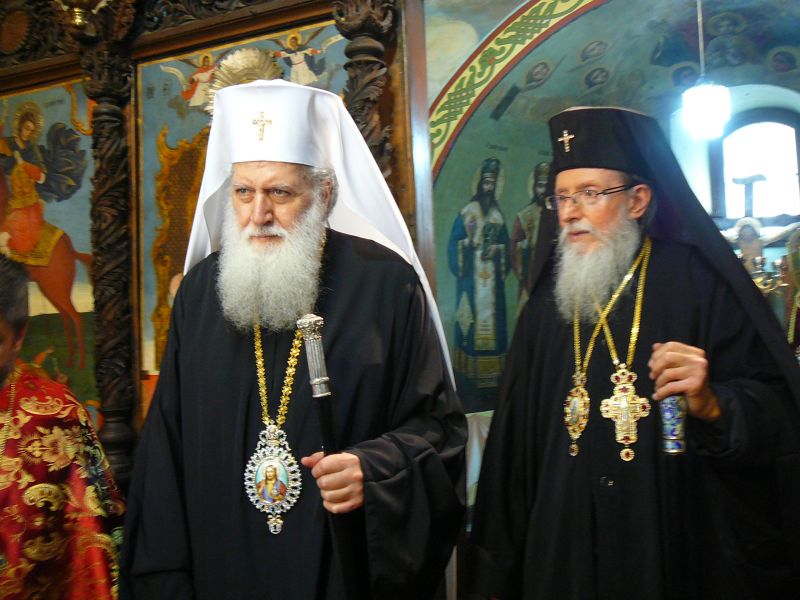
Patriarch Neophyte (Simeon Nikolov Dimitrov) was born on October 15, 1945 in Sofia from a highly pious family. His father was a simple railway man and his mother a maid (cleaner). His Mother was a famous in the Church as a good christian who was singing on the Church choire in some churches and had a great perseverance and love for the Christian faith, she was the one to push further his two boys Simeon and Dimitar to take the spiritual path within the Orthodox Church. One of them the older brother Dimitar Nikolov Dimitrov to later become A Proto-Psalt and Director and Head of Sofia's Saint Alexander Nevsky Cathedral Church choire for many years (the most prestigious place for people who graduated Church music) and the other to become our 7th Patriarch in order from the times of Physical Liberation of Bulgaria From Turkish Slavery and Spiritual liberation from the dictatorship of the Greek Orthodox Church with the restoration of the Bulgarian Church with the Bulgarian Exarchate.

 At the age of twenty in 1965, he graduated from the Sofia Theological Seminary "St. Ioan Rilski / Saint John of Rila"  (then the seminary moved due to communist party decision) at the Cherepish station nearby the Cherepish monastery, Vrachansko. He served two years of military mandatory service, and in 1971 he graduated from the Theological Academy "St. Kliment Ohridski".

After his specialization at the Moscow Theological Academy in Russia, where he received the title of "Candidate of Theology (COT)" in Church Music (COT equal to our Bulgarian "Phd / doctor") , in 1973 he was appointed a teacher of Choral Church Singing and became the conductor of the student choir at the Theological Academy.
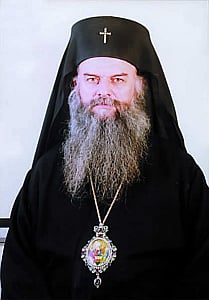
Archimandrite-Gelasij-of-new-York-later-picture-as-metropolitan-of-New-York-America

He began his monastic journey under the Spiritual eldership of Archimandrite Gelasius then abbot of the Troyan Monastery.

His monastic ordination in monkship was performed on August 3, 1975 by the previous Bulgarian Patriarch Maxim on the feast of Assumption of the Virgin Mary, August 15, 1975 , he was ordained to the rank of hierodeacon immediately, on March 25, 1976, Annunciation, he was raised in the Church hierarchy to hieromonk, and on November 21, 1977 ., Presentation of the Theotokos (The Entry of Most Holy Theotokos into the Temple), was raised to the Archimandrite dignity.

He then was assigned the obedience to be Protosyncellus (Protosingel) of the Sofia Metropolia in years 1981 to 1985.
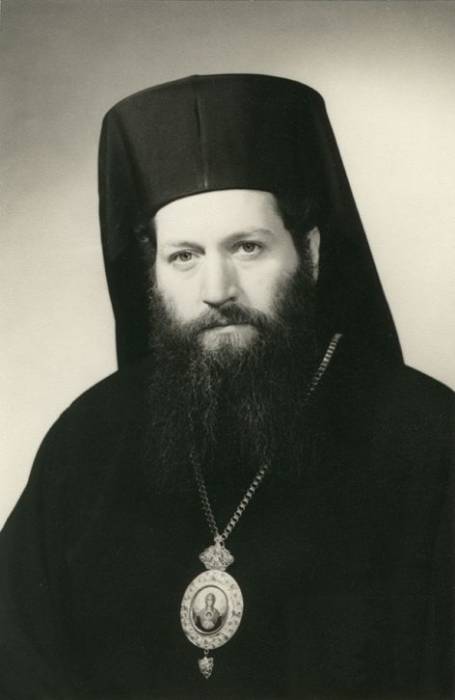
His-All-Holiness-Patriarch-Neophytos-picture-as-young-Bishop-Levkijski-of-Bulgarian-Orthodox-Church

On December 18, 1985, he was ordained as the Bishop of Lefkias (Levkijski) a title earlier held by the all famous Levkijski Bishop Partenius (Partenij)  in the Patriarchal Cathedral "Saint Alexander Nevsky" and was appointed as vicar  bishop of the Metropolia of Sofia.

In 1989, he became rector of Sofia Theological Academy part of (Sofia University at that time), and in July 1991, when the Theological Academy returned to be the pre-revolutinary Faculty of Theology of the Sofia University "St. Kliment Ohridski", was elected the first dean of the restored Faculty of Theology.
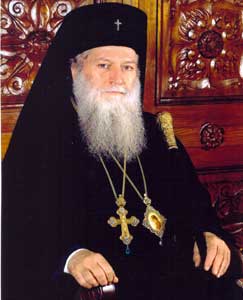
His-Holiness-Neophytos-picture-as-Metropolitan-of-Ruse

Since January 27, 1992, he has been the chief Secretary of Holy Synod (A prestioug position) until March 27, 1994, when Bishop  Neophyte was elected Metropolitan of Dorostolo-Cherven.eparchy (which is now separated in two separate aparchies (The Eparchy of Ruse and Eparchy of Dorostol – the ancient Roman area Dorostorum)  

By decision of the Fifth Church-People's Council in 2001, with the consent and approval of the Holy Synod Assembly of metropolitans, the diocese was divided into two (the Dorostol diocese was separated with the city of Silistra -the Ancient Istrum (Histria ancient city) and he began to be titled Metropolitan of Ruse.
In the function of metropolitan he has won the respect of both church and authorities.and he was given the respectful medal "Respected citizen of Ruse".

In 2008 metropolitan Neophyte received the very prestigious academic title "doctor honoris causa" of the Sofia University "Saint Kliment Ohridski". More about it here.
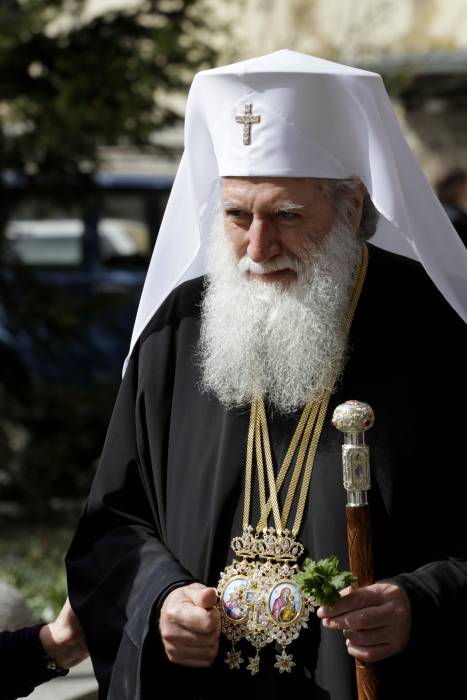
His-All-Holiness-Patriarch-Neophytos-Patriarch-of-Bulgaria-and-Metropolitan-of-Sofia

On 22 June 2010 he was given a medal "St. St. Cyril and Methodius" as a respectful act for his big contribution to development of Bulgarian Music and Culture.

On February 24, 2013, a Patriarchal Electoral Church Council was convened in Sofia and the people and all people were mostly troubled on who will be the next Patriarch in this muddy times.

Soon after his arise to patriarchical throne in 2013 he was given another medal he received "Glory and Honour" in 2013 by Russian Orthodox Church.
Every Church member of that time was troubled about the future of the Bulgarian Orthodox Church, and everyone felt a big relief as The Synodal Elders elected Metropolitan Neophyte of Ruse to become the 7th Patriarch of Bulgaria after the restoration of the BPC-BP Bulgarian Church (Bulgarian Patriarchate) after so many years of being under the yoke of Byzantine Church and after liberation of Bulgaria, due to politics delicions and the harsh and anti-bulgarian activities of the Greeks in attempt to own the Church the church suffered its schism and returned its full communion to the family of national members of Holy Eastern Orthodox Church.
After his election His Holiness Patriarch Neofit is titled  Metropolitan of Sofia.and Patriarch of Bulgaria.
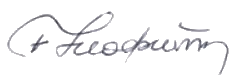
Patriarch-Neophyte_signature-podpis

His-Holiness-Patriarch-Neophytos-head-of-Bulgarian-Orthodox-Church

Patriarch Neophyte has the fame of being one of the best church singers in Bulgaria and one of the best and most famous Church Hymns has been circulating throughout the public space the Internet / TV and Radio for the last 10+ years as they are invaluable due to the unique voice qualities of the Patriarch. I guess there is no person in Bulgaria and outside of it who did not heard his Paschal (Katavasia and Stychorions) Hymns.

Resurrection of Christ Katavasios and Stychorion Playlist with Patriarch Neophytos (Sung) Famous Eastern Orthodox Hymns Patriarch Neofit passed away on 13 of March 2024 after a months of sickness after being hospitalized on 29 November 2023 in VMA (Army Medical Academy) due to pulmonary disease (later to understand it is a cancer in its latests stages). In his last days in hospital, the Holy Synod summoned all the Churches and people to pray fervently for the quick recovery of the patriarch through a miracle.
Patriarch Neofit passed away silently his clean holy Soul to Christ on 13 of March 2024
His brother Proto-Psalt (associated professor) Dimitar also passed on on 11 January 2024.
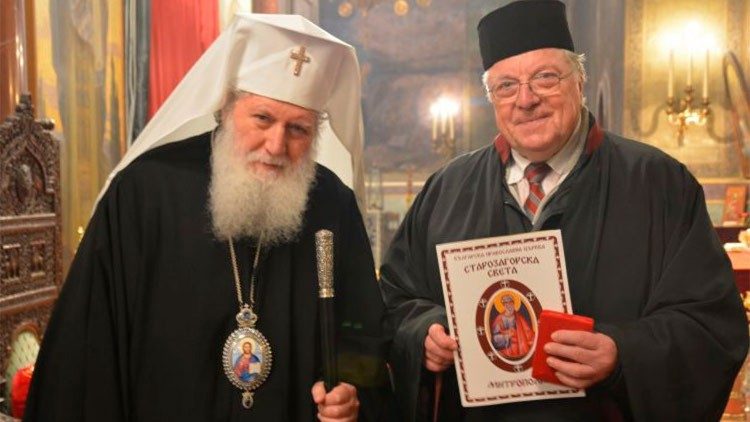
Protopsalt-Dimitar-associated-professor-in-Music-Director-of-st-Alexander-Nevsky-Choire
Patriarch Neophytos and his brothre Proto-Psalt Dimitar

Protopsalt Dimitar Dimitrov a brother of the Patriarch passed just 2 days after a famous Metropolitan of Joanichius has passed away to Christ on 9 January 2024 in 82 years of old.
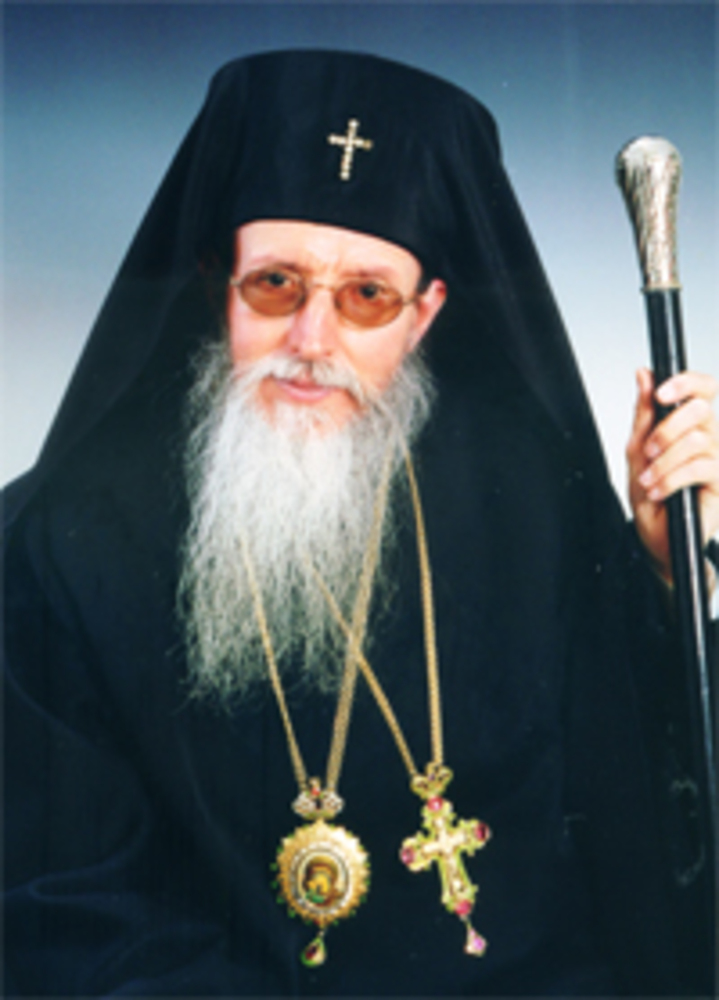
His-Holiness-Mitropolit-Ioanikij-JoanichiusSlivenski
His Holiness Metropolitan Joanichius


Patriarch Neofit and Metropolitan Joanichius

The personality of Patriarch Neophytos was non-conflict, a lover of peace and compromises, anti-war (i would say pacifist in modern terms) and was among the few patriarchs not being in fear or influenced by the overall Church politics of the Russian Church and he publicly condemned the war as a great evil in his Theophany preach.

"The Lord God and the Holy Church bless only that army that does not show aggression, and whose sole purpose is to protect and defend its people and country within its internationally recognized territorial borders," said the patriarch for the feast of Epiphany water sanctification and sprinkling of battle flags.

The patriarch position was to try to reconcile the clergy and try to heal the misunderstandings and human conflicts between his God given flock of Priest, Monks, Bishops and Clergy with true fatherhood love, prayer and a lot of patience that we the people of 21 century miss so badly.
With a lot of sadness we send our beloved Patriarch Neophytos (Neofit) of Bulgaria to the All Mighty God and Pray if he has received a Grace from God to Pray fervently and Always for us his poor pupils and childs!
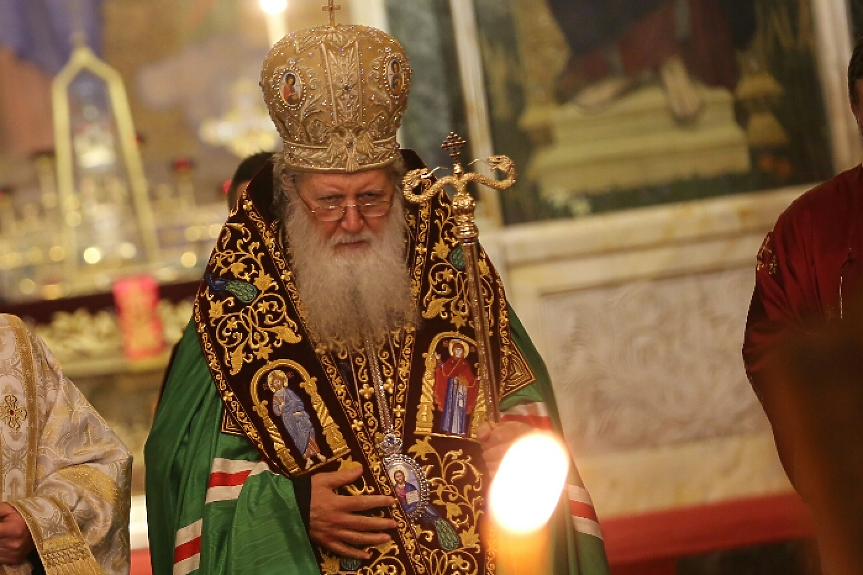
his-Holiness-Patriarh-Neofit-treti-mart-pic

God Have Mercy on the Soul of Patriarch Neophytos ! Blessed and Eternal to be his Memory ! Amen !


Improve MobaXterm Best Windows terminal client with some additional settings tune ups / Install extra Linux Cygwin tools on MobaXterm and various post install configuration goodies

Friday, January 20th, 2023

mobaxterm-logo_400x400-terminal-client-tune-up-howto-for-a-new-install

Earlier I've written a an article MobaXTerm: A good gnome-terminal like tabbed SSH client for Windows / Windows Putty Tabs Alternative in which I've introduced the best in my opinion SSH / Telnet / VNC / RDP / Xserver in one Terminal client emulator for Windows operating systems.

The client has been around for quite some time and it has been improving rapidly over the last 10 years, where it now more looks like a separate Operating System than a single terminal client. It's size is quite compact as well and my opinion and every self respectiving developer, system administrator, IT geek or a hacker would definitely
use the mobaxterm at home or at work place on a daily. I guess some of my readers, who have already migrated SuperPutty / SecureCRT or Putty / XMing or whatever kind of exotic Remote SSH Console terminal is used could validate this 🙂

Therefore as I've set up Mobaxterm on a multiple computers all around, I've found it useful to write a small article with some post-install hints (tune ups) one can do immediately once he has installed the Desktop or Portable Apps version of mobaxterm on desktop PC / notebook.
 

1. Set up your bashrc server / command aliases

Lets say you need to setup some rules for connectivity via a socks proxy to dig holes over a harsh company firewalls or add
custom options to every ssh client attempt to remote server, or simply alias some of your servers with custom connectivity options
and so on simply open vi / vim text editor from mobaxterm local terminal and place inside your rules, for example that could be anything like:


alias ssh='ssh -o stricthostkeychecking=no -o passwordauthentication=yes -o PreferredAuthentications=password  -v'
alias sftp='sftp -o stricthostkeychecking=no -o passwordauthentication=yes -o PreferredAuthentications=password'

alias work-server='ssh UserName@work-server -v -o passwordauthentication=yes -o PreferredAuthentications=password'

alias proxy='ssh -D 3128 UserName@proxyIP-host1 -o ConnectTimeout=80'
alias proxy1='ssh -D 3128 UserName@proxy-host2 -p 443 -o ConnectTimeout=60'
alias proxy3='ssh -D 3128 Username@proxy-host3 -p 443 -o ConnectTimeout=60'

Simply open the terminal and setup whatever you require
export ftp_proxy="http://proxy-host:8080"
export https_proxy="https://proxy-host:8080"
export http_proxy="http://proxy-host:8080"
export HTTP_PROXY="http://proxy-host:8080"
export HTTPS_PROXY="http://proxy-host:8080"


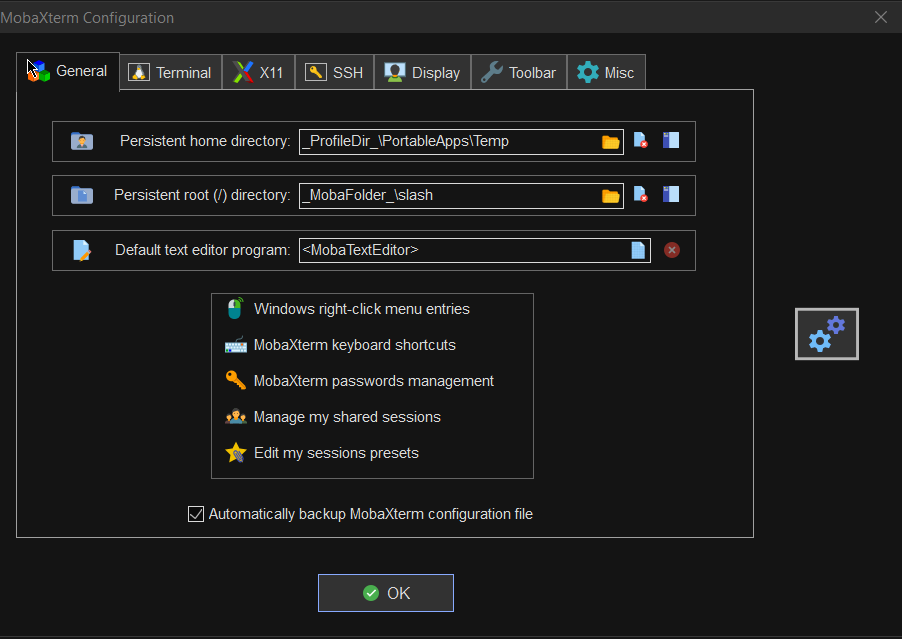
2. Set mobaxterm presistent directory / persistent root directory and default text editor

Make sure you have properly defined at least Persistent directory / Persistent directory if you want to keep the files under your /home/mobaxterm and root directory be able to save your data from local mobaxterm terminal work you have done.

To do so o to Configuration -> General

MobaXterm-persistent-home-directory
 

3. Change default settings for Opening / Closing Terminal tabs just like in gnome-terminal

MobaXterm is really awesome as the developer, followed pretty much the logic of some common GNU / Linux Terminal clients like Gnome-Terminal and KDE's default Konsole terminal.

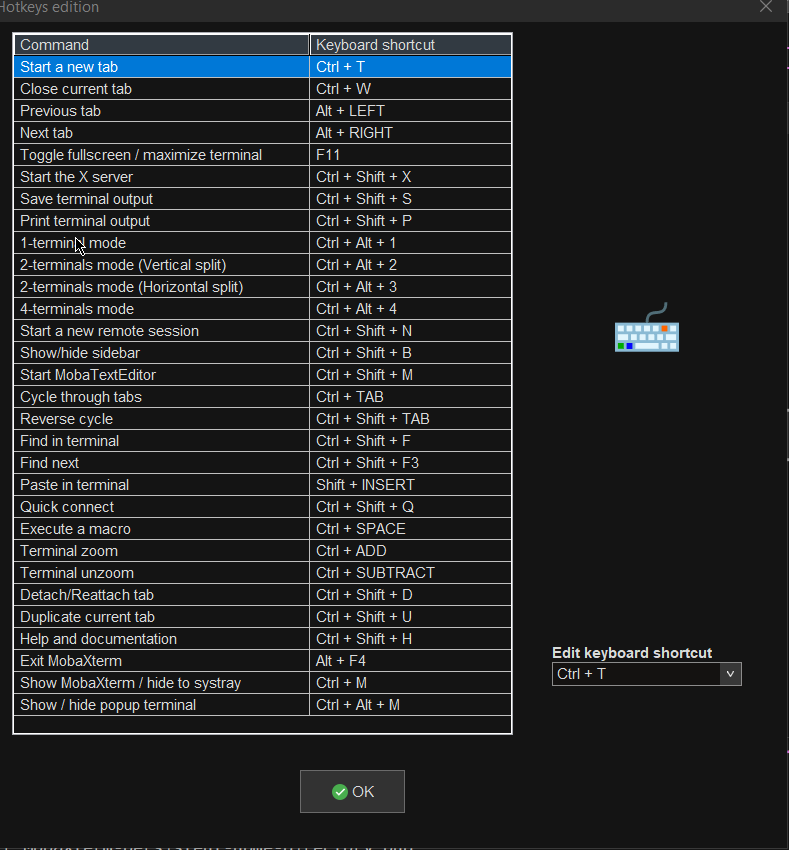
One of the first things to do once Mobaxterm is installed on the PC is to set up nice key binds as default onces might be heard to learn at the beginning or you might have already the habit to use the certain set of key combinations on your Linux desktop:

Common once are:

1. Open tab / Close tab common once I bind to are (CTRL + T / CTRL + W)
2. Previous tab move / Next tab move keys common one I use are (ALT + LEFT / ALT + RIGHT)
3. Find in terminal (CTRL + F)

rebind-mobaxterm-standard-keys
 

4. Make MobaXterm to automatically open a terminal to not Start local terminal every time

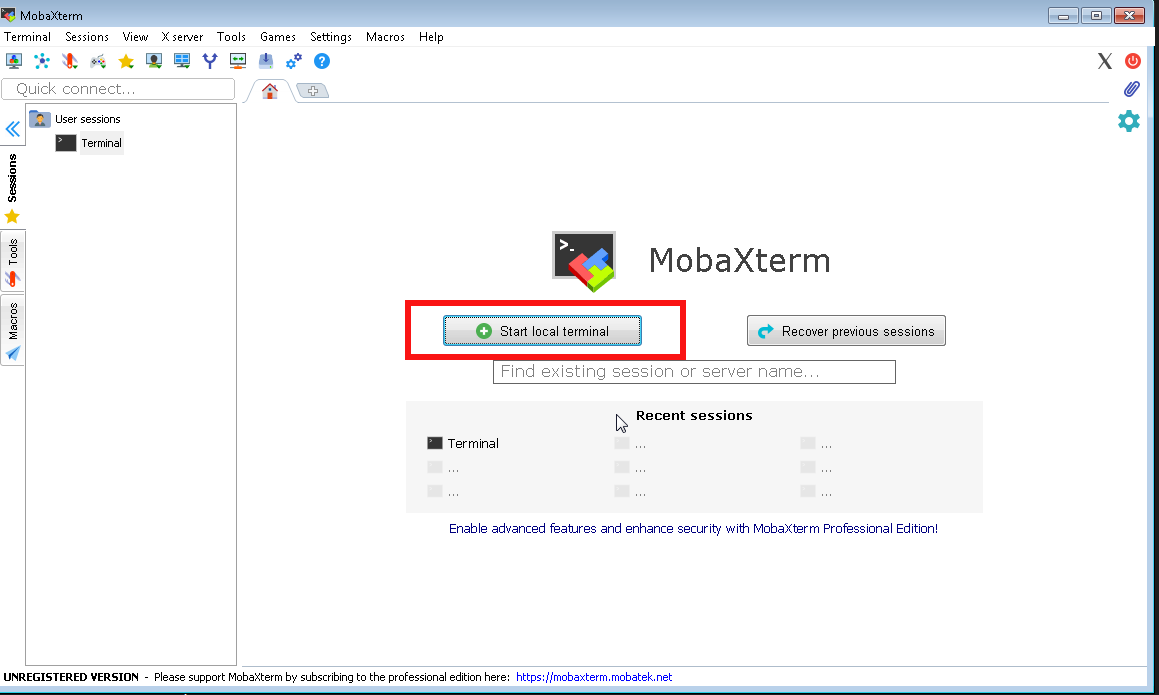
By default mobaxterm it is really annoying cause every time you run it after system reboot you have to select
Start local terminal
Once you run the terminal you get this prompt and you have to press on Start local terminal

mobaxterm-start-local-terminal


How to make Mobaxterm automatically open local Terminal Tab on every boot?
 

To fix this so every time a local terminal is spawn on MobaXterm you have get to:
 

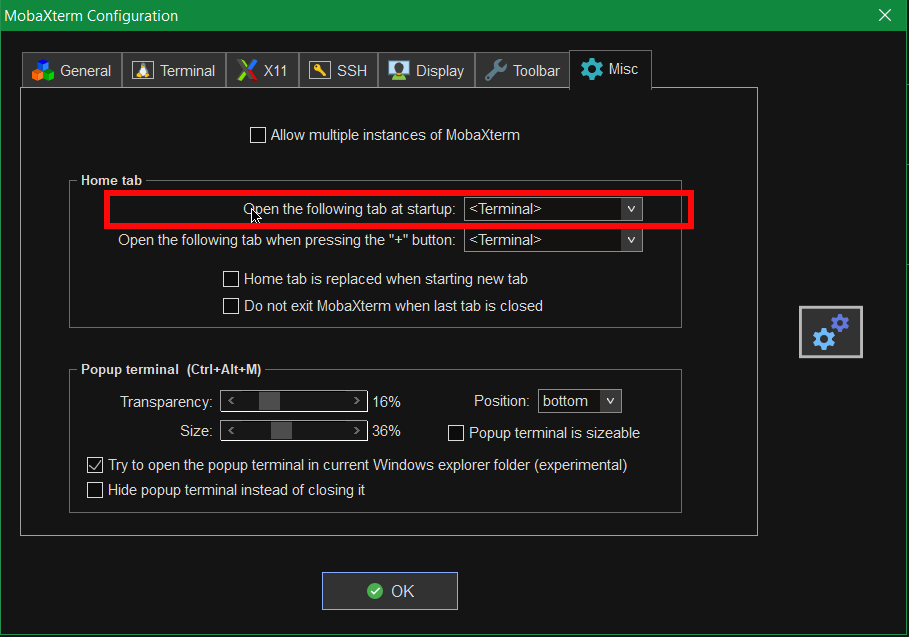
Settings -> Configuration -> Misc


Open the Following tab at startup by default it will be

<Home (Pinned)>

Change it to:

<Terminal>

mobaxterm-open-the-followintab-tab-in-startup

That's it on next login your Local Terminal with /bin/bash.exe will auto load !
 

[hipo.WINDOWS-PC] ➤ env|grep -i SHELL
SHELL=/bin/bash.exe
PATH=/bin:/drives/c/Users/hipo/DOCUME~1
/MobaXterm/slash/bin:/drives/c/Windows:/drives/c/Windows/system32:/drives/c/Windows/system32:/drives/c/Windows:/drives/c/Windows/System32/Wbem:
/drives/c/Windows/System32/WindowsPowerShell/v1.0:/drives/c/Windows/sysnative
PSModulePath=C:\Windows\system32\WindowsPowerShell\v1.0\Modules\
CMDPATH=C:\Windows\system32;C:\Windows;C:\Windows\System32\Wbem;
C:\Windows\System32\WindowsPowerShell\v1.0\;C:\Windows\sysnative\;
C:\Users\hipo\DOCUME~1\MobaXterm\slash\bin
WINPATH=C:\Windows\system32;C:\Windows;C:\Windows\System32\Wbem;C:\Windows\System32\WindowsPowerShell\v1.0\;C:\Windows\sysnative\


5. Make menu buttons to appear smaller


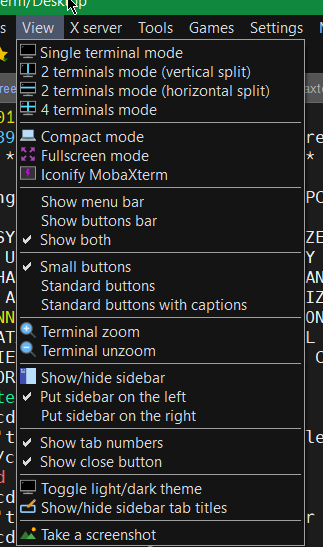
Go to menu and select
View -> (Small Buttons)

mobaxterm-select-small-buttons-screenshot

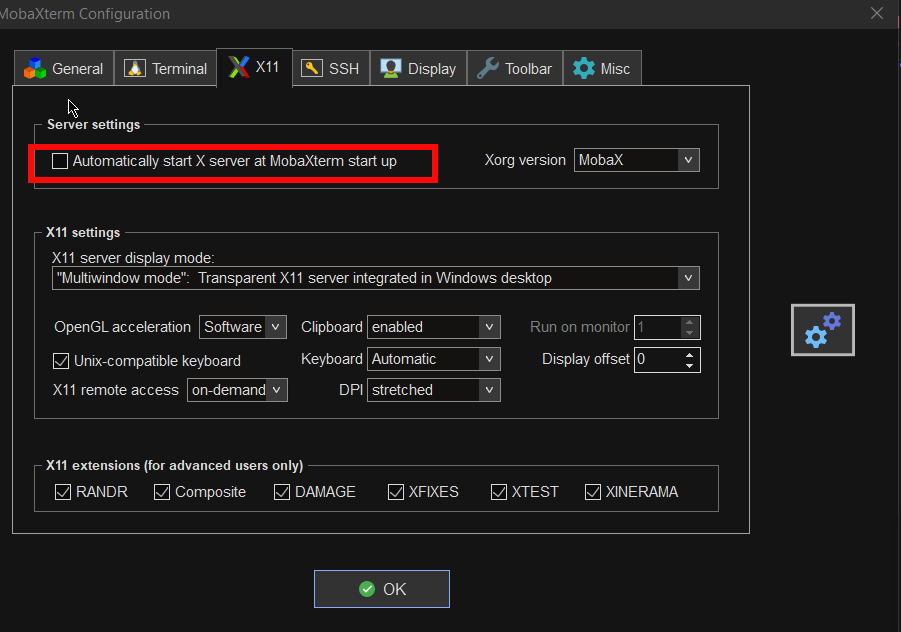
6. Disable auto start of XServer to prevent a port listener on the machine on TCP port

By default mobaxterm opens XServer listener, so you can immediately connect from a remote SSH servers missing Xserver and install software requiring an XServer, for example software such as Oracle Database or some MiddleWare WebLogig or IBM's Web Sphere. This is useful but if you want to have a good security only allow this server on a purpose. Otherwise the XServer will run in parallel with rest of your Moba and just load up your PC and eat up some RAM memory. To disable it go to:

mobaxterm-x11-automatically-start-X-server-disable-stop-at-startup

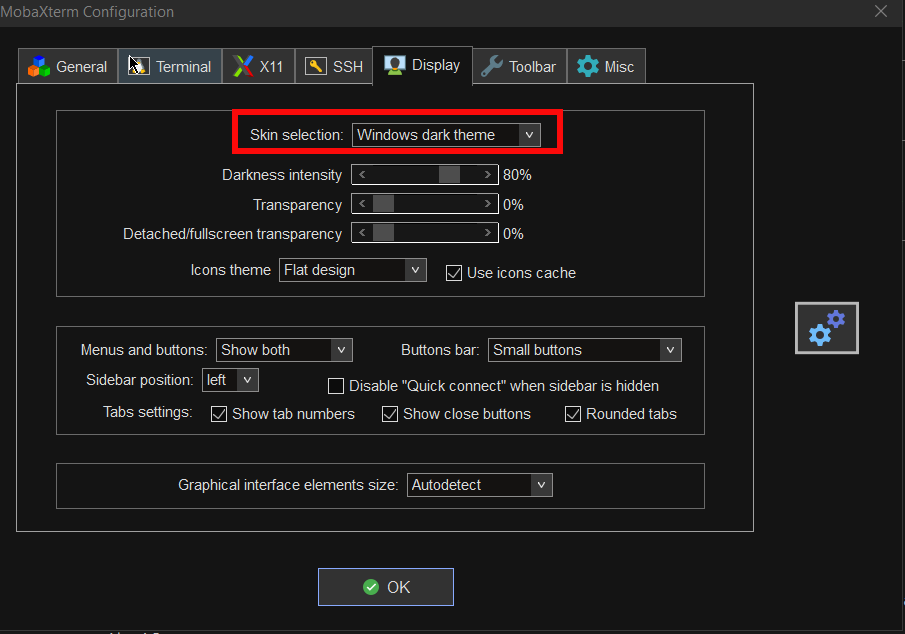
7. Change the mobaxterm Default theme to Dark

This is optional I like to set the Theme to Dark, also as a Theme for Windows as well as for MobaxTerm, the aim of that is simply to not put extra stress on my eye sight. Being on the PC around 8 to 10 hours and spending some 6 to 8 hours on console work is enough. If you want to do as well.

mobaxterm-change-default-theme-to-dark-theme

8. Install additional set of common Linux tools to mobaxterm to use on Windows
 

Tools such as:

1. Midnight Commander (mc)
2. Wget
3. Curl
4. Vim
5. Screen
6. Rsync
7. Perl
8. W3m
9. dosunix
10. unix2dos
11. gnupg
12. diffutils
13. mysql
14. mpg123
15. whois


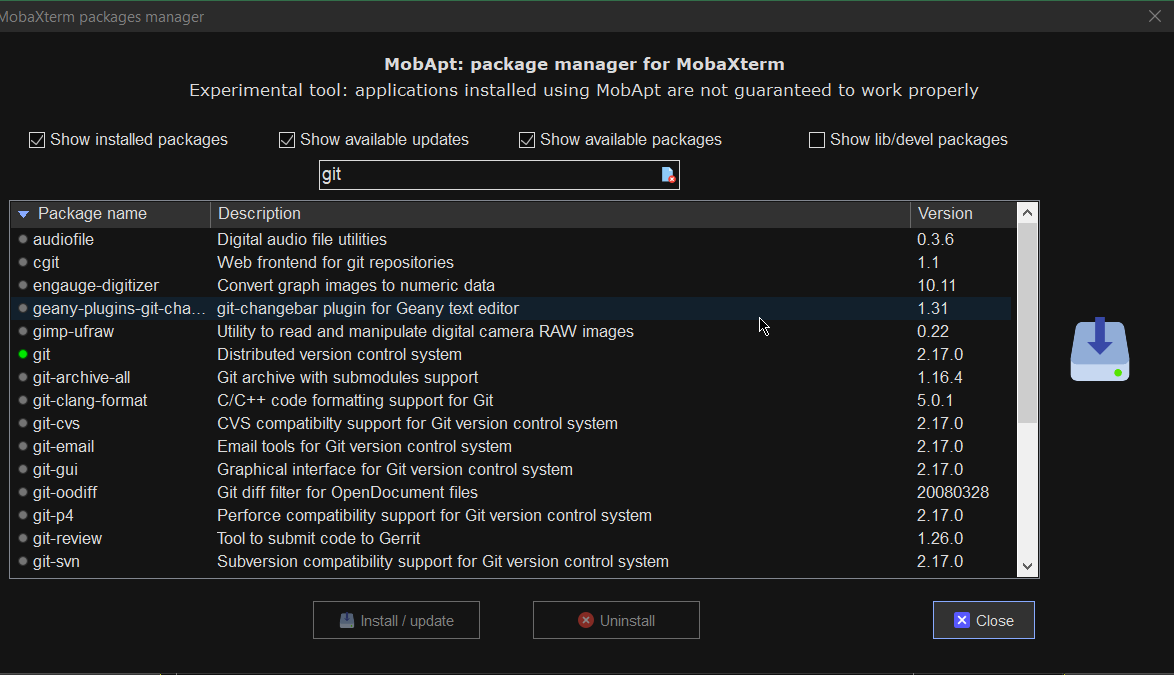
If you want to have a set of packages pre-installed that are including above as well as the rest of mine, here is a dump of my installed mobapt manager packages:

For more simply use the experimental Mobaxterm  Graphical Package installer
 

[hipo.WINDOWS-PC] ➤  for i in $(cat Downloads/installed-packages-mobaxterm.txt ); do apt-cyg install $i; done
 

Found package GeoIP-database

Installing GeoIP-database
Downloading GeoIP-database-20180505-1.tar.xz…
Unpacking GeoIP-database-20180505-1.tar.xz…


Running postinstall scripts
Package GeoIP-database installed.

Rebasing new libraries

Found package adwaita-icon-theme

Installing adwaita-icon-theme
Downloading adwaita-icon-theme-3.26.1-1.tar.xz…


You will be prompted for a single Yes for the respository

MobApt Packages Manager

mobapt-pkg-manager-install-git-from-gui-mobaxterm-package-installer

Though it is said it is experimental, I have to say the MobApt Apt Manager works quite good, I never had any issues with it so far.

9. Mobaxterm.ini the settings storage file that can help you move your configurations

If you have to prepeare new MobaXterm on multiple PCs frequently perhaps it is best to just copy the Mobaxterm.ini file. 
Here is an example of my mobaxterm.ini for download.
 

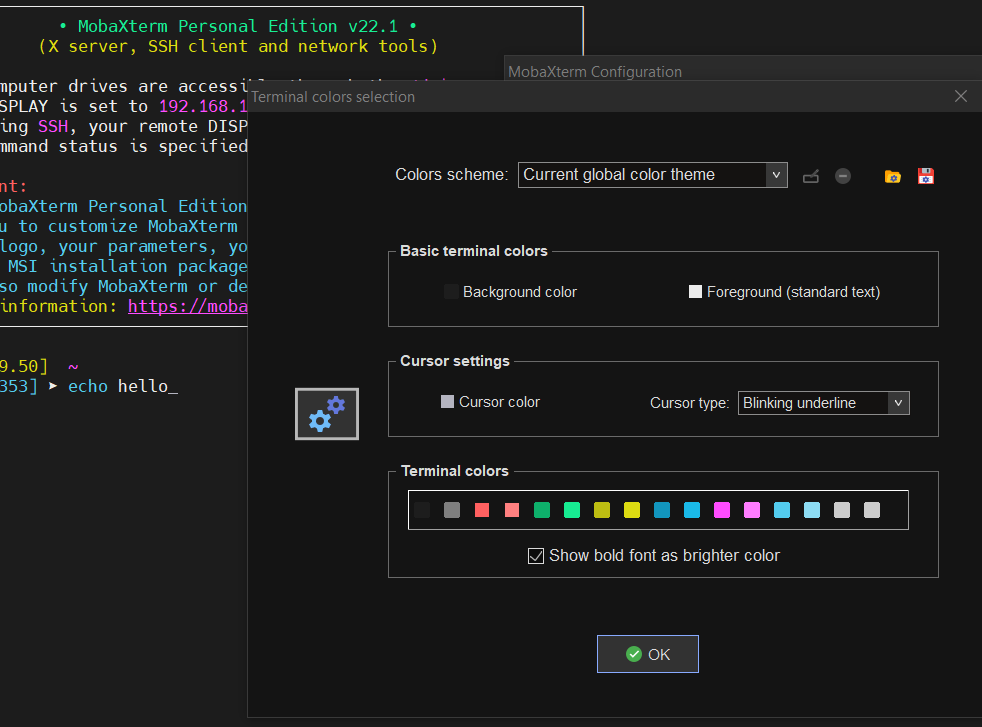
10. Change terminal colors and curor type and enable blinking (customizations)


Settings -> Configuration -> Terminal -> (Default Terminal Color Settings)


mobaxterm-change-terminal-colors-and-blinking-cursor-setting-screenshot

11. Use very useful moba Tools
 

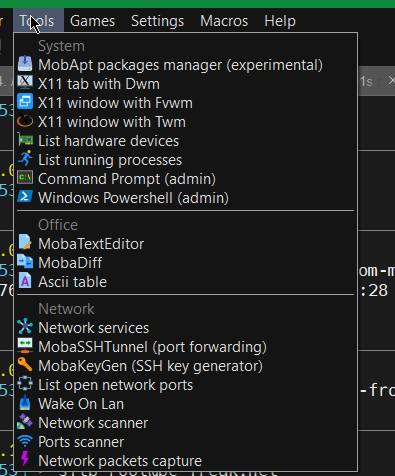
mobaxterm-terminal-great-useful-tools-screenshot
For sysadmins Moba has plenty of other jems such as:

  • Network Port scanner such as Nmap with GUI

  • list open network ports (GUI interface to netmap)

  • SSH tunnel tool

  • Moba Diff

  • Wake on Lan

  • Network Packet capturer (such as tcpdump)

  • List running processes (such as taskmgr in simple form)

  • List machine hardware devices (such as Windows Device manager)

 
12. Remote monitoring of opened ssh session


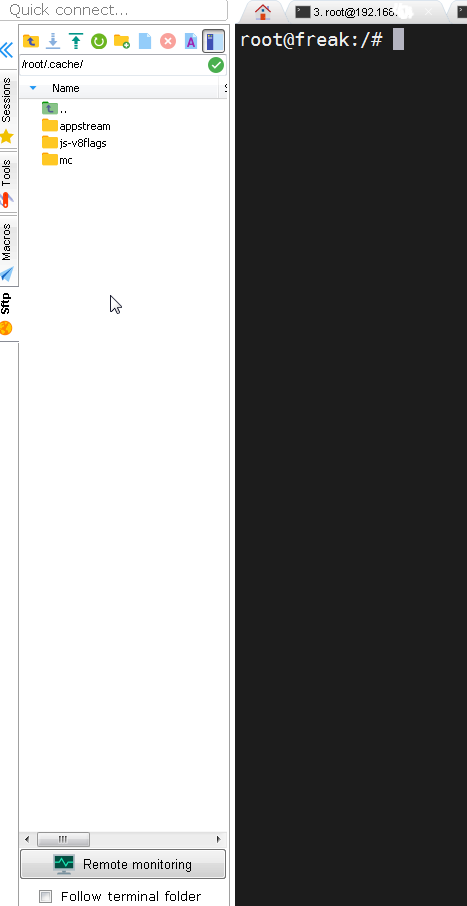
To enable remote monitoring for a Saved session simply use the "Remote monitoring" button on the down left corner of the terminal.

mobaxterm-remote-monitoring-of-remote-ssh-server-screenshot-button

Or to enable it for a new host, open:

1. "Saved sessions"
2. Click over "User sessions"
3. New Session -> (SSH)
4. Basic SSH Settings (Remote host) -> OK
5. Click over the new created session
6. Click on Remote monitoring for the opened session

remote-monitoring-from-mobaxterm-screenshot

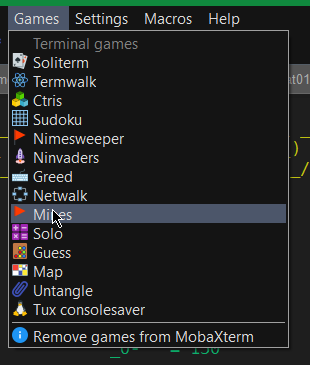
13. Play some mobaxterm console games

As you might have pissed off of configuring go on and enjoy some of the great console games, some of which are also present on a normal Linux new distribution installation. 🙂

mobaxterm-list-of-games-screenshot

List of Moba Games

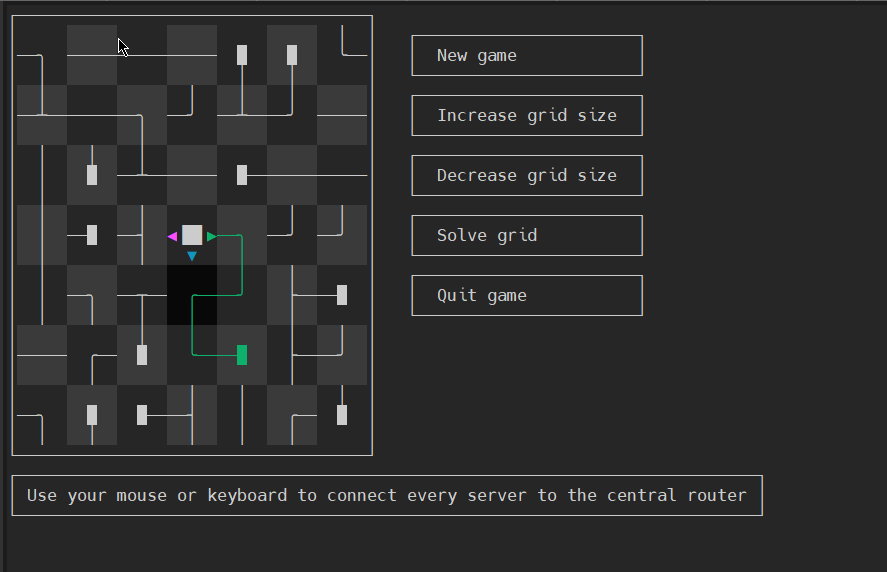
teamwalk-mobaxterm-console-connect-network-routers-game
TeamWalk (Use your mouse or keyboard to connect every server to the central router)

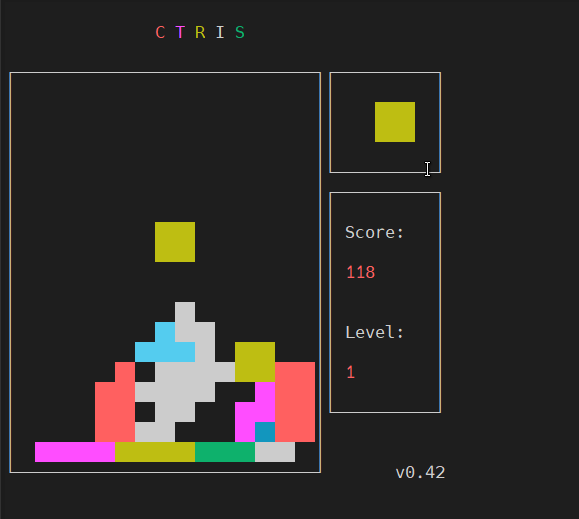
ctris-console-text-game-mobaxterm

Ctris Console tetris from Mobaxterm

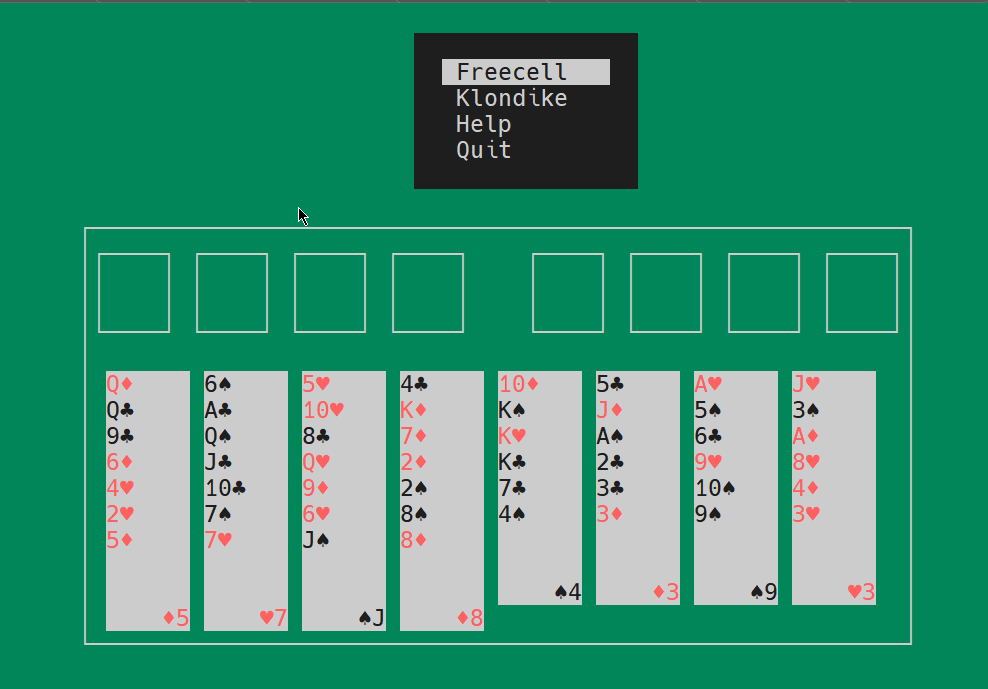
solitaire-text-console-game-played-on-mobaxterm-screenshot

Text console Solitaire from Moba
 

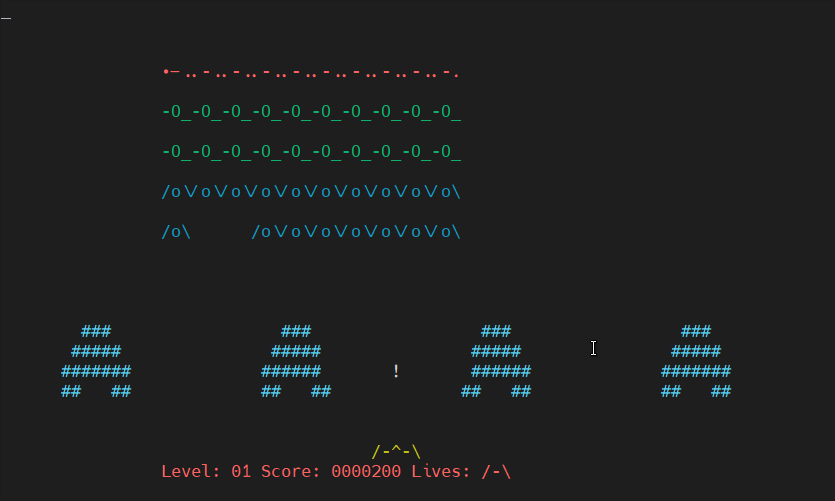
Ninvaders-console-game-mobaxterm

Here is NinVaders (Text Version of Space Invaders Arcade Classic)
 

Enjoy ! 🙂
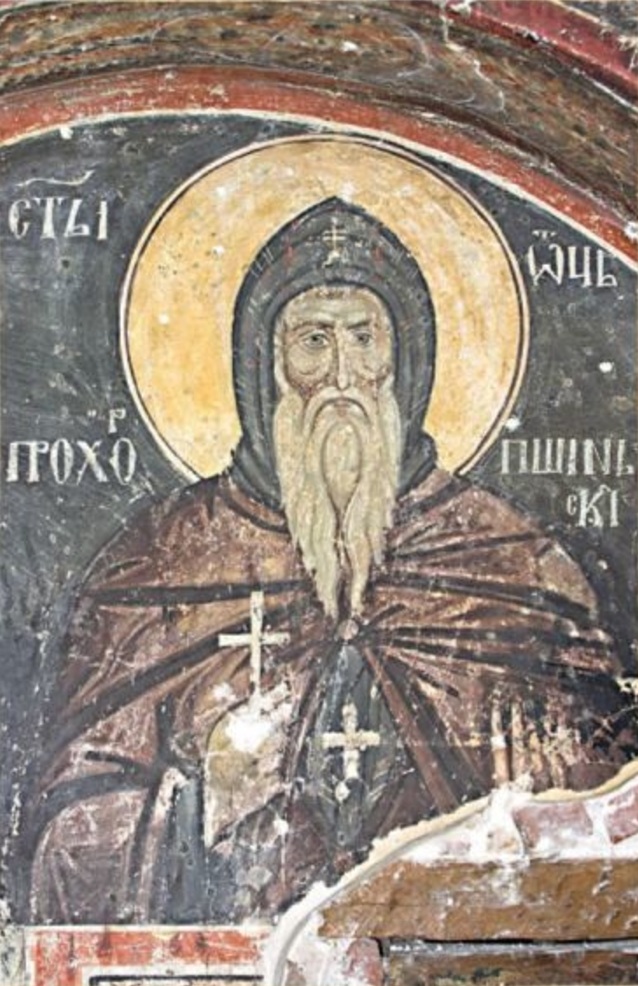
The short historical path of the Holy Relics of Saint Andrew the First-called of the Apostles of Christ

Friday, December 2nd, 2022

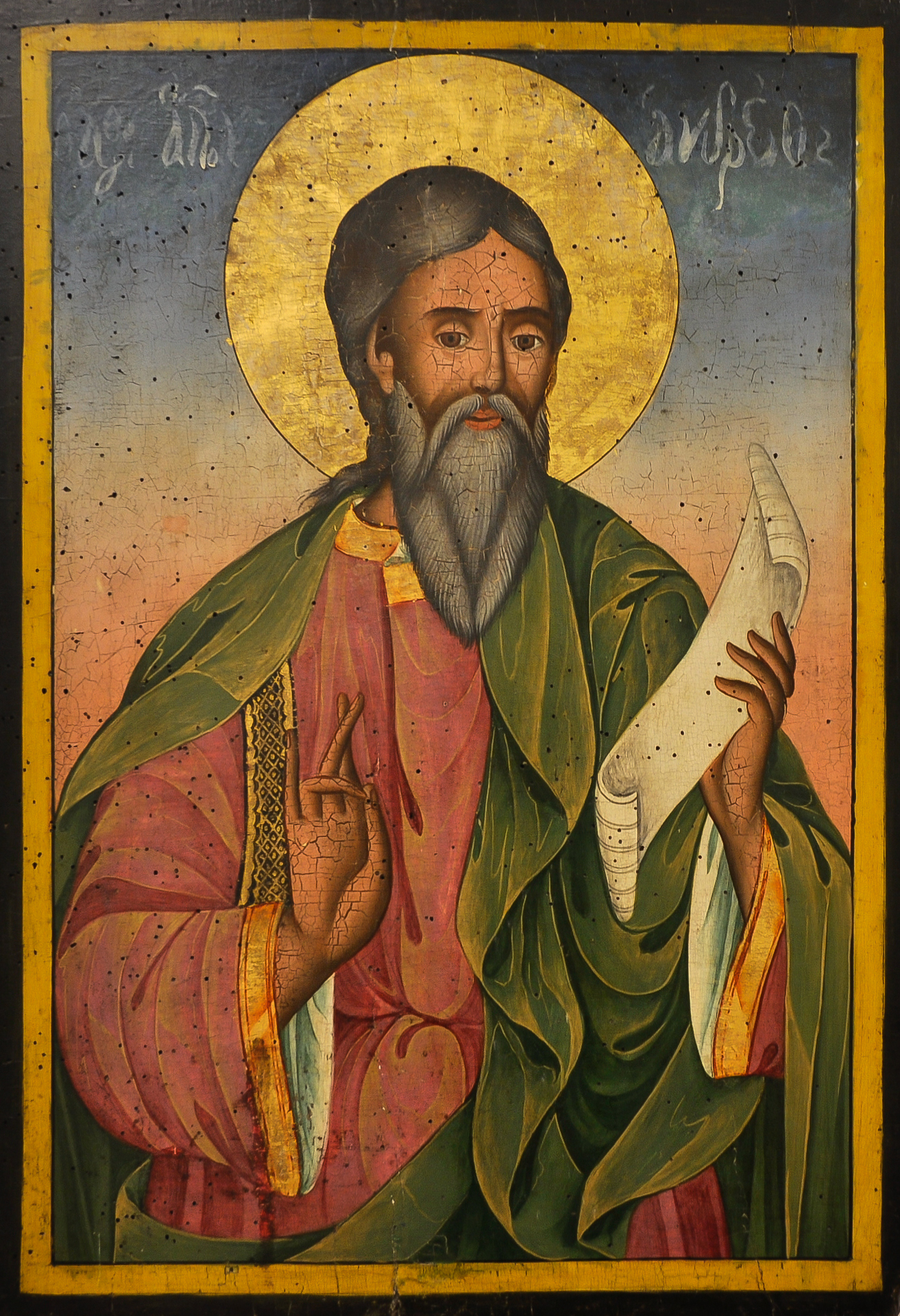
St_Andrew_the_Apostle_-_Bulgarian_icon-by-icon-Yoan-from-Gabrovo-iconographer

Why saint Andrew the Apostle is special for the Bulgarian Orthodox Church
and the Eastern Churches?


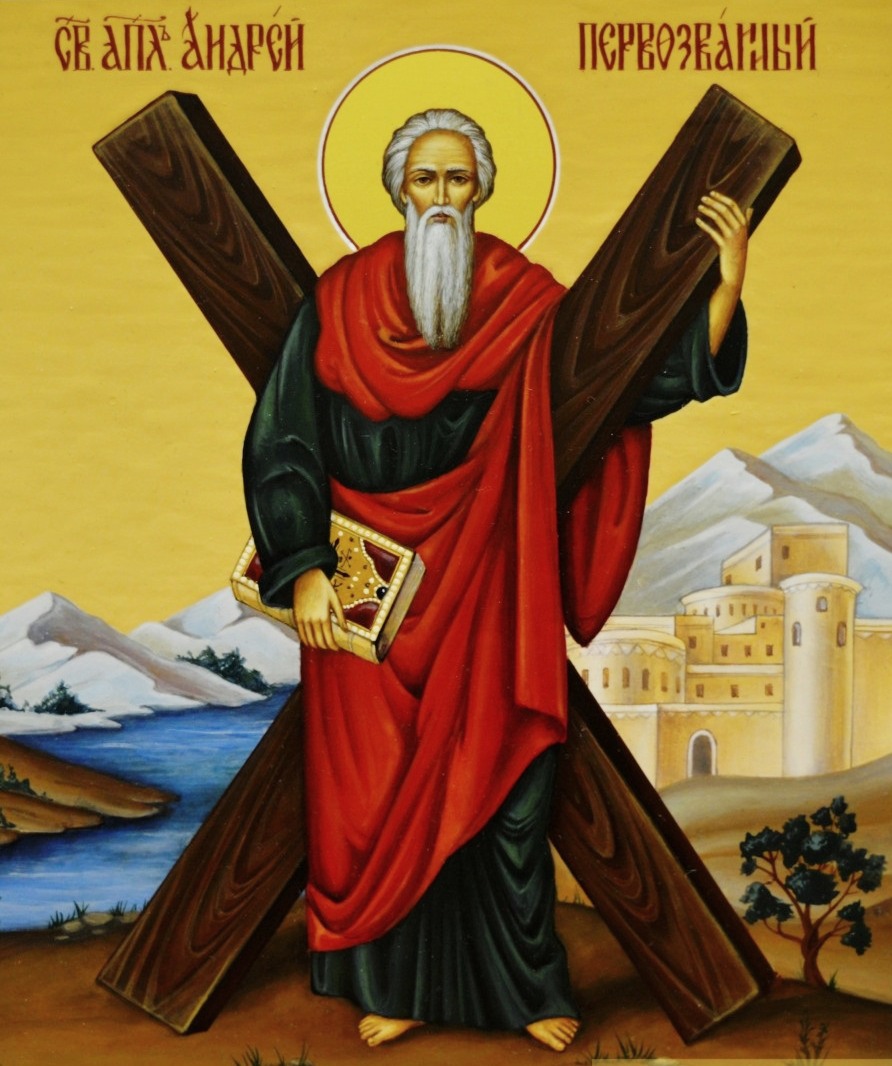
According to Church tradition saint Andrew the Apostle the First-called was the apostle from which wide areas of the Eastern lands was christianized, by his fervent preach of the Gospel and the good news of the Resurrection of Christ who suffered on the Cross for the salvation of mankind.
The Ecumenical Patriarchy of Constantinople and the Ancient Eastern Byzantium Church has received its apostleship in practice, exactly from st. Apostle Andrew.
During his apostleship mission saint Andrew has preached the Gospel and gave the faith for a first time in the Ist century according to Church tradition, as he passed by the Black sea borders, today part of which are in Bulgaria, he went through Romania, where he has spent some time living as a hermit in a cave and then up to Kiev and Scythia, where he made a prophecy that the Christian faith will put its Roots and that soon the pagan tribes of Kiev lands will accept the faith and put the Cross high over their lands.

When Bulgaria was later Christianized by saint Boris-Michael, and the Holy Bulgarian church was established on this lands thanks to the missionary works of Saint Kiril and Methodius, Saint Kliment of Ohrid, saint Gorazd, Naum, Sava, Angelarius and  whole pleade of saints and teachers, Bulgaria has received, also the gift of priesthood and apostleship (has received its own hierarchy of bishops governing the Bulgarian Orthodox Church), thus by spiritual line the Holy Spirit here in Bulgaria was received from Saint Andrew, later this enlightnements achievement, the Books in Church Slavonic, the services and most importantly the Cyrllic alphabet was transffered from Bulgaria and later Serbia to the endless steppes territories of capital Kiev that was a capital of the Rus at that time and in all Scythia today the territories of Russia. Thus all the Byzantine Eastern Churches and  Bulgaria

After the end of the persecution of Christians, in the 4th century AD, Saint Equal-to-the-Apostles Emperor Constantine the Great began to erect numerous Christian temples.

Among them was the temple of the Holy Apostles in the new capital of the empire – Constantinople. After the death of St. Constantine in 337, his son, Constantius, ascended the throne.
The new ruler, fulfilling the will of his father, decided to bring to the capital of the empire the holy relics of the Apostles Andrew, Luke, Timothy and lay them in the church of the Holy Apostles, where the Equal-to-the-Apostles Emperor himself was buried.

Originally, the holy relics of Saint Andrew the First-Called rested at the place of his martyrdom, in Patras, in the Peloponnese, Greece. According to Western tradition, a few days before the relics were transferred to Constantinople, Regulus, who was guarding them, removed the lid of the sarcophagus in which the relics of the Apostle rested, separated from them one shoulder, three fingers of the right hand, part of the knee and a tooth.

holy-right-hand-of-saint-Andrew-the-Apostle-first-called-Vatopedi

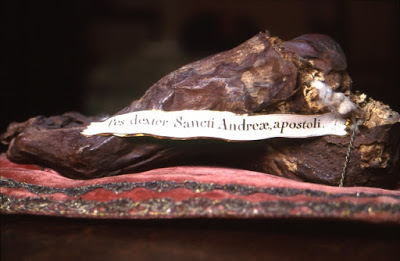
Holy right hand of saint Andrew the First-Called

With these relics Regulus left Patras and set out to preach the Gospel among the pagans inhabiting Scotland.
The inhabitants of the country welcomed the enlightener with great honor and together with their King accepted Holy Baptism.
In Scotland, the first Christian church was built in the name of Saint Andrew, in which parts of his holy relics were laid. Which played the role for Scotlands patron saint protector to become Saint Andrew the Apostle.

The deposition of the holy relics of Saint Apostle Andrew the First-Called in Constantinople took place on May 3, 357 in the presence of the Patriarch of Constantinople Macedonius I and Emperor Constantius.
In the 9th – 10th centuries, the Byzantine autocrats usually sent as a donation for the built monasteries and temples parts of the holy relics that rested in Constantinople, including the relics of the holy Apostles.

In the second half of the 9th century, following an urgent request and special intercession before the emperor, the honorable head of St. Apostle Andrew the First-Called was delivered to the St. Andrew's Church in the city of Patras, where it rested until the middle of the 15th century.

In 1460, to the walls of The army of the Ottoman Sultan Mohammed II was approaching the town of Patras. The Governor /Archon/ of the city of Patras, Thomas Paleologus (brother of the Byzantine Emperor Constantine XI, who died during the capture of Constantinople by the Turks in 1453, father of Princess Sofia, the future wife of the Grand Duke John III of Moscow), losing all hope of preserving independence of the city, took the precious and holy treasure of the city from St. Andrew's Church and arrived in Rome with it to collect funds and forces for the liberation of the Orthodox Christian East from the yoke of the infidels.

The holy head of St. Andrew the First-Called Apostle was in Rome until 1964, when, by the decision of Pope Paul VI, this shrine together with parts of the cross of St. Andrew was returned to the Greek Orthodox Church.

Now these relics are located in one of the largest cathedrals in the Balkans, Saint Andrew the First-Called in Patras, Greece, i.e. in this place where the first disciple of Christ preached and ended his martyr's earthly life.

saint-Andrew-first-called-of-the-apostles-X-shaped-cross-icon.jpg

X shaped cross of Saint Andrew according to medieval tradition

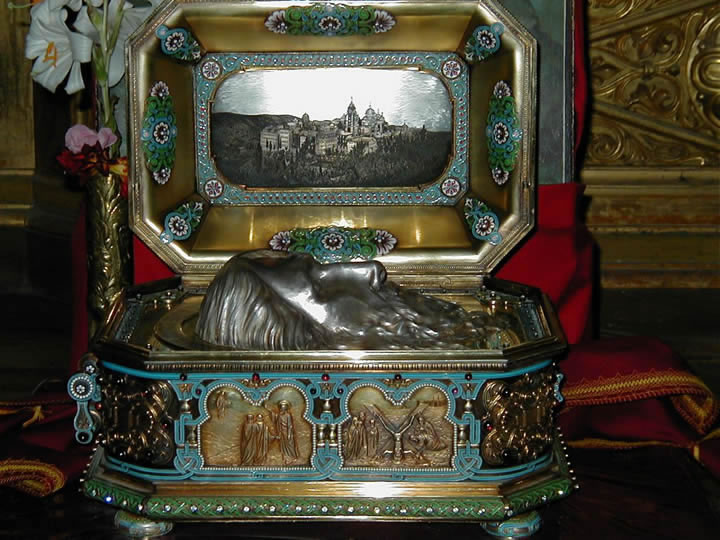
The honorable head of the Apostle rests on the throne in a silver coffin, and behind the throne – saint Andrew's cross-relic (according to middle-ages tradition to be X shaped cross in which are embedded parts of the real cross of Saint Andrew, on which he was crucified.

Head-of-Saint-Andrew-the-first-called-Apostle-reliquary

Mount Athos received the hand of St. Andrew as a gift in the Great Lavra of Athos, founded by Saint Athanasius (the Great) at the request of his friend and companion and patron of the Byzantine emperor Nikephoros Phocas (963-969).
Parts of the holy relics of holy Apostle are also kept in other monasteries on Mount Athos.

foot-of-saint-Andrew-the-first-call-Apostle-holy-relic

Foot Relic of Saint Andrew the Apostle

Likewise, part of the forehead bone is kept in the Saint Andrew's hermitage (scythe), in the scythe of saint Prohet Elijah is preserved the foot of the Apostle.
This walking stick was given in 1806 by Hieromonk Dionysius /in Kyzikon (Kyzicheska) Diocese/, who left the eparchy with these relics from the monastery of Saint Marina, cause the monastery was
looted and sacked by the Turks.

In the Russian monastery of Saint Panteleimon on Holy Mount Athos, the second foot of the First Called Disciple of Christ is preserved.

Part of the relics of Saint Andrew also rest in the nun's monastery dedicated to his name, which is located on the island of Catalonia in the village of Peratata.

Fragments of the honest relics of the Apostle are also found in the monastery of Saint Nicholas on the island of Euboea.

Material written from sources according to information from the Holy Kiev-Pechersk Lavra, on the occasion of the stay from June 27 to 29, 2003 during which the the foot of St. Andrew the First-Called, was given for veneration from the monastery of saint Panteleimon, Mount Athos.


Transferring a part of the relics of Saint Andrew to the church dedicated to Saint Andrew in Sofia, Bulgaria
 
Holy-relics-of-saint-Andrew-first-of-the-Apostles-in-church-of-saint-Andrew-Sofia-Bulgaria


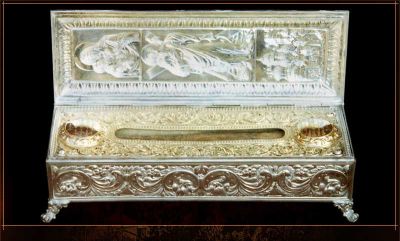
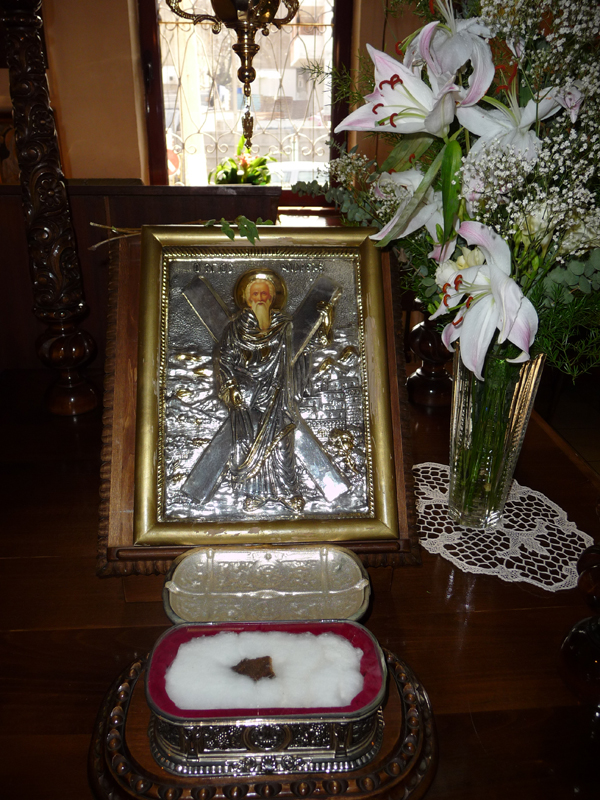
In 2001, the Metropolitan of Patras, Greece at that time Nicodemus, presented a piece of holy relics from the knee of Saint Andrew and a cross in which pieces of the cross on which St. Andrew the Apostle was crucified were placed.
On November 29, 2001, on the occasion of the feast of St. Andrew the First-Called, the Reliquary was carried in a litany procession from the Bulgarian Church Synodal Palace to the capital church "Свети Андрей Първозвани / (Saint Andrew the First-called)".

A Holy Liturgy was served which was  attended by Their Eminences the Metropolitans: Metropolitan Kiril of Varna and Great Preslav, metropolitan Joseph of America and Australia, metr. Gelasius of New York, metr. Grigoriy of Velikoturno, metr. Neophyte of Dorostol and Cherven (currently Patriarch of Bulgaria) , metr. Gavriil (Gabriel) of Lovchan eparchy, His Eminence Bishop Nikolai of Znepol (then) and now metropolitan of Plovdiv, Patriarchal Vicar, Archimandrite Boris,  the secretary of Holy Synod, numerous priests, the graduates of the Sofia Theological Seminary "Saint Ivan Rilski" and many laymen.

When the litany reached its destination, the church "Stsaint Andrew the First-Called", the relics were welcomed, received and placed in the church for worship by Patriarch Maxim (Rest In Peace). Immediately after that, Great Vespers with five loaves of bread as the orthodox tradition is, was served by the Most Reverend (then) Bishop of Znepol, Nikolay, together with Archimandrite Boris and the temple clergy. The Most Holy Patriarch Maxim (already in his 90s) and some of the bishops attended the service in prayer. After the service, the relics remained exposed for worship in the House of God, which was also open at night. It should be noted that this was the only Orthodox church in Bulgaria dedicated to saint Ap. Andrei.
Also, the fact that for the first time the relics of St. Apostle Andrew are coming to our country is important. Part of the relics were transferred to the church on the island of Saint Anastasia near Burgas in the diocese of Sliven.

The reason for the transferral of relics to st. Anastasia is that according to tradition, the Apostle Andrew himself passed through this island in his apostleship mission.

Every year on November 30 – Saint. Andrew's Day, in the church the holiday is celebrated with a solemn Holy Liturgy, celebrated by His Holiness the Bulgarian Patriarch and Metropolitan of Sofia (today Neofitos), and in his absence, by a bishop, visiting clergy and the church clergy.

From materials from Church newspaper (official newspaper of the Bulgarian Orthodox Church)