Archive for the ‘FreeBSD’ Category
Saturday, April 28th, 2012 
If there is necessity to look for a string in all hidden files with all sub-level subdirectories (be aware this will be time consuming and CPU stressing) use:
hipo@noah:~$ grep -rli 'PATH' .*
./.gftp/gftprc
./.gftp/cache/cache.OOqZVP
….
Sometimes its necessery to only grep for variables within the first-level directories (lets say you would like to grep a 'PATH' variable set, string within the $HOME directory, the command is:
hipo@noah:~$ grep PATH .[!.]*
.profile:PATH=/bin:/usr/bin/:${PATH}
.profile:export PATH
.profile:# set PATH so it includes user's private bin if it exists
.profile: PATH="$HOME/bin:$PATH"
.profile.language-env-bak:# set PATH so it includes user's private bin if it exists
.profile.language-env-bak: PATH="$HOME/bin:$PATH"
.viminfo:?/PATH.xcyrillic: XNLSPATH=/usr/X11R6/lib/X11/nls
.xcyrillic: export XNLSPATH
The regular expression .[!.]*, means exclude any file or directory name starting with '..', e.g. match only .* files
Note that to use the grep PATH .[!.]* on FreeBSD you will have to use this regular expression in bash shell, the default BSD csh or tsch shells will not recognize the regular expression, e.g.:
grep PATH '.[!.]*'
grep: .[!.]*: No such file or directory
Hence on BSD, if you need to look up for a string within the home directory, hidden files: .profile .bashrc .bash_profile .cshrc run it under bash shell:
freebsd# /usr/local/bin/bash
[root@freebsd:/home/hipo]# grep PATH .[!.]*
.bash_profile:# set PATH so it includes user's private bin if it exists
.bash_profile:# PATH=~/bin:"${PATH}"
.bash_profile:# do the same with …
Another easier to remember, alternative grep cmd is:
hipo@noah:~$ grep PATH .*
.profile:PATH=/bin:/usr/bin/:${PATH}
.profile:export PATH
.profile:# set PATH so it includes user's private bin if it exists
.profile: PATH="$HOME/bin:$PATH"
….
Note that grep 'string' .* is a bit different in meaning, as it will not prevent grep to match filenames with names ..filename1, ..filename2 etc.
Though grep 'string' .* will work note that it will sometimes output some unwanted matches if filenames with double dot in the beginning of file name are there …
That's all folks 🙂
Tags: Auto, bash shell, bit, BSD, cache cache, cmd, consuming, csh, cshrc, directory name, Draft, export path, expression, file, freebsd, gftp, grep, hipo, home directory, How to, level directories, Linux, MANPATHAnother, nbsp, necessery, noah, note, Path, path profile, private bin, profile path, quot, regular expression, rli, root, set path, Shell, shrc, text, text strings, time, time consuming, tsch, value, XNLSPATH, XNLSPATHThe, zcompdump
Posted in FreeBSD, Linux, System Administration | 2 Comments »
Wednesday, April 18th, 2012 
The default behaviour of lynx – console text browser on Linuces, BSD and other free OSes is to always ask, for the accept cookies prompt once an internet web page is opened that requires browser cookies to be enabled.
I should admin, having this "secure by default" (always ask for new cookies) behaviour in lynx was a good practice from a security point of view.
Another reason, why this cookies prompt is enabled by default is back in the days, when lynx was actively developed by programmers the websites with cookies support was not that many and even cookies was mostly required for user/pass authentication (all those who still remember this days the websites that requires authentication was a way less than today) …
With this said the current continuing security cautious behaviour in the browser, left from its old days is understandable.
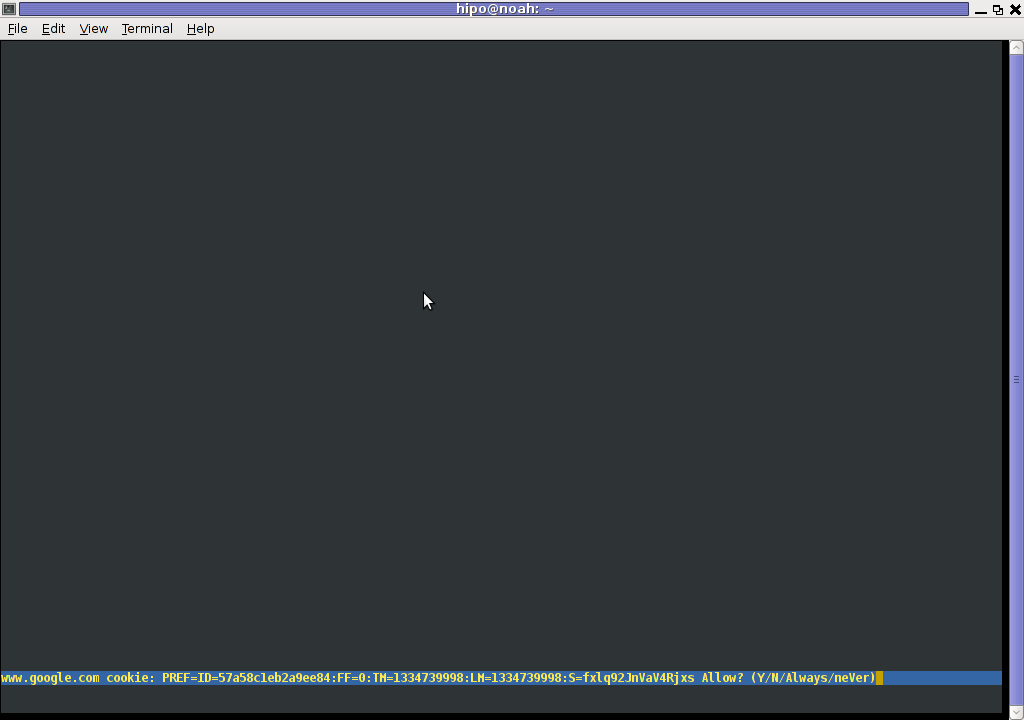
However I personally sometimes, need to use lynx more frequently and this behaviour of always opening a new website in text mode in console to prompts me for a cookie suddenly becomes a big waste of time if you use lynx to browser more than few sites. Hence I decided to change the default way lynx handles cookies and make them enabled by default instead.
Actually even in the past, when I was mainly using internet in console on every new server or home Linux install, I was again making the cookies to be permanently accepted.
Everyone who used lynx a few times already knows its "annoying" to all time accept cookie prompts … This provoked me to write this short article to explain how enabling of constant cookie accepting in lynx is done
To enable the persistent cookies in lynx, one needs to edit lynx.cfg on different GNU / Linux and BSD* distributions lynx.cfg is located in different directory.
Most of the lynx.cfg usual locations are /etc/lynx/lynx.cfg or /etc/lynx.cfg as of time of writting this post in Debian Squeeze GNU / Linux the lynx.cfg is located in /etc/lynx-cur/lynx.cfg, whether for FreeBSD / NetBSD / OpenBSD users the file is located in /usr/local/etc/lynx.cfg
What I did to allow all cookies is open lynx.cfg in vim edit and change the following lines:
a)
#FORCE_SSL_COOKIES_SECURE:FALSE
with
FORCE_SSL_COOKIES_SECURE:TRUE
b)
#SET_COOKIES:TRUE
uncomment it to:
SET_COOKIES:TRUE
c) next, change
ACCEPT_ALL_COOKIES:FALSE
ACCEPT_ALL_COOKIES:TRUE
Onwards opening any website with lynx auto-accepts the cookies.
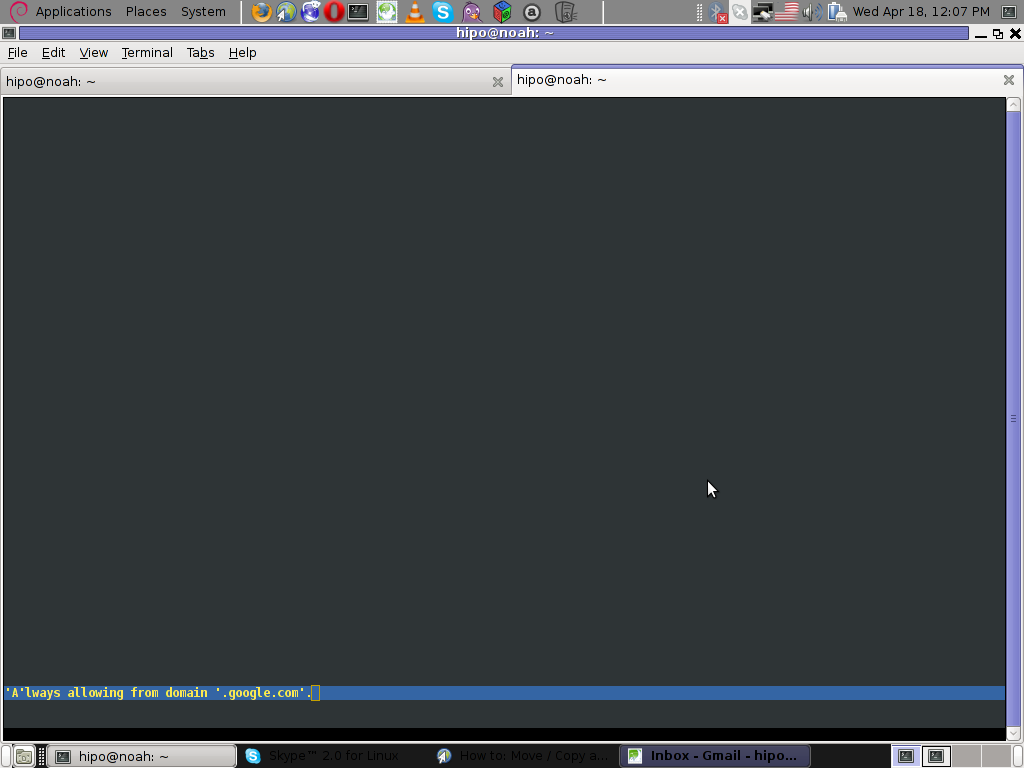
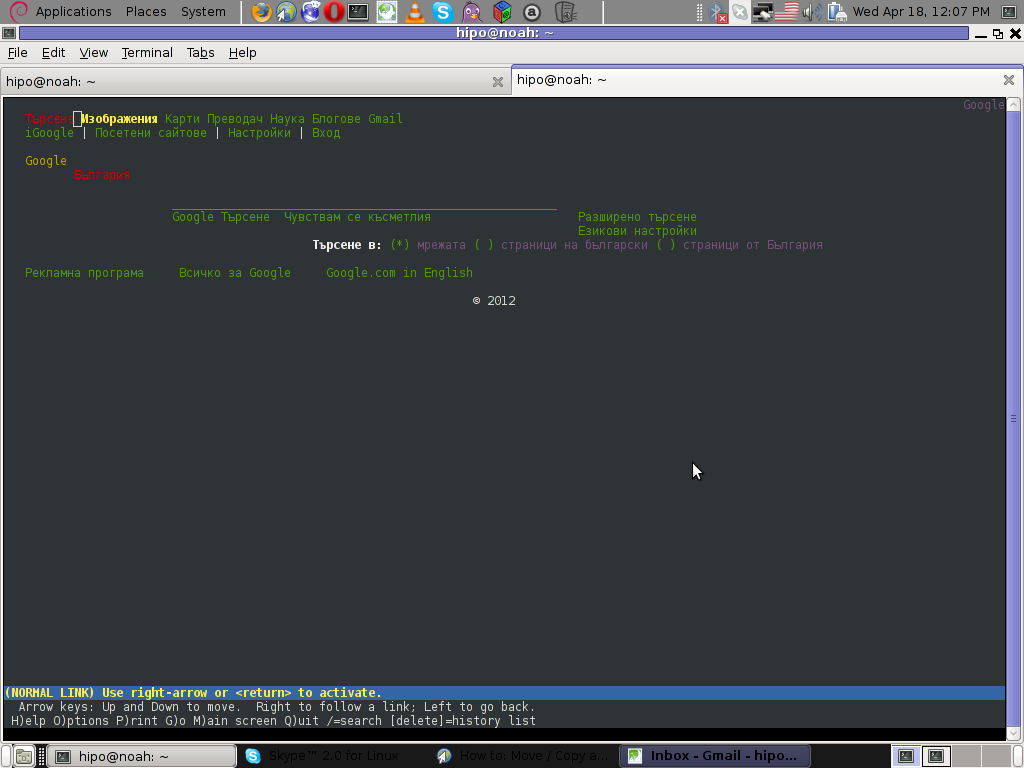
For people who care about there security (who still browse in console (surely not many anymore)), permanently allowing the cookies is not a good idea. But for those who are ready to drop off little security for convenience its ok.
Tags: ALL, authentication, Auto, browser cookies, BSD, bsd distributions, cfg, change, convenience, Cookie, default behaviour, Draft, everyone, file, free oses, GNU, gnu linux, good, How to, internet web, Linux, Lynx, lynx one, NetBSD, Onwards, OpenBSD, page, persistent cookies, point of view, programmers, quot, reason, security point, squeeze, support, text, text browser, text mode, time, TRUEb, TRUEc, TRUEuncomment, uncomment, use, using internet, vim, waste, waste of time, web page, writ
Posted in Curious Facts, Everyday Life, FreeBSD, Linux, System Administration | 1 Comment »
Tuesday, October 4th, 2011 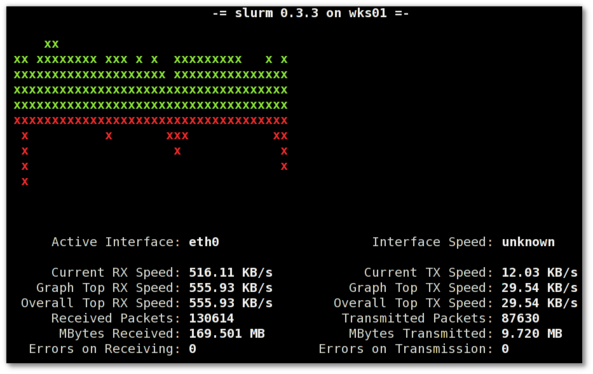
saidar is a text based ncurses program to display live statistics about general system health.
It displays in one refreshable screen (similar to top) statistics about server state of:
CPU, Load, Memory, Swap, Network, I/O disk operations
Besides that saidar supports a ncurses console colors, which makes it more funny to look at.
Saidar extracts the statistics for system state based on libgstrap cross platform statistics library about pc system health.
On Debian, Ubuntu, Fedora, CentOS Linuxes saider is available for install straight from distribution repositories.
On Debian and Ubuntu saidar is installed with cmd:
debian:~# apt-get install saidar

...
On CentOS and Fedora saidar is bundled as a part of statgrab-tools rpm package.
Installing it on 64 bit CentOS with yum is with command:
[root@centos ~]# yum install statgrab-tools.x86_64
Saidar is also available on FreeBSD as a part of the /usr/ports/devel/libgstrab, hence to use on my FreeBSD I had to install the libgstrab port:
freebsd# cd /usr/ports/devel/libstatgrab

freebsd# make install clean
Here is saidar running on my Desktop Debian on Thinkpad in color output:
debian:~# saidar -c
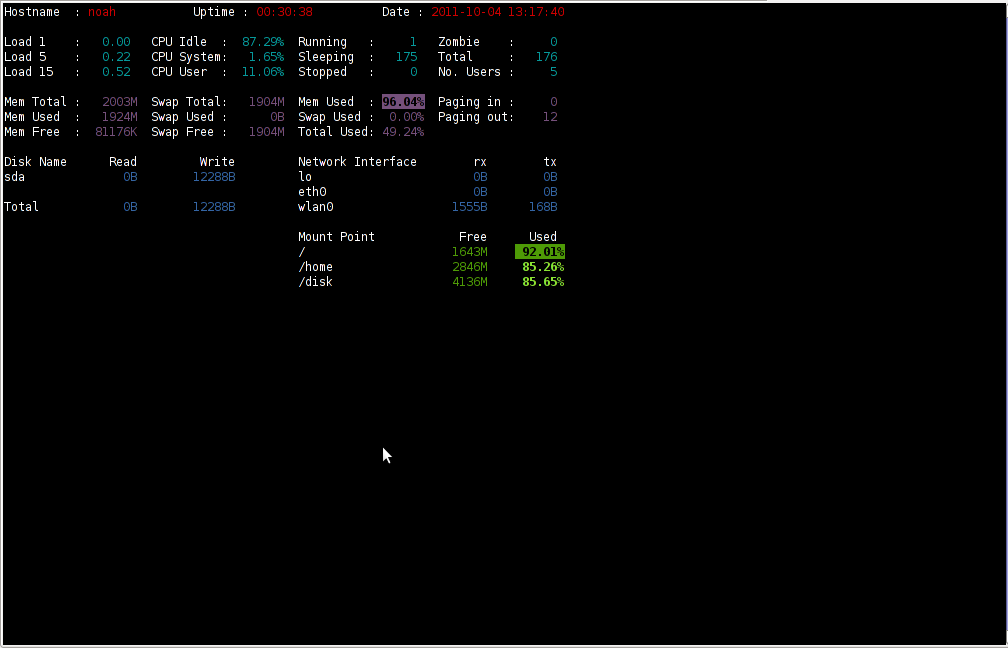
I've seen many people, who use various shell scripts to output system monitoring information, this scripts however are often written to just run without efficiency in mind and they put some let's say 1% extra load on the system CPU. This is not the case with saidar which is written in C and hence the program is optimized well for what it does.
Update: Next to saidar I recommend you check out Slurm (Real Time Network Interface Monitor) it can visualizes network interface traffic using ascii graph such as on top of the article. On Debian and Ubuntu Slurm is available and easily installable via simple:
apt-get install –yes slurm
Tags: CentOS, cleanHere, cpu load, cross platform, Desktop, desktop system, Disk, disk operations, distribution, extracts, fedora, freebsd, health, information, libgstrab, libgstrap, Linux, Load, load memory, memory, Monitor General Server Desktop, package, platform, ports, repositories, root, rpm, saidar, saider, screen, server desktop, server state, Shell, shell scripts, Slurm Real Time Network Interface Monitor, statistics library, system cpu, system health, text, thinkpad, Ubuntu, use, yum
Posted in FreeBSD, Linux, Monitoring, Networking, System Administration | 1 Comment »
Saturday, March 24th, 2012 
I've written a tiny script to check and restart, Apache if the server encounters, extremely high load avarage like for instance more than (>25). Below is an example of a server reaching a very high load avarage:;
server~:# uptime

13:46:59 up 2 days, 18:54, 1 user, load average: 58.09, 59.08, 60.05

load average: 0.09, 0.08, 0.08
Sometimes high load avarage is not a problem, as the server might have a very powerful hardware. A high load numbers is not always an indicator for a serious problems. Some 16 CPU dual core (2.18 Ghz) machine with 16GB of ram could probably work normally with a high load avarage like in the example. Anyhow as most servers are not so powerful having such a high load avarage, makes the machine hardly do its job routine.
In my specific, case one of our Debian Linux servers is periodically reaching to a very high load level numbers. When this happens the Apache webserver is often incapable to serve its incoming requests and starts lagging for clients. The only work-around is to stop the Apache server for a couple of seconds (10 or 20 seconds) and then start it again once the load avarage has dropped to less than "3".
If this temporary fix is not applied on time, the server load gets increased exponentially until all the server services (ssh, ftp … whatever) stop responding normally to requests and the server completely hangs …
Often this server overloads, are occuring at night time so I'm not logged in on the server and one such unexpected overload makes the server unreachable for hours.
To get around the sudden high periodic load avarage server increase, I've written a tiny bash script to monitor, the server load avarage and initiate an Apache server stop and start with a few seconds delay in between.
#!/bin/sh

# script to check server for extremely high load and restart Apache if the condition is matched

check=`cat /proc/loadavg | sed 's/\./ /' | awk '{print $1}'`

# define max load avarage when script is triggered

max_load='25'

# log file

high_load_log='/var/log/apache_high_load_restart.log';

# location of inidex.php to overwrite with temporary message

index_php_loc='/home/site/www/index.php';

# location to Apache init script

apache_init='/etc/init.d/apache2';

#

site_maintenance_msg="Site Maintenance in progress - We will be back online in a minute";

if [ $check -gt "$max_load" ]; then>

#25 is load average on 5 minutes

cp -rpf $index_php_loc $index_php_loc.bak_ap

echo "$site_maintenance_msg" > $index_php_loc

sleep 15;

if [ $check -gt "$max_load" ]; then

$apache_init stop

sleep 5;

$apache_init restart

echo "$(date) : Apache Restart due to excessive load | $check |" >> $high_load_log;

cp -rpf $index_php_loc.bak_ap $index_php_loc

fi

fi
The idea of the script is partially based on a forum thread – Auto Restart Apache on High Load – http://www.webhostingtalk.com/showthread.php?t=971304Here is a link to my restart_apache_on_high_load.sh script
The script is written in a way that it makes two "if" condition check ups, to assure 100% there is a constant high load avarage and not just a temporal 5 seconds load avarage jump. Once the first if is matched, the script first tries to reduce the server load by overwritting a the index.php, index.html script of the website with a one stating the server is ongoing a maintenance operations.
Temporary stopping the index page, often reduces the load in 10 seconds of time, so the second if case is not necessery at all. Sometimes, however this first "if" condition cannot decrease enough the load and the server load continues to stay too high, then the script second if comes to play and makes apache to be completely stopped via Apache init script do 2 secs delay and launch the apache server again.
The script also logs about, the load avarage encountered, while the server was overloaded and Apache webserver was restarted, so later I can check what time the server overload occured.
To make the script periodically run, I've scheduled the script to launch every 5 minutes as a cron job with the following cron:
# restart Apache if load is higher than 25

*/5 * * * * /usr/sbin/restart_apache_on_high_load.sh >/dev/null 2>&1
I have also another system which is running FreeBSD 7_2, which is having the same overload server problems as with the Linux host.
Copying the auto restart apache on high load script on FreeBSD didn't work out of the box. So I rewrote a little chunk of the script to make it running on the FreeBSD host. Hence, if you would like to auto restart Apache or any other service on FreeBSD server – get /usr/sbin/restart_apache_on_high_load_freebsd.sh my script and set it on cron on your BSD.
This script is just a temporary work around, however as its obvious that the frequency of the high overload will be rising with time and we will need to buy new server hardware to solve permanently the issues, anyways, until this happens the script does a great job 🙂
I'm aware there is also alternative way to auto restart Apache webserver on high server loads through using monit – utility for monitoring services on a Unix system. However as I didn't wanted to bother to run extra services in the background I decided to rather use the up presented script.
Interesting info to know is Apache module mod_overload exists – which can be used for checking load average. Using this module once load avarage is over a certain number apache can stop in its preforked processes current serving request, I've never tested it myself so I don't know how usable it is. As of time of writting it is in early stage version 0.2.2
If someone, have tried it and is happy with it on a busy hosting servers, please share with me if it is stable enough?
Tags: Anyhow, apache server, apache webserver, Auto, avarage, awk print, bak, bash script, bash shell, bash shell script, condition, cron, cron job, Draft, dual core, host, incoming requests, index, index page, init, instance, job, level, level numbers, Linux, linux servers, loc, location, night time, php, quot, Restart, restart apache, rpf, script, server load, server overloads, server services, server uptime, Shell, ssh, ssh ftp, time, unexpected overload, unreachable, utility
Posted in FreeBSD, Programming, System Administration | 5 Comments »
Wednesday, May 26th, 2010 
Since just few days ago it was the birthday of Pac-Man game (The abolute classic game among ’80s arcardes).
I decided to try to look if there is an ASCII Pacman available somewhere.
Luckily there are number of ASCII versions of the classic arcade PacMan for both Linux and FreeBSD, I thought,it doesn’t worth the time to check if ASCII Pacman is also available for Windows OS.
For all the ASCII game fans out there I’ve installed ASCII PacMan FreeBSD version on the Play Cool FreeBSD ASCII games free page From there you can play a number of cool ascii art games online via telnet, the reasons I took the time to add the ASCII Pacman to the list of possible games to play is that it’s a shame that the list misses one of the most notable games if not the most notable ever made.
For Linux I’ve found three version of ASCII Pacman:
1. The best looking one is probably ASCII Pacman Linux clone game available on sourceforge.net
You can download ASCII Pac-Man 0.9.1 from here
I’ve included 2 files with instructions on installation and usage of the game. I saw that as a completely necessery since,the game controls of the elsely nice looking game are hard to get. To play the game you will need to use the game controls:
z,x – to move right and left and m,k for up and down .
2. A bit more ugly and less interactive is another version of ASCII PacMan called:
Pac-Man for Console or simply Console Pacman
This two compiled without any troubles on my Debian GNU/Linux squeeze/sid Linux .
Unfortunately the up-mentioned ascii version of pacman won’t work on FreeBSD
3. The ASCII Pacman that is running and compatible with FreeBSD is called Pacman ASCII and herein is it’s home page
PacMan ascii is a way less sophisticated, so don’t expect too much of it. Originally Pacman ASCII was a project by some French guy in with the main task to learn C++.
Anyways he did a good job, since his little ascii pacman game is compatible with FreeBSD as well.
You can download ASCII Pacman for FreeBSD here
I did some minor modifications to few of the ASCII Pacman .cpp files in order to change the default help and game language from French to English, since French would be cryptic to most of the non-french users.
Tags: ascii art, ASCII PacMan (Pac-Man) for Linux and FreeBSD / Play online ASCII Pacman on Pc-Freak, English, game controls, games, good job, list, look, number, time, version
Posted in Entertainment, FreeBSD, Games Linux, Linux and FreeBSD Desktop | No Comments »
Friday, December 16th, 2011 
1. Frogatto & Friends – Is an Indian Free Software (Open Source) game in the spirit of old-school jump’en runs like Commander Keen, Prehistoric, Jazz Jack Rabbit
The game is really entertaining, the graphics looks approximately nice, the music is awesome, the gamelplay is good even though after some point in the game the moment with “where should I go now, I can’t find exit” comes through and it gets boring.
Generally if you compare with all the existing jump and run arcade games free software games available for Linux and FreeBSD the game will definetely arrange itself in the list of TOP 10 free software Arcade Games
and therefore its my own believe that Frogatto is a game that every GNU / Linux and FreeBSD desktop should have in Application -> Games GNOME menu.
Frogatto is rich of levels, enemies obstacles objects, places to visit (which puts it ahead of many of the linux arcade games which often miss enough game levels, has a too short game plots, or simply miss overall game diversity).

The game’s general look & feel is like a professional game and not just some tiny free software arcade, made by its authors for the sake to learn some programming, graphics or music creation.
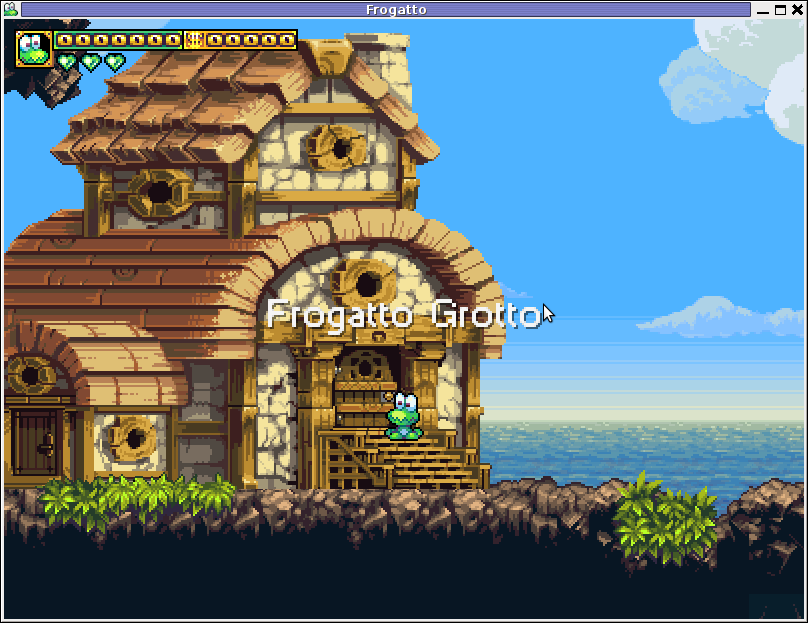

Besides that Frogatto & Friends is multi-platform supporting all the major operating systems.
Game supports:
- Windows
- Mac
- iPhone
- Debian GNU / Linux
- FreeBSD
The game source code is also available on Frogatto.com – The Game’s Official website
The game is available as a deb package in Debian and Ubuntu GNU / Linuxes so to install on those deb based distributions, simply use apt:
debian:~# apt-get install frogatto

...
The above command will install two packages frogatto (containing the game’s main executable binary) and frogatto-data containinng all the game textures, levels, graphics, music etc.
BTW the package saparation on a gamename and gamename-data in Debian (for all those who have not still noticed), can be seen on most of the games with a game data that takes more disk space.
After the game is installed the only way to start the game is to run it manually through pressing ALT+F2 in GNOME or running the progrtam through gnome-terminal with cmd:
debian:~$ frogatto
Here are few more Frogatto gameplay screenshots:


I’ve noticed Frogatto is also available as an RPM package for Fedora Linux, as well as has a FreeBSD port in the /usr/ports/games/frogatto and this makes it easy to install on most free software OSes in the wild.
While checking frogatto.com , I found an interesting link to a website offering free graphics (pictures), textures and sounds for free and open source games for all those who hold interest into the development of Free Software & Open Source Games make sure you check OpenGameArt.org
OpenGameArt.org looks like a great initiative and will definitely be highly beneficial to the development of more and better FSOS Games so I wish them God speed with this noble initiative.
Frogatto is very suitable for growing kids since it doesn’t contain no violence and every now and then the main game actor the Frogatto Frog leads few lines English dialogues with some of the characters found in the quest.
For none speaking English countries, the game can help the kids to learn some basic english words and thus can help develop kids intellect and knowledge
And oh yeah one more criticism towards the game is the Enlish structure, it seems people who wrote the plot can work this out in the time to come. Many of the English sentences during dialogues the frog leads with the cranks he met does not sound like a common and sometimes even correct english / phrases.
Besides those little game “defect”, the game is pretty awesome and worthy to kill some time and relax from a long stressy day.
Tags: arcade games, code, com, deb package, Debian, debian gnu, Desktop, Disk, English, exit, fedora linux, Free, free software games, freebsd, game levels, game source code, game textures, Gnome, gnu linux, Indian, IPhone, jack rabbit, jack rabbitthe, Jazz, jazz jack rabbit, jump, jump and run, knowledge, linux freebsd, look feel, menu, music creation, nbsp, official, Open, open source game, open source games, operating systems, package, Prehistoric, professional game, programming graphics, quot, saparation, school jump, short game, software, software arcade, software open source, Source, time, Ubuntu
Posted in Everyday Life, FreeBSD, Games Linux, Linux, Linux and FreeBSD Desktop | No Comments »
Friday, January 13th, 2012 scrot and import are two commands, which can be used to take screenshot in terminal on Linux and FreeBSD:
To use scrot cmd to take screenshots on Ubuntu and Debian the scrot package has to be installed:
noah:~# apt-get install scrot

...
scrot should also be available on most other Linux distributions in the main repositories, I'll be glad to hear if someone has used it on Fedora, SUSE etc.
On FreeBSD, there is a port called scrot , to install on FreeBSD:
freebsd# cd /usr/ports/graphics/scrot

freebsd# make install clean

...
Scrot has plenty of nice arguments one can use to make a screenshot. Maybe the most handy one in my view is after a preliminary set delay before screenshot is taken.
To take screenshot with it after lets say 5 seconds delay before the screenshot:
hipo@noah:~/Desktop$ scrot -t 20 -d 5
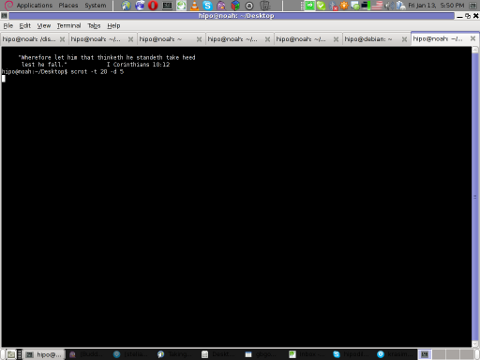
To put an year, month and day and year followed by screen resolution with scrot :
hipo@noah:~$ scrot '%Y-%m-%d_$wx$h.png'
Another way to take a screenshot of screen with command is by using ImageMagick's – import image manipulation package.
To take screenshot of the current screen via terminal using import , type in xterm, gnome-termina or Gnome's Run Application (ALT+F2)
hipo@noah:~$ import -window root ScreenShot.png
To make import command to save the taken screenshot in a format (minute:hour:day:month:year)i :
hipo@noah:~$ import -window root $screenshot_dir/screenshot-$(date +%M_%k_%d_%m_%Y|sed -e 's/^ *//').png
Taking a delayed screenshot is also possible via The GIMP via menus File -> Create -> Screenshot
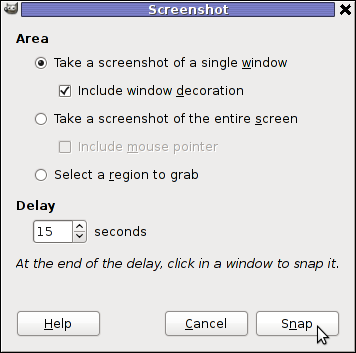
Now here is an interesting question, what if I would like to take periodic screenshots of what I do on my Desktop to take random movie scenes from a movie I watch with totem or vlc??
This task is quite easily achiavable with a little bash shell script, I wrote:
screenshot_dir='Screenshots';

seconds='60';

if [ ! -d "$screenshot_dir" ]; then

mkdir $screenshot_dir;

fi

while [ 1 ]; do

sleep $seconds;

(import -window root $screenshot_dir/screenshot-$(date +%M_%k_%d_%m_%Y|sed -e 's/^ *//').png) &

done
This script will take screenshot automatically to Screenshots/ directory every (1 min – 60 seconds)
You can also my downloads take_screenshot_every_60_secs_import.sh here
To use take_screenshot_every_60_secs_import.sh just issue the script inside xterm or gnome-terminal, after that simply use your computer as you normally would.
The script will take snapshots every minute and store all taken screenshots in Screenshots dir.
If you prefer to use scrot to take automatically the screenshots every lets say 5 minutes, you can use a script like:
screenshot_dir='Screenshots';

# 300 secs (5 mins)seconds='300';

if [ ! -d "$screenshot_dir" ]; then

mkdir $screenshot_dir;

fi

while [ 1 ]; do

sleep $seconds;

(scrot $screenshot_dir/'%Y-%m-%d_$wx$h.png') &

done
You can fetch take_screenshot_every_60_secs_scrot.sh here
The script using scrot is better in terms of efficiency, the system load scrot will put on your machine will be less.
Using some of this scripts will be handy if you need screenshots to Movies, Programs and favourite Free Software games.
Hope this is educative to someone 😉
Tags: Alt, Auto, bash shell script, Desktop, Draft, fedora, freebsd, GIMP, Gnome, gnu linux, handy one, hipo, How to, image manipulation, ImageMagick, import, import command, import image, import window, linux distributions, manipulation package, multiple, noah, package, png, quot, repositories, root, screen, screenshot, Screenshots, scrot, Shell, someone, SUSE, terminal, totem, type, Ubuntu, wx, xterm, year
Posted in FreeBSD, Linux, Linux and FreeBSD Desktop, System Administration, Various | No Comments »
Thursday, February 7th, 2008 On one of my previous posts I give an url to a great wiki. Unfortunately I have seen I have given a wrong linkhere is the mediawiki bsdtips.utcorp.net Today I have to go to a German classes. I’m in doubt what kind of laptop to take I doubt between IBM Thinkpad and Dell. IBM’s has ati where I prefer having nvidia. On the other hand I know not all of Dell’s hardware would probably work correctly in Linux and BSD. Another problem is IBM is being selled with preinstalled XP … END—–
Tags: doubt, ibm, kind, laptop, Linux, nvidia, problem, url, wiki, work
Posted in FreeBSD | No Comments »
Saturday, January 26th, 2008 I have collected a bunch of useful bsd tips stored into files they can be seen here bsd_tips Also something very precious as tips is the wiki of gongoputch (a kewl guy hanging around on irc.freenode.net ##freebsd). Here is the Wiki too bsdtips . Now about my day a normal day like everyday more or less :). I have fasted and prayed for 3 days only on water I feel really good now. I have to fast again soon. Weakening the flesh definetely enpowers The Spirit! :).I was very nicely surpriced today when I went to the Stephanie’s office (Our teacher from Holland) and find out that I have passed the HRQM exam with 4.5 ! As usually I prayed before the exam trusting on the Lord’s guidance and help and he led me and helped me! Blessed be the God of Israel 🙂 For his mercies to me (like to everybody on earth 🙂 are countless. Today I found Classic.Games.Collection.1982-1987 and I intend to walk through the games and have some fun :). END—–
Tags: Blessed, bunch, earth, exam, games, HRQM, kewl, net, today, wiki
Posted in FreeBSD | No Comments »
Thursday, June 19th, 2014 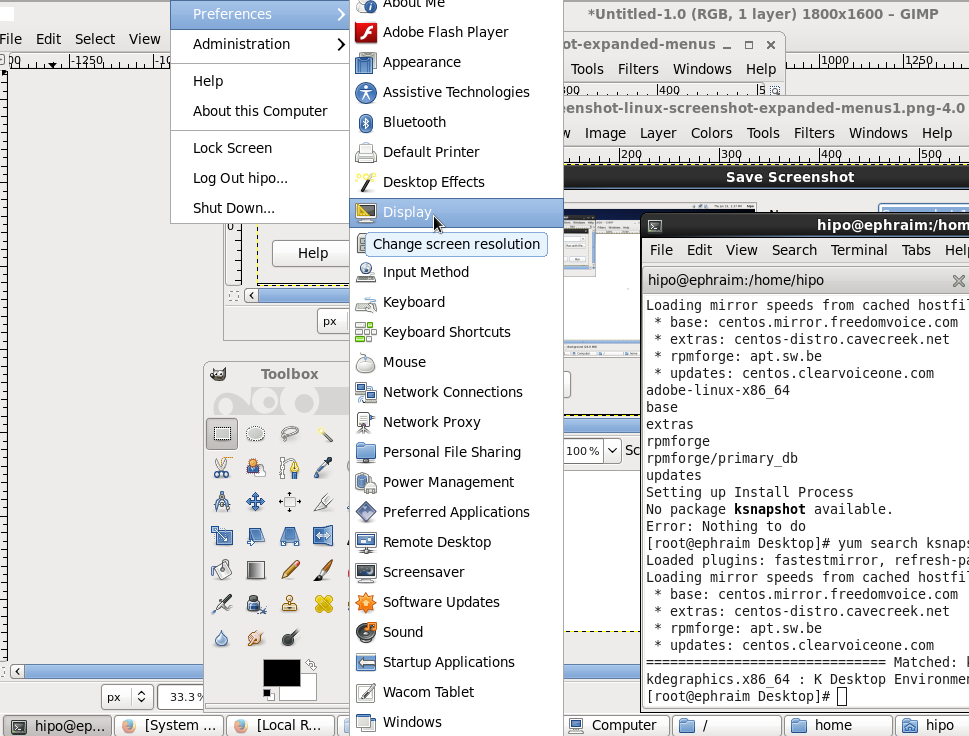
If you're using actively Linux or FreeBSD on Desktop PC and experimenting with software, taking personal notes, developing software for Linux, writting documentation, participating in free software community etc., you will certainly need use screenshot heavily.
Taking a screenshot in Linux is done in same way as in any modern operating system by using the Print Screen (PrtScr) button, however there are few Nuts & Bolts of Linux screenshotting, to take advantage of full power of screenshot creation (i.e. be able to do some screenshot customization) which are not offered by default screenshot utilities (GNOME – gnome-screenshot and KDE's KSnapshot)
Here are few useful Linux /BSD Screenshot Tips and Tricks:
If you have done screenshots of Linux running programs more than few times already, you have probably noticed the usual way to screenshot by pressing Print Screen (PrtScr) button to take snapshot of the expanded GNOME / KDE menu is not working. In that order of thought you probably wondered whether it is possible to take a screenshot of an expanded menus? As a Linux user, I've been asking myself this question too, and feeling irritated that I cannot prepare screenshot of a GNOME running application expanded menu. I've found two ways (though there are probably many more to make screenshot of an expanded Linux menu). Here is how:
Create screenshot of running application expanded menus
1. Taking screenshot of expanded menu using the command line
As with everything in Linux, there aremultiple ways to make screenshot of expanded Linux menus.
- Make timed screenshot of the screen scheduled to screenshot after a set number of seconds.
The quickest way for to screenshot expanded menu is to use gnome-panel-screenshot or ksnapshot from command line. It is interesting pressing Prt Sc kbd button in GNOME invokes gnome-screenshot and in KDE uses ksnapshot
gnome-panel-screenshot --delay 5
To not spend time running it from gnome-terminal (in GNOME desktop), press Alt+F2 (simultaneously) and use the Run Application command shortcut.
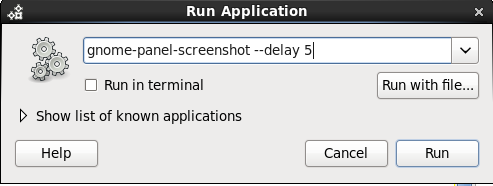
This will instruct Screenshot utility to wait for 5 seconds before capturing your desktop this should be enough time for you to go to navigate to expanded menu which you want to get screenshotted.
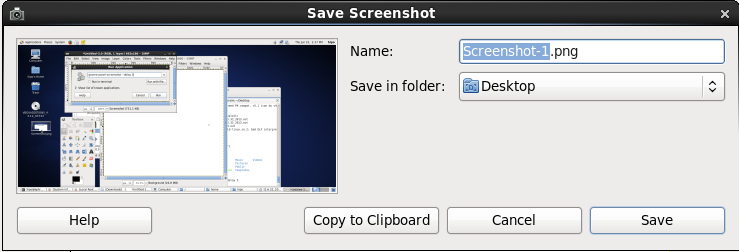
- Make timed screenshot of the screen in GUI with GIMP
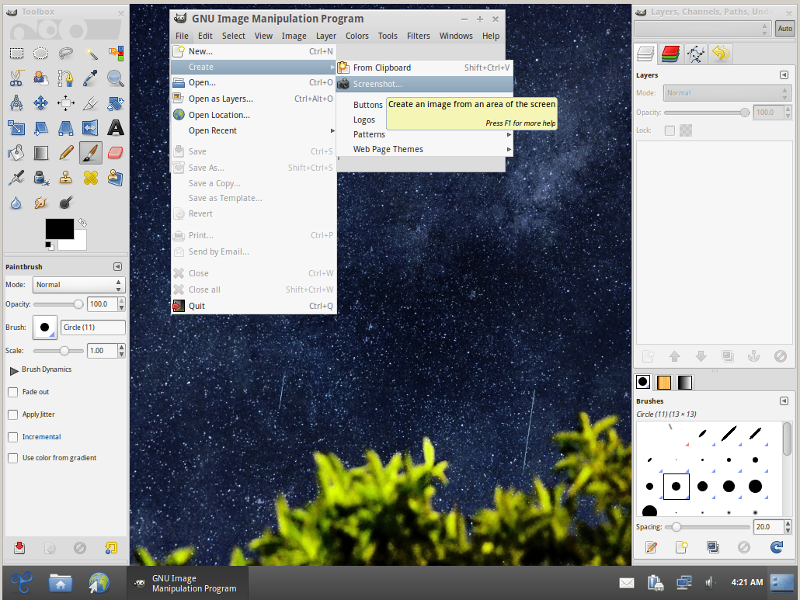
(If you're wonderhing what kind of Linux is on screenshot – this is Trisquel – Run Free! GNU / Linux. It is a Spanish distribution focused on providing 100% free software in it – without proprietary firmware or software. Trisquel is based on Debian and uses the dpkg / apt-get package managers. Trisquel is a recommended Linux to use by Richard Stallman and The Free Software Foundation).
To make timed screenshot with GIMP use menus:
File -> Create -> Screenshot
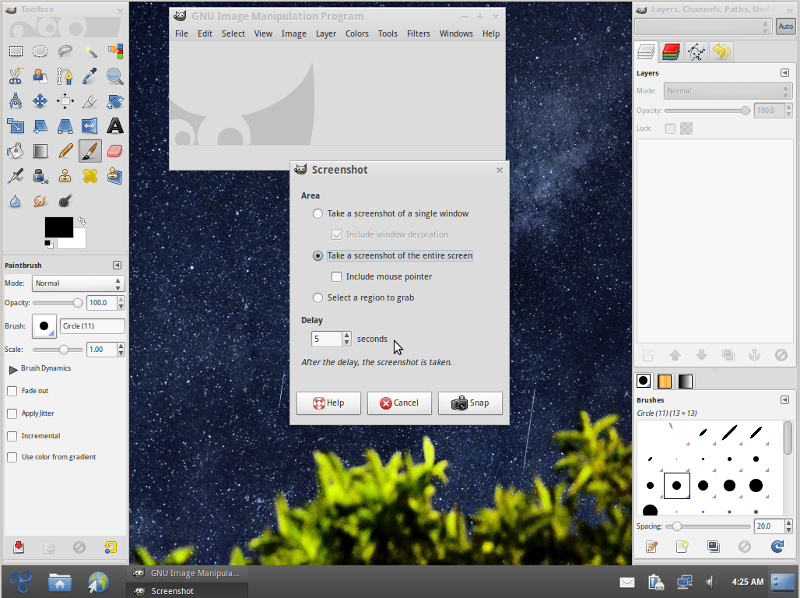
Chosee whether you want to Take screenshot of the entire screen or a Region to Grab and set your wanted Delay
Screenshot will be prepared on $HOME/Desktop, after set time.
Tags: BSD, Gnome, line, Linux, make, menus, running, screenshot, time, use
Posted in Everyday Life, FreeBSD, Linux and FreeBSD Desktop, Various | No Comments »








How to permanently enable Cookies in Lynx text browser – Disable accept cookies prompt in lynx console browser
Wednesday, April 18th, 2012The default behaviour of lynx – console text browser on Linuces, BSD and other free OSes is to always ask, for the accept cookies prompt once an internet web page is opened that requires browser cookies to be enabled.
I should admin, having this "secure by default" (always ask for new cookies) behaviour in lynx was a good practice from a security point of view.
Another reason, why this cookies prompt is enabled by default is back in the days, when lynx was actively developed by programmers the websites with cookies support was not that many and even cookies was mostly required for user/pass authentication (all those who still remember this days the websites that requires authentication was a way less than today) …
With this said the current continuing security cautious behaviour in the browser, left from its old days is understandable.
However I personally sometimes, need to use lynx more frequently and this behaviour of always opening a new website in text mode in console to prompts me for a cookie suddenly becomes a big waste of time if you use lynx to browser more than few sites. Hence I decided to change the default way lynx handles cookies and make them enabled by default instead.
Actually even in the past, when I was mainly using internet in console on every new server or home Linux install, I was again making the cookies to be permanently accepted.
Everyone who used lynx a few times already knows its "annoying" to all time accept cookie prompts … This provoked me to write this short article to explain how enabling of constant cookie accepting in lynx is done
To enable the persistent cookies in lynx, one needs to edit lynx.cfg on different GNU / Linux and BSD* distributions lynx.cfg is located in different directory.
Most of the lynx.cfg usual locations are /etc/lynx/lynx.cfg or /etc/lynx.cfg as of time of writting this post in Debian Squeeze GNU / Linux the lynx.cfg is located in /etc/lynx-cur/lynx.cfg, whether for FreeBSD / NetBSD / OpenBSD users the file is located in /usr/local/etc/lynx.cfg
What I did to allow all cookies is open lynx.cfg in vim edit and change the following lines:
a)
#FORCE_SSL_COOKIES_SECURE:FALSEwith
FORCE_SSL_COOKIES_SECURE:TRUEb)
#SET_COOKIES:TRUEuncomment it to:
SET_COOKIES:TRUEc) next, change
ACCEPT_ALL_COOKIES:FALSEACCEPT_ALL_COOKIES:TRUEOnwards opening any website with lynx auto-accepts the cookies.
For people who care about there security (who still browse in console (surely not many anymore)), permanently allowing the cookies is not a good idea. But for those who are ready to drop off little security for convenience its ok.
Tags: ALL, authentication, Auto, browser cookies, BSD, bsd distributions, cfg, change, convenience, Cookie, default behaviour, Draft, everyone, file, free oses, GNU, gnu linux, good, How to, internet web, Linux, Lynx, lynx one, NetBSD, Onwards, OpenBSD, page, persistent cookies, point of view, programmers, quot, reason, security point, squeeze, support, text, text browser, text mode, time, TRUEb, TRUEc, TRUEuncomment, uncomment, use, using internet, vim, waste, waste of time, web page, writ
Posted in Curious Facts, Everyday Life, FreeBSD, Linux, System Administration | 1 Comment »